


 English
 繁體中文
繁體中文
 Deutsch
 Français
 Español
 日本語
日本語
 Tiếng Việt
 Português
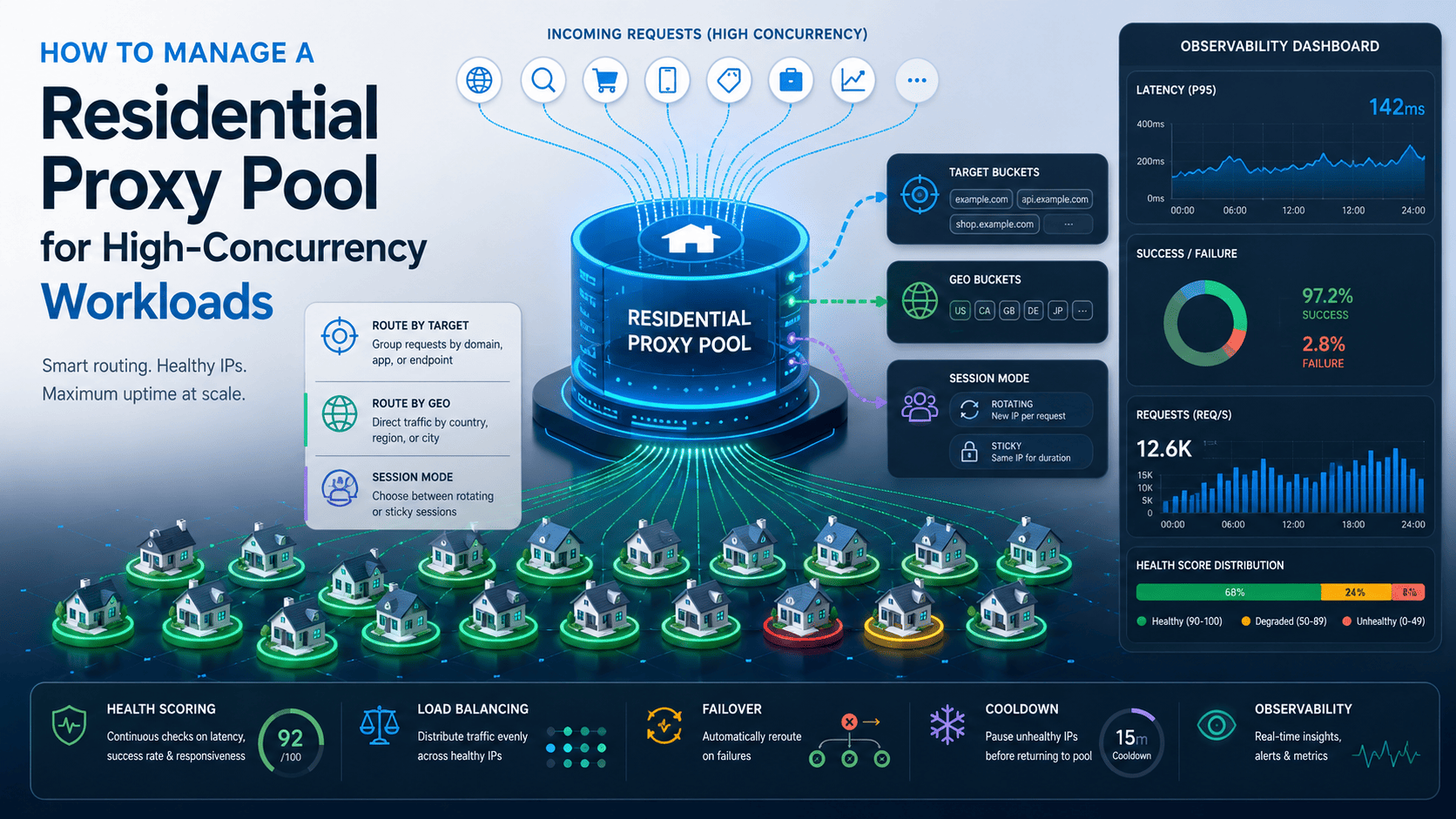
Managing a residential proxy pool at high concurrency is a scheduling problem, not a procurement problem. More residential proxies only help if your routing layer can separate traffic by target, geography, and session behavior, then keep unhealthy pool members from taking more load than they should.
That’s where most teams fail. They expand the pool, keep one flat queue, and then watch quality drop because the same exits get reused too aggressively, sticky flows get mixed with rotating traffic, and retries pile onto already failing targets. This article uses provider documentation, Requests documentation, and a minimal verifiable control-loop pattern, so the guidance below stays with safe starting logic and observable tuning rather than unsupported “magic numbers.”
How should you structure the pool?
A workable residential proxy pool manager should split traffic before it balances traffic. In practice, that means routing by target bucket, then geo bucket, then session mode, and only then selecting a pool member inside that filtered sub-pool.
That structure matters because different workloads break for different reasons. A region-QA job, a pricing monitor, and a short stateful workflow may all need residential proxies, but they do not need the same geography, the same session behavior, or the same concurrency policy.
Use these control units consistently:
Target bucket: one site, API, or workflow with its own tolerance and retry behavior.
Geo bucket: a subdivision by country, city, or region when locality matters.
Pool member: one residential gateway, endpoint, or assignable route.
Sticky session: a continuity-preserving route for a workflow that should hold the same exit IP for a limited sequence.
Rotation policy: either rotating residential traffic or sticky routing, depending on the workflow.
If you collapse all of that into one global queue, one noisy workload can damage the rest of the system. That’s why the first architectural decision is isolation, not balancing algorithm choice.
How should you route traffic and set safe caps?
Route requests in this order: target bucket first, geography second, and session mode third. Only after those constraints are fixed should you choose a pool member with round-robin, least-loaded, or health-weighted routing.
For most high-concurrency residential proxy workloads, least-loaded or health-weighted selection is a better default than blind round-robin because it reacts to current pressure and recent degradation instead of assuming all pool members behave the same way.
You also need concurrency caps at more than one layer:
Per-target cap, so one target can’t consume the whole pool.
Per-session cap, so sticky workflows don’t overload one route.
Per-pool-member cap, so one endpoint doesn’t become a hotspot.
Global cap, so the worker layer can’t emit unlimited in-flight pressure.
The safest way to set those caps is to start low and raise them only after one target bucket shows stable error and latency behavior in a controlled observation window. There is no universal “correct” cap because safe concurrency depends on request duration, session continuity, target tolerance, and how evenly your pool can spread traffic.
A practical tuning loop looks like this:
Choose one target bucket and one geo bucket.
Start with a deliberately conservative per-session or per-member cap.
Run a fixed observation window and record success rate, timeout rate, and latency trend.
Raise the cap one step at a time only if quality remains stable.
Back off as soon as added concurrency causes a disproportionate jump in timeouts, proxy errors, or visible block signals.
Pool sizing should follow the same logic. Estimate required active session capacity from target concurrency divided by the safe concurrency each session can carry, then add recovery headroom for cooldown and failover. That gives you a usable planning baseline without pretending raw IP count is the same thing as usable concurrent capacity.
This is also the point where provider-side visibility starts to matter. If your scheduler depends on real-time usage visibility, sub-user separation, IP whitelisting, and rotating residential support, Proxy001’s residential product page publicly lists those capabilities, which matches the operational model described here.
What does a minimal pool manager look like?
A first version does not need a complex orchestration layer. It needs state tracking, constrained member selection, outcome recording, cooldown, and a repeatable way to verify that the scheduler is doing what you think it is doing.
Prerequisites
Before you build the loop, make sure you have:
Residential proxy endpoints from your provider.
A clear mapping of which endpoints belong to which geo bucket and session mode.
Python with
requestsinstalled, plusrequests[socks]if your provider uses SOCKS proxies.A verification endpoint such as
https://httpbin.org/ipso you can check routing behavior before aiming traffic at a production target.
Requests is a reasonable fit for this control loop because sessions can persist parameters across requests and reuse underlying connections, while per-request proxies= remains the clearest way to avoid confusion with environment proxy settings. Requests also recommends explicit timeouts because requests do not time out unless a timeout value is set, and automatic retries can be added with an HTTPAdapter and Retry policy when you need controlled recovery behavior.
Step 1: Define pool state
Each pool member needs just enough state to support routing and recovery.
from dataclasses import dataclass
from time import time

@dataclass
class PoolMember:
    name: str
    proxy_url: str
    target_bucket: str
    geo_bucket: str
    session_mode: str   # "rotating" or "sticky"
    in_flight: int = 0
    success_count: int = 0
    error_count: int = 0
    timeout_count: int = 0
    avg_latency_ms: float = 0.0
    unhealthy_until: float = 0.0

    def healthy(self) -> bool:
        return time() >= self.unhealthy_until
Step 2: Filter before you pick
Never select from the whole residential proxy pool. Filter by target bucket, geo bucket, and session mode first, because that single step removes most of the damage caused by global random routing.
def eligible_members(pool, target_bucket, geo_bucket, session_mode):
    now = time()
    return [
        m for m in pool
        if m.target_bucket == target_bucket
        and m.geo_bucket == geo_bucket
        and m.session_mode == session_mode
        and m.unhealthy_until <= now
    ]
Step 3: Enforce capacity before assignment
A healthy member is not automatically an available member. If the target bucket or the member is already at its safe limit, the correct action is to queue, shed low-priority work, or back off.
def target_capacity_ok(active_for_target, target_cap):
    return active_for_target < target_cap

def member_capacity_ok(member, member_cap):
    return member.in_flight < member_cap
Step 4: Select the least-loaded eligible member
Least-loaded is a strong first selector because it is easy to reason about and easy to debug.
def pick_member(candidates, member_cap):
    eligible = [m for m in candidates if member_capacity_ok(m, member_cap)]
    if not eligible:
        raise RuntimeError("No healthy pool members available under current cap")
    return min(eligible, key=lambda m: (m.in_flight, m.avg_latency_ms))
If you later want weighted routing, add recent health signal on top of this. Don’t start there unless you already have stable data.
Step 5: Send the request and record the outcome
This is the minimum useful loop: in-flight tracking, latency recording, explicit timeout handling, and cooldown on failure.
import requests
from time import perf_counter, time

def send_with_pool(pool, url, target_bucket, geo_bucket, session_mode,
                   active_for_target, target_cap, member_cap, cooldown_seconds):
    if not target_capacity_ok(active_for_target, target_cap):
        raise RuntimeError("Target bucket is at capacity")

    candidates = eligible_members(pool, target_bucket, geo_bucket, session_mode)
    member = pick_member(candidates, member_cap)

    proxies = {"http": member.proxy_url, "https": member.proxy_url}
    member.in_flight += 1
    started = perf_counter()

    try:
        response = requests.get(url, proxies=proxies, timeout=(5, 20))
        response.raise_for_status()

        latency_ms = (perf_counter() - started) * 1000
        member.success_count += 1
        member.avg_latency_ms = (
            latency_ms if member.avg_latency_ms == 0
            else (member.avg_latency_ms * 0.8) + (latency_ms * 0.2)
        )
        return response

    except requests.Timeout:
        member.timeout_count += 1
        member.error_count += 1
        member.unhealthy_until = time() + cooldown_seconds
        raise

    except requests.RequestException:
        member.error_count += 1
        member.unhealthy_until = time() + cooldown_seconds
        raise

    finally:
        member.in_flight -= 1
The exact value of cooldown_seconds should come from your target behavior and your own observation windows, not from a copied constant. Treat it as an operator-controlled setting that you tune against recent error behavior.
Verify the scheduler
Success is not “the code ran.” Success means the scheduler made the routing decision you expected.
Use these checks:
Requests only route to members that match the requested target bucket, geo bucket, and session mode.
Failed members stop receiving new assignments during cooldown.
Healthy members do not absorb unsafe load while unhealthy members remain excluded.
A simple verification path is to point the pool at https://httpbin.org/ip and compare sticky and rotating behavior. Sticky paths should keep the same exit during the same session window, while rotating paths should return different exits when provider-side rotation is enabled.
A minimal log record is enough to prove the loop is working:
timestamptarget_bucketgeo_bucketsession_modemember_idin_flightstatus_codeerror_typelatency_msbytes_transferredcooldown_state
That schema gives you the first dashboard worth building: success rate by target bucket, latency by member, concurrency by session mode, and bytes transferred by workload.
Top 3 failures to expect
One part of the pool gets overloaded while others stay quiet.
Cause: global queueing or naive round-robin across unequal members.
Fix: filter to the right sub-pool first, then balance inside it.Bad sessions keep reappearing immediately after failure.
Cause: no explicit unhealthy state or no cooldown.
Fix: remove failed members from assignment temporarily and reintroduce them through limited trial traffic instead of full load.Success rate drops as concurrency rises.
Cause: missing per-target, per-session, or per-member caps.
Fix: add those caps and raise them only through measured observation windows.
Compliance in the loop
Use this pattern for approved workflows such as regional QA, advertising verification, authorized market research, data-quality testing, and fraud analysis. Keep concurrency inside the target’s authorized or contractually allowed bounds, and do not turn retry or failover logic into a tool for overwhelming access controls.
How do you keep the pool stable over time?
High-concurrency stability comes from pressure control, not from retrying harder. Once one target bucket starts failing, the right response is to reduce pressure, isolate damage, and let the scheduler route around degraded members.
Retries should be treated as recovery, not throughput. Requests can add automatic retries through an HTTPAdapter and Retry, but that only helps when the retry count is restrained and the retried failure types are chosen carefully. If you retry aggressively under saturation, you turn one failure into a retry storm that increases latency, bandwidth usage, and pool damage.
You should also route on recent signal, not lifetime averages. A pool member that looked healthy earlier can still be the wrong choice now if timeouts, latency, or proxy errors spike in the current observation window.
Bandwidth control matters too because residential proxy products are often traffic-metered. The biggest leaks are unnecessary retries, large responses sent through the wrong workflow, and low-priority jobs that keep running after a target bucket is already in distress.
The most common design mistakes are predictable:
Treating the whole pool as one global queue.
Using raw IP count as the main scaling metric instead of healthy concurrent session capacity.
Assuming provider-level capacity claims translate directly into safe per-target concurrency.
Leaving failed members in rotation because the scheduler has no cooldown state.
Ignoring bandwidth and retry amplification until cost or latency forces attention.
Compliance note and CTA
Use residential proxy pools for approved business workflows such as regional QA, localized content validation, advertising verification, brand protection, fraud research, and authorized market or data-quality testing. Keep request rates and concurrency within the service’s terms, contract, or approved testing scope, and keep transport security intact while you debug; Requests documentation warns that disabling certificate verification exposes applications to man-in-the-middle risk.
If you want a provider whose published product page already exposes the controls this workflow needs, Proxy001 is a practical place to start because its residential offering publicly lists rotating residential support, real-time usage and performance monitoring, sub-user management, and IP whitelisting. Start with one target bucket, one geo bucket, one conservative routing policy, and one logging view first. Once the scheduler can isolate failures, enforce caps, and recover members cleanly, scale the pool gradually instead of widening everything at once.
