


 English
 繁體中文
繁體中文
 Deutsch
 Français
 Español
 日本語
日本語
 Tiếng Việt
 Português
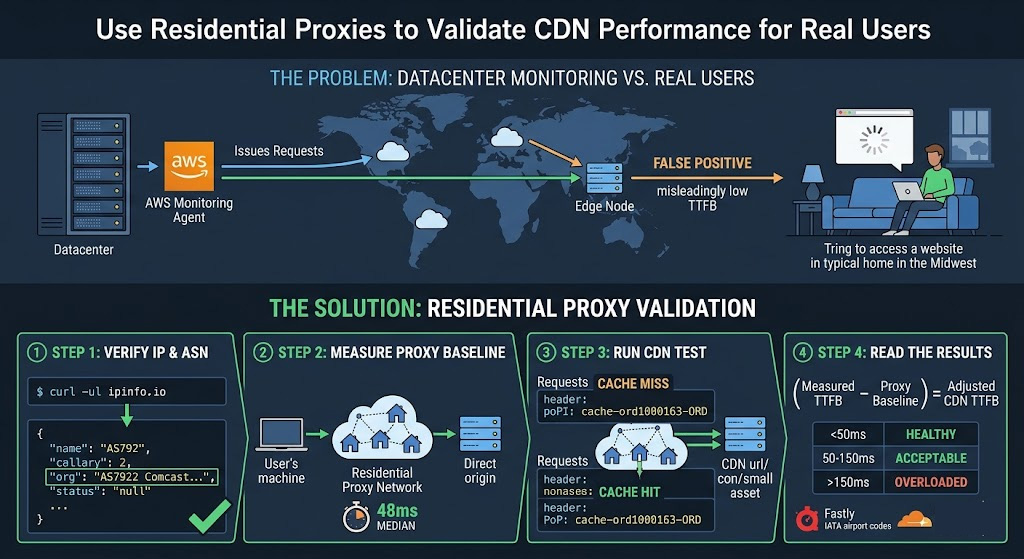
The first time we ran a CDN performance audit, we did what most ops teams do: launched monitoring agents from AWS us-east-1 and a couple of DigitalOcean droplets, pointed curl at our CDN URLs, and logged the results. Numbers looked clean—consistent cache HITs, TTFBs well under 30ms. We shipped the report.
Three weeks later, a product manager forwarded a Slack thread from support. Users in the Midwest and Southeast were complaining about slow load times. We pulled the monitoring data again and saw nothing wrong.
The problem wasn't our CDN. It was our test vantage points. Requests from cloud datacenter IP blocks follow BGP paths heavily optimized for cloud-to-cloud traffic—not for the residential last-mile hops that the majority of your actual users take. Switching to rotating residential proxies changed our monitoring picture entirely.
Why Your CDN Test Results Are Probably Lying to You
CDN routing isn't purely geographic. Under DNS-based CDN delivery, the authoritative nameserver selects the "most optimized" edge node based on the source IP of the DNS request. As ThousandEyes documents in their CDN monitoring guide, "when the request is received by the CDN authoritative server, the most optimized edge server (based on the source IP address DNS request) is selected."
That single sentence is why datacenter-based testing produces misleading data. Your AWS monitoring agent carries an IP from AS16509 (Amazon's ASN). A Comcast subscriber in Ohio carries an IP from AS7922. Both might be making DNS requests from the same physical region—but the CDN's routing logic treats them as traversing entirely different network topologies, and routes them accordingly, often to different PoPs. The TTFB you measure from your cloud agent reflects a network path your real users never take.
The practical effect: your monitoring can show zero CDN anomalies while users in specific ISP+region combinations hit unwarmed cache nodes, misconfigured origin fallbacks, or a PoP two time zones away. You won't see any of that unless your test traffic looks like theirs.
How CDN Routing Responds to Residential vs. Datacenter IPs
Most major CDNs use either DNS-based routing, Anycast BGP routing, or a hybrid of both. Under DNS-based routing (used by Cloudflare, Akamai, and others), the CDN's nameserver returns the IP of the "nearest" edge node computed from the requesting IP's BGP attributes—not just physical coordinates. Under Anycast routing, BGP advertises an identical IP prefix from multiple PoP locations, and the network's routing tables direct each client to the topologically nearest node based on BGP path selection.
In both models, "nearest" is evaluated from the perspective of the requesting IP's network path. A residential IP in Los Angeles and a cloud IP from a datacenter physically colocated in the same facility can resolve the same CDN hostname to completely different edge IPs—because their upstream BGP paths diverge before they reach the CDN's infrastructure.
Running a test from a residential proxy in a target city tells you which PoP that city's home broadband users actually reach. Running the same test from your cloud instance tells you which PoP your cloud instance reaches. For CDN validation purposes, those are not equivalent, and treating them as such is how teams spend days debugging phantom issues. The steps below walk through exactly how to get a measurement that reflects that residential path.
The Four Measurements That Tell the Whole Story
Before running any test, be clear on what you're actually measuring. Each request should yield four things:
TTFB (Time to First Byte) is your primary latency signal—it captures DNS resolution, TCP connection, TLS handshake, and server processing time combined. You'll read it from curl's %{time_starttransfer} variable.
Cache status tells you whether the edge node served the response from local cache (HIT) or had to pull from origin (MISS). Each CDN surfaces this differently:
Cloudflare:
CF-Cache-Status: HIT/MISSFastly:
X-Cache: HIT/MISSCloudFront:
X-Cache: Hit from cloudfront+X-Amz-Cf-Pop
A MISS on a static asset that should be cached is a red flag—the edge node for that region hasn't warmed up, or your cache rules are misconfigured.
PoP identification confirms which edge node answered. Fastly's X-Served-By header uses the format cache-[datacenter][number]-[IATA]—so cache-ord1000163-ORD means Chicago O'Hare, cache-sjc1000133-SJC means San Jose. Cloudflare encodes the PoP in the CF-RAY suffix (e.g., 572244ec8cadd266-DFW = Dallas). CloudFront uses X-Amz-Cf-Pop directly.
Origin vs. edge delta quantifies what your CDN is actually contributing. Force a cache bypass on the first request (via Cache-Control: no-cache), measure TTFB, then re-request normally. The gap between those two TTFBs—adjusted for your proxy latency baseline—is the CDN's actual performance contribution for that region and ISP.
Prerequisites
Three things need to be in place before running any test:
curl 7.29.0+ for
%{remote_ip}support (runcurl --versionto confirm; most modern systems are well above this). Python 3.8+ withrequestsinstalled (pip install requests)A rotating residential proxy with geo-targeting—one that lets you pin requests to a target country and, ideally, a specific city. Country-level targeting isn't granular enough; CDN PoP selection can vary between ISPs in the same metro area
A cacheable CDN URL for a static asset—a JS bundle, image, or font file that should produce a cache HIT after the first request. Avoid dynamic endpoints; they'll never cache and the test data will be meaningless
For the residential proxy, we use Proxy001. Their real residential proxy network covers 100M+ IPs across 200+ regions with city-level targeting, and supports both rotating and sticky sessions—the sticky session option matters in Step 3. You can start with their free proxy trial to validate speed and geo-coverage before committing to a plan, which is worth doing before running a full multi-region test matrix. Setup instructions for Python, Node.js, and curl are in their API documentation.
Disclosure: This article was developed in partnership with Proxy001.
Step 1 — Verify Your Proxy Is Actually a Residential IP
Don't skip this. A provider that routes datacenter IPs through a residential-labeled pool invalidates every measurement downstream. Before running any CDN test, confirm your exit IP's ASN belongs to a genuine residential ISP:
curl -s \
  -x http://USERNAME:PASSWORD@PROXY_HOST:PROXY_PORT \
  https://ipinfo.io/json
Inspect the org field in the JSON response. A legitimate residential IP returns your target ISP's name and ASN. If you see a cloud provider's ASN, the proxy isn't routing through a home network:
org field value | IP type |
|---|---|
"AS7922 Comcast Cable Communications" | Residential ISP ✓ |
"AS7018 AT&T Services" | Residential ISP ✓ |
"AS16509 Amazon.com" | Cloud datacenter ✗ |
"AS14061 DigitalOcean" | Cloud datacenter ✗ |
Run this check once per geo-targeting configuration before scaling up. If you're testing five regions, verify all five exit IPs. The check takes seconds and saves hours of debugging misleading data downstream.
Step 2 — Measure Proxy Baseline Latency Before Touching Your CDN
This is the step almost every guide omits, and skipping it makes your results uninterpretable.
Residential proxies add latency. A request travels from your machine → proxy provider's network → a residential device → the target server and back. The residential hop introduces variable latency depending on home network quality, ISP peering, and physical distance. If you measure CDN TTFB through a proxy and get 180ms, you have no idea whether that's 80ms proxy latency baseline + 100ms origin pull, or 140ms proxy latency baseline + 40ms edge hit.
To establish the baseline, point your proxy at a direct origin URL that bypasses your CDN. How to find that URL depends on your setup:
CDN dashboard: Open your CDN provider's control panel and look for the "Origin," "Backend," or "Shield" settings. The hostname or IP listed there is your direct origin address—test against it
CDN bypass header: Most CDNs support a request header that forces an origin pull (bypassing edge cache). Check your provider's documentation; the exact parameter varies by CDN and often requires specific VCL or cache rule configuration
Dedicated health endpoint: If neither option is available, add a
/healthpath to your origin server and temporarily exclude it from CDN coverage in your routing rules—then remove that exclusion once baseline testing is complete
Once you have a direct origin URL, run:
curl -o /dev/null -s \
  -x http://USERNAME:PASSWORD@PROXY_HOST:PROXY_PORT \
  -w "Proxy baseline TTFB: %{time_starttransfer}s | Total: %{time_total}s\n" \
  https://origin.example.com/health
Run this five times and take the median. Here's what a typical baseline run produces—your actual millisecond values will depend on your proxy pool quality, exit node location, and target region:
Proxy baseline TTFB: 0.048s | Total: 0.051s
Proxy baseline TTFB: 0.053s | Total: 0.055s
Proxy baseline TTFB: 0.044s | Total: 0.047s
Proxy baseline TTFB: 0.051s | Total: 0.052s
Proxy baseline TTFB: 0.047s | Total: 0.049s
Median in this example: 48ms. Whatever your actual median is, that number gets subtracted from every CDN measurement in Steps 3 and 4.
Early in our testing, we skipped this step and flagged what looked like a CDN routing anomaly in a Western US region—exceptionally high TTFB from what should have been a healthy edge node. It turned out to be a slow residential device in our proxy pool contributing most of that measured latency to the proxy latency baseline, not to CDN edge performance. Without the baseline measurement, we spent two hours chasing a ghost.
Step 3 — Running the CDN Performance Test
With curl (quick single-request validation):
curl -o /dev/null -s \
  -x http://USERNAME:PASSWORD@PROXY_HOST:PROXY_PORT \
  -D /tmp/cdn_headers.txt \
  -w "\nDNS Lookup:    %{time_namelookup}s\nTCP Connect:   %{time_connect}s\nTLS Handshake: %{time_appconnect}s\nTTFB:          %{time_starttransfer}s\nTotal Time:    %{time_total}s\nEdge IP:       %{remote_ip}\nHTTP Status:   %{http_code}\n" \
  https://cdn.example.com/static/app.min.js
Then inspect the saved response headers:
grep -i "x-cache\|cf-cache-status\|x-served-by\|x-amz-cf-pop\|cf-ray" /tmp/cdn_headers.txt
Run the command twice in quick succession. The first request may produce a MISS if the node hasn't cached this asset for traffic from this ISP path—that's normal cold-start behavior. The second should return a HIT on any properly configured CDN.
With Python (multi-sample, multi-region testing):
import requests
import time
import statistics
import os
import sys

# Credentials via environment variables—safe for CI/CD use
PROXY_HOST = os.environ.get("PROXY_HOST", "your-proxy-endpoint")
PROXY_PORT = int(os.environ.get("PROXY_PORT", "10000"))
PROXY_USER = os.environ.get("PROXY_USER", "your_username")
PROXY_PASS = os.environ.get("PROXY_PASS", "your_password")

proxies = {
    "http":  f"http://{PROXY_USER}:{PROXY_PASS}@{PROXY_HOST}:{PROXY_PORT}",
    "https": f"http://{PROXY_USER}:{PROXY_PASS}@{PROXY_HOST}:{PROXY_PORT}",
}

TARGET_URL        = "https://cdn.example.com/static/app.min.js"
PROXY_BASELINE_MS = 48    # Replace with your Step 2 median
TTFB_THRESHOLD_MS = 100   # Max acceptable adjusted TTFB
SAMPLES           = 5

ttfbs = []
print(f"Testing: {TARGET_URL}\n{'─' * 60}")

for i in range(SAMPLES):
    start = time.perf_counter()
    resp = requests.get(
        TARGET_URL,
        proxies=proxies,
        stream=True,    # Returns when headers received ≈ TTFB
        timeout=20,
        headers={
            "User-Agent": (
                "Mozilla/5.0 (Windows NT 10.0; Win64; x64) "
                "AppleWebKit/537.36 (KHTML, like Gecko) "
                "Chrome/124.0.0.0 Safari/537.36"
            )
        }
    )
    ttfb = time.perf_counter() - start
    ttfbs.append(ttfb)

    cache_status = (
        resp.headers.get("CF-Cache-Status")
        or resp.headers.get("X-Cache")
        or "N/A"
    )
    pop_id = (
        resp.headers.get("X-Served-By")        # Fastly
        or resp.headers.get("X-Amz-Cf-Pop")   # CloudFront
        or resp.headers.get("CF-RAY", "N/A")  # Cloudflare (includes PoP suffix)
    )

    print(
        f"[{i+1}] TTFB: {ttfb * 1000:.0f}ms | "
        f"Status: {resp.status_code} | "
        f"Cache: {cache_status} | "
        f"PoP: {pop_id}"
    )
    resp.close()
    time.sleep(1.5)

raw_median = statistics.median(ttfbs) * 1000
adjusted   = raw_median - PROXY_BASELINE_MS

print(f"\nMedian TTFB (raw, through proxy): {raw_median:.0f}ms")
print(f"Median TTFB (adjusted, proxy baseline subtracted): {adjusted:.0f}ms")

if adjusted > TTFB_THRESHOLD_MS:
    print(f"FAIL: Adjusted TTFB {adjusted:.0f}ms exceeds threshold {TTFB_THRESHOLD_MS}ms")
    sys.exit(1)
Here's what a typical run looks like for a well-functioning CDN with a warm Chicago edge node—your numbers will vary by region, proxy exit quality, and CDN configuration:
Testing: https://cdn.example.com/static/app.min.js
────────────────────────────────────────────────────────────
[1] TTFB: 264ms | Status: 200 | Cache: MISS | PoP: cache-ord1000163-ORD
[2] TTFB:  71ms | Status: 200 | Cache: HIT  | PoP: cache-ord1000163-ORD
[3] TTFB:  68ms | Status: 200 | Cache: HIT  | PoP: cache-ord1000163-ORD
[4] TTFB:  74ms | Status: 200 | Cache: HIT  | PoP: cache-ord1000163-ORD
[5] TTFB:  70ms | Status: 200 | Cache: HIT  | PoP: cache-ord1000163-ORD

Median TTFB (raw, through proxy): 71ms
Median TTFB (adjusted, proxy baseline subtracted): 23ms
In this example, the PoP identifier cache-ord1000163-ORD confirms the request was served by a Chicago O'Hare edge node—the correct PoP for a Comcast Chicago residential IP. After subtracting the 48ms proxy latency baseline, the 23ms adjusted TTFB places this in the healthy range. Request 1 shows expected cold-start MISS; requests 2–5 are consistent HITs from the same PoP.
Step 4 — Reading the Results
Subtract your Step 2 proxy latency baseline from each measurement before drawing any conclusions.
The ranges below reflect practical benchmarks for well-peered residential ISP paths to a same-country PoP. Cross-continent routing will push adjusted HIT TTFB higher—treat 80–200ms as acceptable for those scenarios. Adjust thresholds to match your CDN provider's documented performance targets and your users' actual geographic distribution.
| Adjusted TTFB | Cache Status | What it means |
|---|---|---|
| < 50ms | HIT | Edge node healthy; content cached; routing correct |
| 50–150ms | HIT | Acceptable; investigate whether PoP is geographically appropriate |
| > 150ms | HIT | Edge node possibly overloaded, or routing to a distant PoP |
| Any value | MISS (2nd+ request) | Caching misconfiguration—check CDN cache rules and TTL settings |
| Any value | MISS (1st request only) | Normal cold-start; re-run to confirm HIT |
Validating PoP geography: Cross-reference the PoP identifier with your CDN provider's published location list. For Fastly, the three-letter suffix in X-Served-By is an IATA airport code—ORD is Chicago O'Hare, SJC is San Jose, LHR is London Heathrow. Cloudflare publishes its full network map at https://www.cloudflare.com/network/. If a Chicago residential proxy consistently resolves to a JFK or IAD PoP, real Chicago users are likely hitting that distant node—worth escalating to your CDN provider.
Checking the origin delta: Force a cache bypass on the first request (Cache-Control: no-cache) to measure an origin-pull TTFB, then request again normally for the cached TTFB. The difference, once proxy latency baseline is subtracted from both, is the CDN's actual performance contribution for that ISP path. A narrow delta (under 30ms) after baseline subtraction suggests either your origin is already fast for that region, or the CDN's PoP for that path is routing suboptimally.
Five Things That Will Invalidate Your Test Results
1. Rotating IPs between the cache cold-start and warm-request pair. Default rotating residential proxies assign a different exit IP on each request. If your second curl call exits through a different residential device than your first, the CDN may route it to a different PoP—you're no longer measuring the same path. Use a sticky session (a session-locked exit IP) for the two-request cache validation sequence.
Most providers expose sticky sessions through a session ID appended to the proxy username string. A common format looks like USERNAME-session-SESSIONID, where SESSIONID is any string you define—each unique string pins requests to the same residential exit for the session's duration. Check the "Sticky Session" or "Session Control" section of your proxy provider's API documentation for the exact syntax; it's usually under authentication or connection settings.
2. No User-Agent header. Some CDNs vary cache behavior by User-Agent—serving different asset variants to mobile vs. desktop clients, or applying separate routing rules to requests without a browser UA. The Python script above sets a realistic Chrome User-Agent by default. For curl, add: -H "User-Agent: Mozilla/5.0 (Windows NT 10.0; Win64; x64) AppleWebKit/537.36"
3. Testing large files. High-bandwidth assets amplify residential proxy throughput variance and bury the TTFB signal in body transfer time. Stick to static files under 100KB—a JS bundle or small image works well. You're measuring latency and routing correctness, not download speed.
4. Testing only at off-peak hours. Residential network conditions shift significantly between 9am and 8pm. Evening congestion on home ISPs can meaningfully inflate proxy latency baseline values. If your users are reporting issues during peak hours, run your test during that window—not at 2am when residential upstream bandwidth is nearly idle.
5. Skipping the PoP geography check. A clean TTFB number means nothing if you haven't confirmed you're hitting the right PoP. Always cross-reference %{remote_ip} from curl with a geolocation lookup (ipinfo.io works for this), and confirm the PoP identifier matches the proxy's target city. A Chicago residential proxy resolving to a Frankfurt edge node is a real CDN routing issue—and TTFB alone won't surface it.
Turning a One-Off Test Into Continuous Validation
A single test run catches point-in-time issues. To catch degradations before users notice them, productionize the scripts above in three steps.
Scheduled regional sweep. Add a cron job that runs the Python script on a recurring interval. The script already exits with status 1 when adjusted TTFB exceeds TTFB_THRESHOLD_MS, which makes failure detection straightforward:
# Add to crontab -e
# Runs every 30 minutes; logs results with timestamp
*/30 * * * * /usr/bin/python3 /opt/cdn-monitor/cdn_test.py \
  >> /var/log/cdn_monitor.log 2>&1
Set PROXY_BASELINE_MS and TTFB_THRESHOLD_MS per region—either hardcoded per script instance or passed as environment variables. Trigger an alert (email, PagerDuty, or Slack webhook) when exit(1) fires across more than two consecutive runs from the same region.
Post-deploy smoke test. New deployments invalidate CDN caches across PoPs. A residential proxy check immediately after deploy confirms re-warming is happening correctly in your priority geos before real traffic arrives. The Python script's sys.exit(1) on threshold breach integrates directly with GitHub Actions as a pipeline failure:
name: CDN Smoke Test
on:
  workflow_run:
    workflows: ["Deploy to Production"]
    types: [completed]

jobs:
  cdn-validate:
    runs-on: ubuntu-latest
    steps:
      - uses: actions/checkout@v4
      - run: pip install requests
      - name: Validate CDN performance (Chicago residential)
        env:
          PROXY_HOST: ${{ secrets.PROXY_HOST }}
          PROXY_USER: ${{ secrets.PROXY_USER }}
          PROXY_PASS: ${{ secrets.PROXY_PASS }}
        run: python3 cdn_test.py
PoP drift alerting. Log the X-Served-By or PoP suffix value alongside each test run's timestamp and region. If the edge node serving a specific proxy region changes unexpectedly—Chicago requests suddenly routing through cache-iad1234-IAD instead of cache-ord1000163-ORD—that's an early signal of a BGP routing shift, CDN configuration change, or provider-side incident. Treat an unexpected PoP switch with the same urgency as a sudden TTFB spike.
A Note on Authorized Use
The methodology in this guide is intended for testing CDN performance on web properties you own or have explicit authorization to test. Using residential proxies for unauthorized data collection, bypassing access controls you don't own, or violating a target site's Terms of Service falls outside the scope of this guide. Before running automated requests against any endpoint, confirm you have the right to do so—both under the site's ToS and any applicable data protection regulations in your jurisdiction. Proxy001's acceptable use policy applies to all traffic routed through their network.
Validate CDN Performance the Way Real Users Experience It
The methodology in this guide relies on residential proxies that genuinely route through home ISP networks—not recycled datacenter addresses relabeled as residential. The ASN check in Step 1 is your first line of defense; the proxy latency baseline measurement in Step 2 is your second.
Proxy001 covers 100M+ real residential IPs across 200+ regions with city-level targeting, which gives you the granularity to test by metro area and ISP path rather than just by country. Both rotating and sticky sessions are available from the same account, so you can run broad multi-region sweeps and the targeted two-request cache validation sequence in Step 3 without switching providers. The platform integrates directly with Python, Node.js, curl, and browser automation tools—no additional middleware required.
Start with their free proxy trial before building out your full test matrix. You can verify geographic coverage, ASN legitimacy, and connection quality for your target regions with zero commitment. No credit card required.
→ Start your free residential proxy trial at Proxy001
