


 English
 繁體中文
繁體中文
 Deutsch
 Français
 Español
 日本語
日本語
 Tiếng Việt
 Português
Are ISP Proxies and Static Residential Proxies the Same Thing?
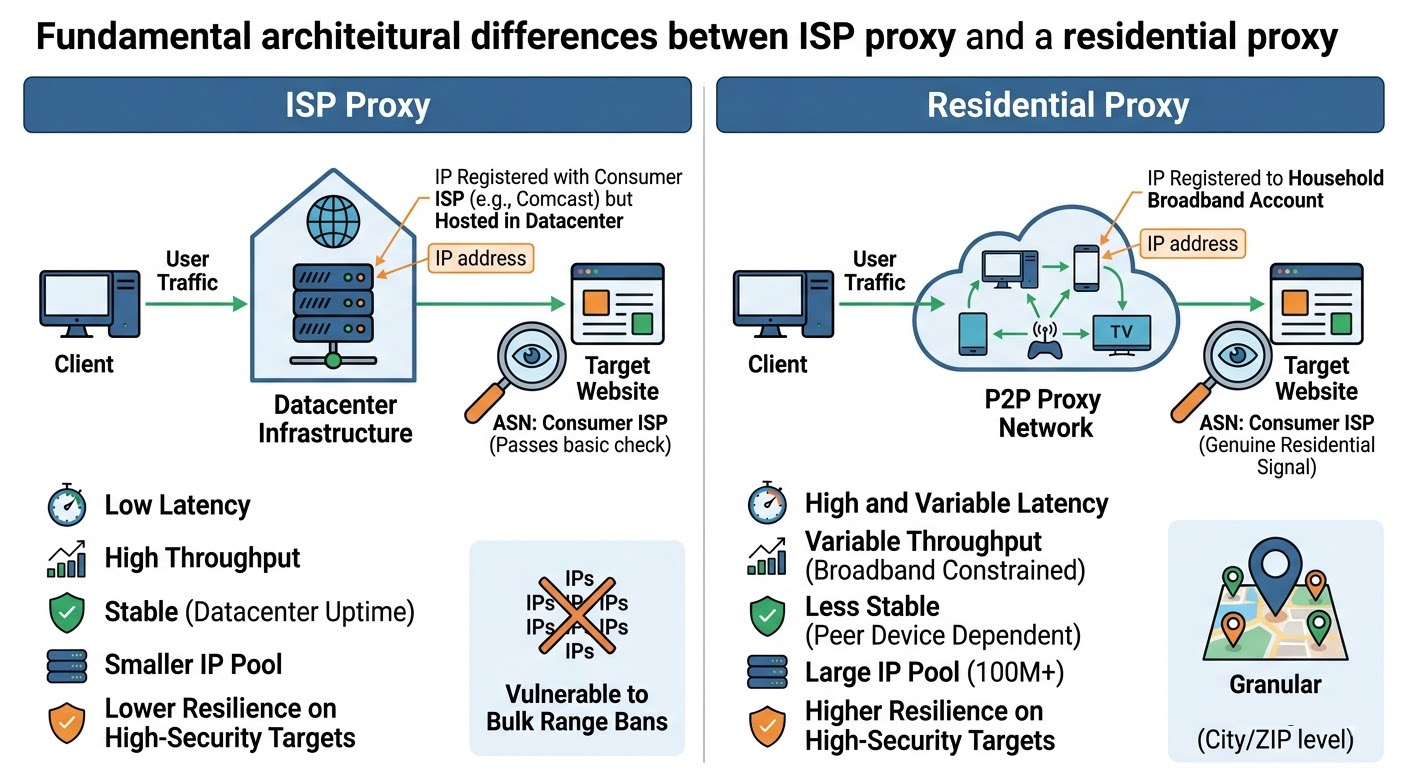
Yes—depending on which provider you're looking at. "ISP proxy" and "static residential proxy" describe the same product type: an IP registered with a consumer ISP, hosted on datacenter hardware rather than an actual home device.
The naming inconsistency is real and genuinely confusing. Smartproxy and Bright Data tend to say "static residential." Oxylabs and iProyal lean toward "ISP proxy." A few providers list both as separate product lines with slightly different configurations. Before you compare pricing across providers, confirm you're actually comparing the same product—otherwise you'll waste time on an apples-to-oranges evaluation.
One more thing to be clear on: ISP proxies aren't a subset of residential proxies. They're their own distinct category. That framing matters for everything that follows.
How Does Each Proxy Type Actually Work?
The core difference comes down to where the IP lives and how traffic gets routed.
Residential proxies route your requests through actual end-user devices—home computers, phones, smart TVs—on real consumer broadband connections. The IP belongs to a household's ISP account. When a target site sees that request, it sees a genuine residential fingerprint: a consumer ISP's ASN, typical home-connection latency variability, the whole picture. Your traffic literally travels through someone's home router.
ISP proxies work differently. The IP address is registered with a consumer ISP and carries that ISP's ASN (Autonomous System Number)—but the traffic runs through a datacenter. From the outside, the IP looks residential because the ASN registration says "Comcast" or "BT," not "Amazon Web Services" or "Hetzner."
That ASN detail is the reason ISP proxies work at all. Systems like AWS WAF's ASN match rules route traffic based on whether an IP's ASN belongs to a hosting company versus a consumer ISP. An ISP proxy clears that check while running on fast, reliable datacenter infrastructure.
The honest caveat: more sophisticated anti-bot systems don't stop at the ASN. Behavioral analysis, TCP/IP fingerprint consistency checks, and IP reputation scoring can still flag ISP proxy traffic on certain high-security targets. If your target runs Cloudflare Enterprise, PerimeterX, or DataDome, this distinction matters—and Section 4 covers exactly which proxy type handles those environments better.
ISP Proxy vs. Residential Proxy: Side-by-Side
| ISP Proxy | Residential Proxy | |
|---|---|---|
| Infrastructure | Datacenter hardware, ISP-registered ASN | Real home devices on consumer broadband |
| Latency | Low (datacenter infra) | High and variable (depends on peer device's home connection) |
| Throughput | High (datacenter infra) | Limited and variable (constrained by peer device's broadband) |
| Stability | Very high — datacenter uptime | Moderate — peer device must stay online |
| IP rotation | Typically static (same IP per session) | Rotating per request or per session |
| IP pool size | Smaller | Much larger (100M+ at major providers) |
| Geo coverage | Limited regions | 200+ countries, city/ZIP-level precision |
| ASN-based detection | Passes (residential ISP ASN) | Passes (genuine residential) |
| Performance on high-security targets | Lower — smaller pool, higher block risk at scale | Higher — larger pool, genuine residential signals |
| Pricing model | Per-IP/month or per-GB | Per-GB ($5–$15/GB typical) |
A few things worth unpacking from that table:
The latency gap is the ISP proxy's defining advantage. Residential proxies route through real home connections, which means you're at the mercy of whatever broadband the peer device happens to have — slow, variable, and often interrupted. ISP proxies run on datacenter infrastructure, which delivers consistently low latency and high throughput. For high-frequency polling or monitoring tasks, that difference is the line between a viable setup and one that's too slow to be useful.
The IP pool size gap matters more than providers let on. A smaller ISP pool means higher request density per IP. On sites that monitor per-IP request frequency, ISP proxies hit ban thresholds faster than residential pools where each IP handles far fewer requests across the network. This is the core tradeoff you're accepting when you choose ISP for performance.
Stability looks better for ISP proxies on paper, but the risk profile is different. ISP proxies have consistent uptime because they're on datacenter hardware. Residential proxies can drop mid-session because the peer device went offline. However, ISP proxies carry the risk of bulk IP range bans on heavily protected targets — one enforcement sweep can take out a large portion of a small pool. The risk profile is different, not necessarily lower.
Which One Should You Use? (Scenario-Based Guide)
"It depends on your use case" is technically accurate and practically useless.
Go with ISP proxies when:
You're managing multiple accounts on social media, ad platforms, or e-commerce marketplaces. Account management needs a consistent IP identity per account — rotating IPs trigger account-linking detection on most platforms. ISP proxies give you a stable, predictable presence per session.
You're running price monitoring, SEO rank tracking, or high-frequency data polling. ISP proxies' speed advantage is decisive here: the gap between datacenter-backed latency and a variable home broadband connection translates directly into how many requests you can process per hour under the same workload.
Your target sites have standard-to-moderate anti-bot protection. If clearing the ASN check is the main obstacle, ISP proxies do that cleanly with better throughput.
Go with residential proxies when:
You're scraping heavily protected targets — major retail sites, travel aggregators, platforms with Cloudflare Enterprise or PerimeterX in front. The larger IP pool and genuine residential fingerprint provide meaningfully better resilience on these targets. Against high-security platforms like Amazon, a concentrated ISP proxy deployment burns through a small pool faster than you'd expect under sustained high-volume activity, because each IP absorbs a disproportionate share of requests before ban cycles kick in.
You need granular geo-targeting. City-level and ZIP-level residential coverage is far more reliable than what most ISP proxy pools offer. For localized ad verification, SERP localization testing, or region-specific price checks, residential is the practical choice.
You're handling ad verification or bot fraud detection where traffic authenticity matters more than speed.
The real limits of each — not buried in fine print:
ISP proxies are vulnerable to ban cascades at scale. A smaller IP pool means that if a platform starts blocking your IP range aggressively, you have fewer fallback options. This is the scenario where a large residential pool's sheer breadth becomes a structural advantage, not just a nice-to-have.
Residential proxies don't guarantee reliability. Peer-device architecture means your exit node can drop offline mid-task. For checkout flows, login sequences, or anything requiring a maintained session, that instability can corrupt your workflow in ways that are annoying to debug. If your use case requires session persistence, ISP proxies' static IP behavior is a genuine operational advantage.
When Is ISP Proxy Actually Cheaper?
ISP proxies are typically billed per-IP — a fixed monthly cost per IP, with unlimited or generous bandwidth included. Residential proxies bill per-GB at $5–$15/GB depending on provider tier. That pricing structure creates different cost curves depending on how you use them.
ISP proxies cost less when you're reusing the same IPs heavily. A dedicated ISP IP runs around $2–$5/IP per month with unlimited bandwidth. If that IP handles consistent session traffic — say, 200 requests per day averaging 200KB each — that's roughly 1.2GB/month. At residential per-GB rates, that same traffic costs $6–$18/month. The ISP option is cheaper the moment your per-IP traffic volume justifies the fixed fee.
Residential proxies cost less when you need breadth, not depth. A large crawl across many different domains — where each IP fires a handful of requests and moves on — doesn't justify a per-IP fee. You pay only for what you transfer, and the flexible scaling matches unpredictable demand better than pre-purchasing fixed IP capacity.
A practical decision rule: if the same IP needs to stay active or be reused consistently, ISP per-IP pricing is usually more cost-efficient. If your primary requirement is IP diversity across a wide crawl and you can't predict volume in advance, residential per-GB gives you more flexibility without committing to fixed capacity you might not fully use.
How to Test Which Type Works for Your Use Case
The right validation isn't theoretical — it's a small empirical test before you commit budget.
Prerequisites — confirm these before running any test:
You have an active proxy account or access to a free trial that supports both ISP and residential types
You have a defined target URL and a specific task (number of pages to scrape, account sessions to manage, etc.)
You have an HTTP client available (curl, Python requests, Puppeteer, or similar)
You can access ipinfo.io or a comparable IP inspection tool to verify ASN data
1. Pick a provider that supports both types. Testing ISP and residential proxies through the same provider controls for infrastructure and support variables. Proxy001 offers both with a free trial, which makes pre-commitment validation straightforward — you can run both types against your actual target before deciding.
2. Verify the IP type you actually received. Run your proxy through ipinfo.io and check the org field. A genuine ISP proxy should show a consumer ISP name in the ASN field (Comcast, BT, Verizon) — not a datacenter provider. If you see AWS, OVH, or Hetzner, you've been handed a datacenter proxy regardless of what the product page says.
3. Run 500–1,000 requests against your real target. Not 50. Log your success rate, average response time, and any blocks or CAPTCHAs triggered. Real-world data from your actual target matters far more than published benchmarks.
4. Measure effective success rate, not connection availability. A proxy that connects 100% of the time but gets blocked on 20% of requests has an effective success rate of 80%. Track both metrics separately.
How to read your results: If blocks and CAPTCHAs are appearing on more than 1 in 5 requests, the anti-bot system on that target isn't accepting this proxy type — switch before scaling up. Conversely, if your request flow runs clean with minimal interruptions across the full sample, the proxy type is viable for that target at production volume.
Common issues and fixes:
Immediate blocks on a high-protection target with ISP proxies: The IPs may have prior abuse history from previous users. Ask your provider about IP freshness or request a different subnet. If the problem persists, this is a signal that the target requires residential proxies' larger pool and genuine traffic signals.
Residential connections dropping mid-session: Peer devices going offline. Use session-pinning if your provider supports it — this holds the same exit node for the duration of a defined session window. A common pattern in account management workflows is to set session pins to 30–60 minute windows to balance persistence with peer device volatility.
IP type doesn't match what you bought: Run the ipinfo.io check. If the ASN points to hosting infrastructure, escalate to provider support with the IP address and ASN data in hand.
On compliance: Only collect data you have a legitimate right to access. Publicly available data is generally accessible in most jurisdictions, but scraping personal information at scale, bypassing authenticated access controls, or reselling scraped datasets enters legally complex territory. Check the terms of service for your target, and get legal review for anything sensitive or high-volume.
Try Both Before You Commit
If the framework above still leaves you uncertain, that's exactly the situation a free trial is for. Proxy001 provides access to both ISP and residential proxies, with a pool of 100M+ IPs covering 200+ regions and city/ZIP-level targeting on residential. The platform integrates with Puppeteer, Selenium, Scrapy, and other standard scraping and automation frameworks, so there's minimal setup overhead. New accounts get free trial access — enough to run the 500–1,000 request validation outlined above against your actual target. Run the test, check your block rate, and let the data decide.
→ Start your free trial at proxy001.com
