


 English
 繁體中文
繁體中文
 Deutsch
 Français
 Español
 日本語
日本語
 Tiếng Việt
 Português
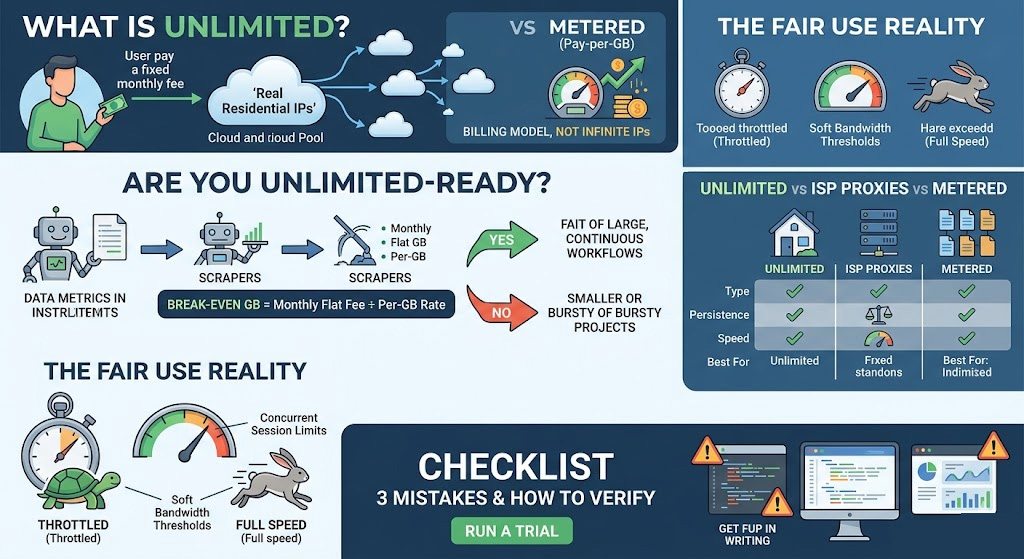
When most people search for "unlimited residential proxies," they picture a pool of infinite IPs. That's not what the product is. Unlimited describes the billing model — flat monthly fee, no per-gigabyte charge — not how many IPs you can access. The distinction stays theoretical until a large crawl halts mid-run because a pay-per-GB allowance ran out, or until a monthly invoice doubles because a data pipeline ran hotter than expected. Those are the actual problems unlimited plans solve, and they're only worth solving if your workload is large and continuous enough to justify the flat cost.
What Does "Unlimited" Actually Mean in a Residential Proxy Plan?
Unlimited residential proxies combine two things: IP addresses sourced from real ISP-assigned home devices, and a billing structure where you pay a fixed monthly fee regardless of how much bandwidth you use. You're not buying more IPs — you're removing the variable cost of per-GB overage.
Compare that to metered (pay-per-GB) residential proxies: you purchase a data allowance, and once it's depleted, jobs stall until you top up. At $0.55/GB on the lower end of the market, a 500GB month costs $275 in bandwidth alone.
There's also a second term you'll see: unmetered. The two aren't identical. "Unmetered" technically means the provider doesn't count gigabytes at all — a model more common in datacenter proxies. "Unlimited" residential plans, by contrast, almost always include a Fair Use Policy (FUP) that can throttle speed if your consumption far exceeds typical usage patterns. If a provider claims their residential plan is completely unmetered with zero conditions, verify before signing: ask directly — "Do you have a Fair Use Policy? What are your concurrent connection limits and soft bandwidth thresholds?" A provider who can answer those questions specifically is telling you something different than one who says "no limits whatsoever."
Is "Unlimited" Truly Unlimited? What Fair Use Policies Actually Do
Most unlimited residential proxy plans have a Fair Use Policy buried in the terms of service. It doesn't cut your connection when triggered — it throttles your speed, which can be worse for long-running jobs because the pipeline keeps running slowly rather than failing loudly.
Two concrete examples from providers' own published documentation:
Webshare: Unlimited bandwidth plans include a defined high-volume usage threshold before any throttling applies. Once exceeded, connection speeds drop significantly. Concurrent session limits also apply and vary by plan tier. For the exact thresholds and concurrency caps on any specific plan, check Webshare's Fair Usage Policy or ask their support team directly before committing.
Bright Data: Their unlimited datacenter and ISP zones apply a 100GB-per-proxy monthly fair-use limit. Exceeding it triggers speed reduction on that specific proxy. (Source: Bright Data Fair Use documentation)
Neither of these makes unlimited plans a bad choice — but they make the concurrency cap and soft threshold the real purchase criteria, not just the headline "unlimited" label. Before committing to any plan, nail down four numbers:
Concurrent connection limit — how many simultaneous open sessions are allowed
RPS ceiling — maximum requests per second account-wide
Soft bandwidth threshold — the GB level (if any) that triggers speed reduction
What throttling actually looks like — a speed ceiling on a pipeline running millions of requests is operationally very different from a hard stop
Get these in writing from support if they're not in the documentation. The answer tells you more about the plan than any marketing page.
Why ISP Proxies Might Solve the Same Problem for Less
Before locking in unlimited residential proxies, there's a third option that gets far less attention: ISP proxies (also called static residential proxies).
ISP proxies are IP addresses registered with real internet service providers but hosted on datacenter hardware. They're not sourced from actual home devices, but they carry ISP-assigned ASNs, which is why most anti-bot systems classify them as residential-grade traffic. They're faster and more stable than rotating residential proxies — and they almost always include unlimited bandwidth as the default, billed per IP or per port rather than per gigabyte.
One important caveat: advanced anti-bot systems such as Akamai Bot Manager and Cloudflare's bot detection increasingly fingerprint datacenter hosting infrastructure at the ASN level, even when that ASN is ISP-registered. If your target platform runs enterprise-grade bot protection, ISP proxy performance in specific regions is worth validating in a trial rather than assumed.
Here's how all three options compare on the dimensions that actually drive the purchase decision:
| Unlimited Residential | ISP Proxy (Static Residential) | Metered Residential | |
|---|---|---|---|
| Billing model | Flat monthly fee | Per IP/month | Per GB consumed |
| IP type | Rotating, real home devices | Static, ISP-registered datacenter | Rotating, real home devices |
| Session persistence | Configurable sticky sessions | Same IP permanently | Configurable sticky sessions |
| Speed | Variable (residential hardware) | Faster (datacenter infrastructure) | Variable |
| IP pool diversity | Large, rotates across many ASNs | Fixed IPs, limited pool size | Large, rotates across many ASNs |
| Best for | High-volume rotation, large-scale scraping | Long sessions, account management | Pilot projects, variable workloads |
Choose ISP proxies when your tasks require stable, persistent connections — managing social or e-commerce accounts, logged-in scraping sessions, or checkout flows where a rotating IP triggers re-authentication. You're building session history on a fixed IP; rotating residential IPs, unlimited or otherwise, can't do that reliably.
Choose unlimited residential proxies when you need large-scale IP rotation across diverse geographies, strong residential trust signals, or access to targets that treat datacenter infrastructure with more skepticism than real residential IPs.
Does Your Use Case Actually Require an Unlimited Plan?
Not all heavy proxy users need unlimited, and not all unlimited buyers are actually heavy users. The two scenarios where unlimited genuinely earns its cost are: high total bandwidth consumption and continuous operation — both at the same time, ideally. A job that uses 500GB but runs only one week a month may still be cheaper on metered. A job that runs 24/7 but consumes only 80GB/month almost certainly is.
| Workload Profile | Recommended Plan |
|---|---|
| 500GB+/month, continuous crawling (SERP monitoring, price intelligence, large-scale product catalog scraping) | Unlimited residential |
| 50–150GB/month, project-based or seasonal (quarterly research, one-time data pipeline) | Metered residential |
| Low bandwidth, high session persistence (social account management, logged-in scraping) | ISP proxy |
| Variable/bursty (ad verification, periodic geo-testing) | Metered if campaigns are infrequent; unlimited if teams run continuous multi-geo audits |
The gray zone is roughly 150–300GB/month. At that volume, whether metered or unlimited wins depends entirely on your provider's specific pricing — which is what the next section helps you calculate.
At What GB Threshold Does Unlimited Become Worth It?
Before you start: You need two numbers — your provider's per-GB rate (listed in your plan details) and an estimate of your monthly bandwidth consumption. If you have a proxy dashboard with usage history, pull the last 30-day total. If you're estimating from scratch, Step 1 below explains how to do it accurately.
Break-Even Formula:
Break-Even GB = Monthly Flat Fee ÷ Per-GB Rate
For example, if an unlimited plan costs $300/month (this is a hypothetical figure — use your provider's actual pricing) and the pay-per-GB rate is $0.55/GB:
$300 ÷ $0.55 ≈ 545 GB/month
Above 545GB, the unlimited plan saves money. Below it, metered is cheaper.
How to calculate your actual threshold:
Step 1 — Estimate your monthly bandwidth. This is where most teams get the math wrong. The number that matters is what your scraper actually downloads, not what a browser loads.
Raw HTML scraping (most common): the HTML document itself is typically 20–300KB. The HTTP Archive's 2025 Web Almanac records a median HTML resource size of 22KB — even pages with heavy markup rarely exceed 300KB as a raw document. In practice, scrapers fetching and parsing HTML without loading assets run well under 500KB per request. In our own testing with a mid-complexity e-commerce catalog scraper running 20 concurrent threads on raw HTML, actual per-page consumption came in comfortably within that range — the 2–5MB figures cited in some industry articles apply to fully-rendered headless browser sessions, not typical scraping workloads.
Headless browser scraping (Puppeteer/Playwright rendering full pages): full page weight including JS, CSS, and images averages 2.5–3MB per page, per HTTP Archive 2025 data.
API/JSON endpoints: typically 10–150KB per response.
The fastest way to calibrate is to run your actual scraper against a representative sample of 100–200 target URLs and read the bandwidth consumed from your proxy provider's dashboard. That 15-minute check is more reliable than any back-of-envelope estimate.
Step 2 — Get your provider's per-GB rate. Check your plan details for the exact figure. Current market rates for rotating residential proxies generally range from $0.55–$1.00/GB depending on volume tier — confirm the specific rate on your provider's pricing page.
Step 3 — Find the unlimited plan's monthly fee. Check your provider's current pricing page for the flat-rate options available — pricing structures vary, so confirm whether the fee covers all geographies and concurrency levels you need.
Step 4 — Apply the formula. The result is your break-even GB threshold.
Step 5 — Add a 20–30% buffer. Retries, failed requests, and crawl depth spikes inflate real-world consumption above baseline estimates. If your calculation gives 400GB/month, compare against 500–520GB.
Step 6 — Cross-check against FUP constraints. If the unlimited plan throttles at concurrency levels your jobs require, a metered plan without concurrency restrictions may deliver better throughput even if the raw cost-per-GB is higher. Price and performance aren't interchangeable.
Sanity check: If your estimate looks implausibly high — several terabytes monthly for a scraper running a few hours a day — your per-page size estimate is almost certainly off. Re-run Step 1 using actual dashboard sampling rather than estimated page weights.
No historical data? Run your scraper for 30 minutes at production concurrency, check bandwidth consumed in the dashboard, and extrapolate: (GB consumed in 30 minutes) × 2 × 24 × 30. Rough, but orders-of-magnitude more accurate than guessing page sizes.
PlainProxies' published analysis of scraping workloads puts the typical market inflection point at roughly 300–500GB/month, consistent with break-even math at current market rates. Below that range, pay-per-GB almost always wins on cost. Consistently above it, unlimited almost always wins on both cost and operational simplicity.
Should You Buy an Unlimited Residential Proxy Plan?
Once you've run the break-even formula with your actual numbers, the decision criteria are straightforward:
Buy unlimited if your calculation puts you above your break-even threshold and your jobs run continuously rather than in bursts. The flat cost removes budget unpredictability and lets you scale request volume without tracking a GB counter.
Choose ISP proxies instead if your workload requires stable, persistent sessions — account management, logged-in scraping, or checkout automation. Unlimited bandwidth at a per-IP cost, with no rotation forcing re-authentication.
Stay metered if your calculation puts you below the break-even threshold, your workloads are project-based, or you're still in the validation phase and want cost exposure you can directly control.
If your numbers put you in the unlimited-ready zone, Proxy001's unlimited residential proxy plan is built for high-concurrency, data-intensive operations — 100M+ real residential IPs across 200+ regions, 100Gbps+ network backbone, real-time usage dashboard, and sub-account management for teams running parallel workloads.
3 Mistakes People Make When Buying an "Unlimited" Plan
Skipping the FUP before signing. You commit to a plan, launch your scraper at full concurrency, and watch response times degrade six hours in. The provider's fair-use policy capped concurrent sessions at a level nobody mentioned during the sales process. Always get the specific FUP terms — throttle triggers, bandwidth soft ceiling, concurrency limits, and consequences — before purchase, not during an incident.
Confusing unlimited bandwidth with unlimited IPs. Some providers advertise "unlimited IPs" to mean large pool access but still bill per gigabyte. Others offer unlimited bandwidth but a hard cap on pool size. These are two independent variables. Verify both before buying: what you're billed on (bandwidth, per-IP, or per-port) and how large the IP pool you can actually rotate through is.
Not verifying that IPs are genuinely residential. Some providers mix datacenter IPs into residential pools, particularly for less-trafficked geographies. If your targets run residential IP detection — and major e-commerce platforms, social networks, and financial services increasingly apply it at the ASN and device fingerprint level — block rates will spike in those regions without any clear explanation. Ask how IPs are sourced, whether the pool is audited for ASN diversity, and what percentage are active residential devices versus stale or reassigned addresses. Providers who can answer with specifics are more credible than those who cite a headline IP count. If a provider can't explain sourcing clearly, treat that as an operational risk before committing to a flat monthly fee on a pool you haven't validated.
How to Verify Before You Commit
Don't commit to a flat-rate unlimited plan on estimated usage. Run a trial with a real workload first.
You'll need: a trial account with the provider, your actual production scraping or automation script, and access to the provider's dashboard for bandwidth and performance metrics.
Step 1: Activate your free trial.
Step 2: Run your production script — not a synthetic test — at your typical concurrency level for 60–90 minutes during your peak operating window.
Step 3: Read the actual bandwidth consumed from the provider's dashboard. Use this to extrapolate monthly usage per the formula in the previous section.
Step 4: Monitor success rates and response times throughout the test. Watch specifically for latency increases in the final 15 minutes versus the first 15 — that pattern can indicate soft concurrency throttling triggering mid-test.
Step 5: Test across the geographic targets your production jobs actually hit. Residential proxy performance varies significantly by country; strong results in one region don't guarantee equivalent performance elsewhere. Don't assume uniform performance across all geos.
Two things commonly skew trial results: first, test IPs getting flagged by the target site during the session, which artificially inflates block rates — rotate through at least 50 different IPs during the test to minimize this effect. Second, trial tiers sometimes carry lower concurrency caps than paid plans — confirm with the provider whether trial account limits match production limits before drawing conclusions.
Run your trial only against targets you have explicit authorization to access, or targets with publicly permissioned access such as open APIs or publicly accessible product catalogs. Using a performance trial against unauthorized targets creates legal exposure and produces noisy performance data.
If you're ready to run that test, Proxy001 offers a free proxy trial covering both their rotating residential and unlimited residential plans. With 100M+ real residential IPs across 200+ regions, a real-time dashboard showing usage and per-session performance metrics, sub-account management for multi-team operations, and integrations for Python, Node.js, Puppeteer, and Selenium, it's designed for the kind of workload that pushes metered plans into unpredictable cost territory. Run your production script on trial, plug the bandwidth data into the break-even formula, and you'll have the numbers to make the call without guessing.
Start your free trial → proxy001.com
