 English
 繁體中文
繁體中文
 Deutsch
 Français
 Español
 日本語
日本語
 Tiếng Việt
 Português
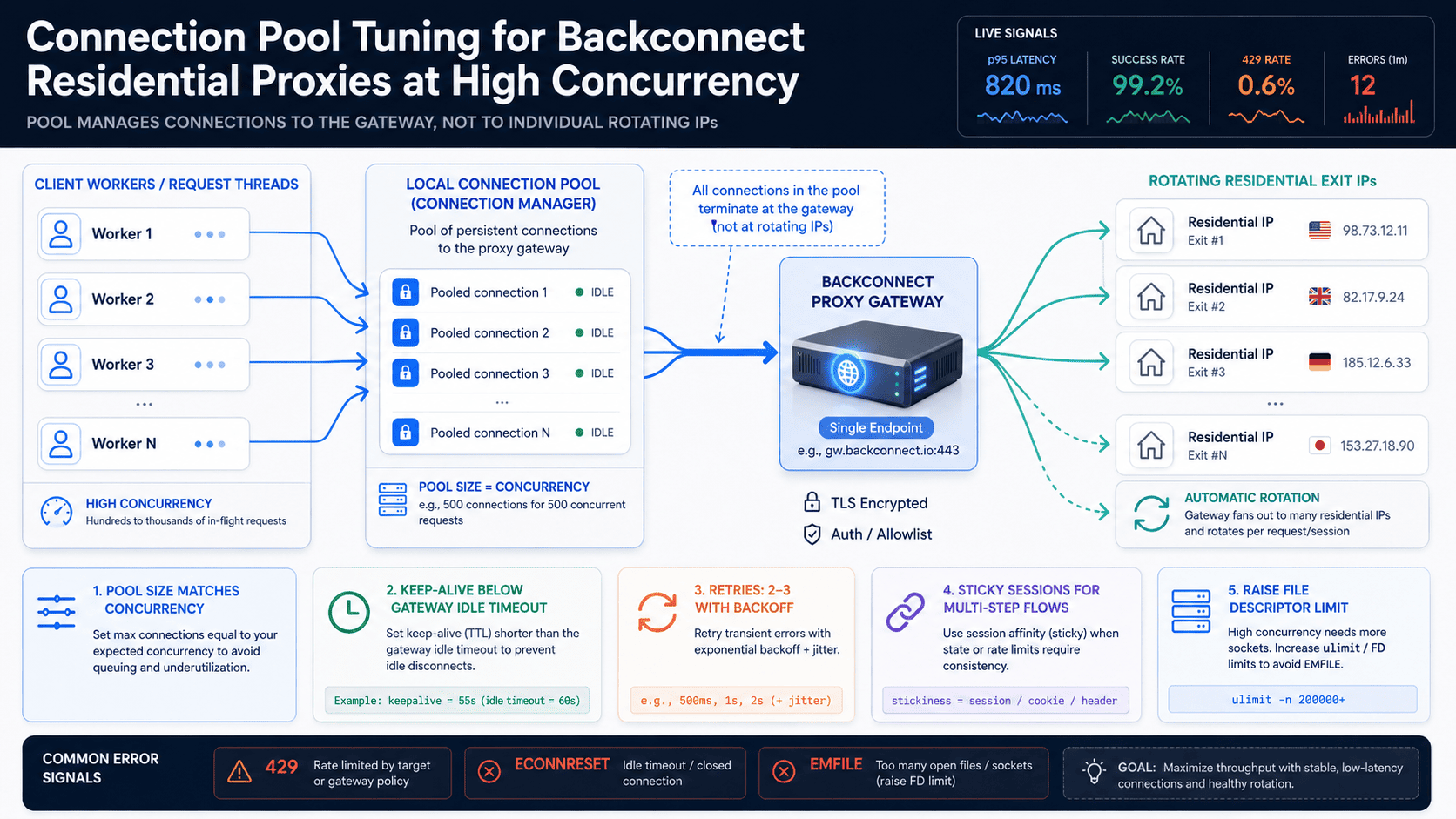
Your scraper runs clean at 50 concurrent requests, then collapses into connection timeouts and ECONNRESET errors the moment you push past a few hundred. The fix is almost never "buy more proxies" — it's tuning the connection pool that sits between your client and the gateway of your backconnect residential proxies. Get pool size, keep-alive, and retry budget right, and a single rotating gateway will carry thousands of concurrent requests without the error storm.
This guide covers the exact knobs that matter, with starting values you can drop into Python requests, aiohttp, and JVM clients, plus a decision block at the end for picking a per-request versus sticky-session setup.
[Image: A diagram showing client workers → local connection pool → single proxy gateway endpoint → fan-out to many rotating residential exit IPs | Purpose: help the reader see that the pool manages connections to the gateway, not to the rotating IPs | Alt: Connection pool architecture for backconnect residential proxies showing one gateway endpoint rotating multiple exit IPs]
How backconnect residential proxies change connection pooling
Backconnect residential proxies break the core assumption every connection pool is built on: that the upstream is one stable host. You connect to a single gateway endpoint — something like gateway.provider.com:8000 — and the provider rotates the actual exit IP behind that gateway, either per request or per sticky session. From your HTTP client's point of view there's exactly one host, so your pool keeps connections open to the gateway while the residential IP on the other side keeps changing.
That split has three direct consequences. Connection reuse to the gateway is usually fine and desirable, because it saves a fresh TCP handshake and TLS handshake on every call. The exit-IP rotation happens at the gateway, not in your client, so you don't manage IPs in code — you manage connections. And the pool itself becomes the bottleneck: too few connections serialize your concurrency, too many exhaust file descriptors and the provider's own connection cap.
A backconnect residential proxy exposes one gateway endpoint while rotating the exit IP behind it, so your connection pool manages connections to the gateway, not to the rotating residential IPs themselves. Once you internalize that, every tuning decision below follows from it.
Sizing the connection pool for high concurrency
Set your pool's max size to your target in-flight concurrency, not to a round number copied from a tutorial. If you run 500 concurrent workers, you need a pool that can hold up to roughly 500 connections to the gateway. The default ceilings in popular clients are far below that, and they fail quietly rather than loudly.
The defaults, as of current library versions (verify against the version you ship):
Python
requestsmounts anHTTPAdapterwithpool_connections=10andpool_maxsize=10. Past 10 connections per host, it opens throwaway sockets and discards them — your throughput craters with no exception thrown.urllib3PoolManagerfollows the same default of 10.aiohttpTCPConnectordefaults tolimit=100total andlimit_per_host=0(unlimited per host), so a single host is capped at 100 overall.HikariCP on the JVM defaults to
maximumPoolSize=10.
Concrete configs to start from:
# requests
adapter = HTTPAdapter(pool_connections=64, pool_maxsize=512, max_retries=0)
session.mount("http://", adapter)
session.mount("https://", adapter)

# aiohttp
connector = aiohttp.TCPConnector(limit=512, limit_per_host=512, ttl_dns_cache=300)
Then raise the operating-system ceiling, because each pooled connection consumes one file descriptor. The default soft limit (ulimit -n) is commonly 1024 on Linux, so a 512-connection pool can hit "Too many open files" before it's warmed up. Check it with ulimit -n, and raise it with ulimit -n 65535 or LimitNOFILE=65535 in a systemd unit. At extreme concurrency, also watch ephemeral-port exhaustion: widen net.ipv4.ip_local_port_range and rely on keep-alive to cut socket churn.
Each pooled connection consumes one file descriptor, so a pool of 512 connections needs the process file-descriptor limit (ulimit -n, commonly 1024 by default on Linux) raised before the pool can fully open.
Tuning keep-alive and connection reuse
Keep connections to the gateway alive, but cap their idle lifetime below the provider's own idle timeout — otherwise you'll reuse a socket the gateway already closed and eat a reset on the next request. This is the single most common "random" failure in high-concurrency proxy clients: the client believes a pooled connection is healthy, sends a request, and gets a connection reset because the gateway dropped it after N seconds idle.
The fix is to make your client's idle TTL shorter than the gateway's keep-alive window. Look up the gateway idle timeout in your provider's documentation first; if it isn't published, set a conservative client-side idle timeout and enable retry-on-reset so a stale socket costs one retry instead of a hard failure. In aiohttp, set keepalive_timeout explicitly (it defaults to 15 seconds as of aiohttp 3.x) and keep ttl_dns_cache warm so you're not re-resolving the gateway on every new connection.
connector = aiohttp.TCPConnector(
    limit=512, limit_per_host=512,
    keepalive_timeout=30,   # keep below the gateway's idle timeout — verify with your provider
    ttl_dns_cache=300,
)
HTTP/2 is worth checking but rarely available here. A single HTTP/2 connection multiplexes many streams and can collapse your connection count dramatically, yet most residential proxy gateways only speak HTTP/1.1 over the CONNECT tunnel — confirm support with your provider before designing around it.
Connection reuse improves throughput only while the pooled socket outlives the gateway's idle timeout; once it sits idle longer than that window, the next request on it fails with a connection reset.
Sticky sessions vs rotating exits: match pool config to rotation mode
Choose per-request rotation for breadth and sticky sessions for stateful flows — then size and recycle the pool differently for each, because the two modes stress connections in opposite ways. Treating them the same is why a config that flies on a broad crawl falls apart on a login flow.
With per-request rotating residential proxies, every request can exit a different IP. You want a large pool, free reuse of gateway connections, and each request handled independently — ideal for wide crawling and discovery. With sticky sessions, you carry a session ID (usually encoded in the proxy username, e.g. user-session-abc123) so consecutive requests keep the same exit IP for a window of roughly 1–30 minutes. Here you want connection affinity: pin each session to its own connection or sub-pool, and size the pool to the number of concurrent sessions rather than raw request volume.
| Dimension | Per-request rotation | Sticky session |
|---|---|---|
| Exit IP lifetime | New IP each request | Same IP for the session window (≈1–30 min) |
| Pool sizing basis | Concurrent requests | Concurrent sessions |
| Connection reuse | Reuse gateway connections freely | Pin each session to its own connection/sub-pool |
| Best fit | Broad crawling with rotating residential proxies | Logins, carts, multi-step paginated flows |
| Effect of IP change | None — it's expected | Session breaks; you must re-authenticate |
The practical rule: if a workflow spans more than one request that must share an exit IP, you're in sticky-session territory and your pool math is per-session, not per-request.
Timeouts and retry budgets that survive rotation
Use a short connect timeout, a generous read timeout, and a bounded retry budget — residential exits are slower and flakier than datacenter IPs, so the right timeouts prevent both premature failures and request pile-ups. A single global timeout is the wrong tool, because connecting to the gateway should be fast while reading a full response through a residential IP can legitimately take much longer.
Starting values, then tune against your actual target:
Connect timeout: 5–10s. Connecting to the gateway is local-ish; if it's slow, the gateway or your egress is saturated, not the exit IP.
Read timeout: 30–60s. Residential paths are slower; set it per target, not globally. In
requests, split them:timeout=(5, 60).Retries: cap at 2–3 with exponential backoff and jitter. Because the proxy rotates, a retried request usually exits a fresh IP automatically — which is exactly why retrying transient failures works so well with rotating residential proxies. Honor the
Retry-Afterheader on429, and only auto-retry idempotent requests so a retriedPOSTdoesn't double-submit.
With rotating residential proxies, a retried request automatically exits a new IP, which is why a capped retry budget of 2–3 attempts with exponential backoff recovers most transient 429 and connection-reset errors without any manual IP management. Leave the budget uncapped, though, and one stubborn target can multiply your real request volume several times over.
[Experience supplement: insert measured p50/p95 latency and error-rate-by-class numbers from your own load test here | Concrete benchmark figures from real testing would let this section give exact thresholds instead of ranges, and are the kind of first-hand data that lifts trust signals.]
Throughput tuning for rotating proxy unlimited bandwidth workloads
Unlimited bandwidth removes the data cap, not the concurrency ceiling — on fast residential proxies your throughput is gated by pool size, gateway connection limits, and per-IP rate limits long before it's gated by gigabytes. A residential proxy service that bills on rotating proxy unlimited bandwidth instead of per-GB changes your cost model: you can pull full pages, retry freely, and run high concurrency without watching a meter. The bottleneck simply moves to the connection layer.
So tune the connection layer, not the data plan. First, find your provider's concurrent-connection or thread cap — most plans on unlimited bandwidth residential proxies still limit how many connections hit the gateway at once, and your pool_maxsize must respect that number or you'll get rejected connections. Confirm the figure in the provider dashboard or docs. Second, treat throughput as a function of concurrency and latency: effective throughput ≈ concurrency ÷ average per-request latency. "Fast residential proxies" means lower gateway latency and a healthier IP pool, but a fast IP behind a too-small pool still serializes, so the win only lands if the pool can hold the concurrency. Third, spread load across exit IPs — rotation does this for free — so no single residential IP trips a per-IP rate limit; residential proxy unlimited bandwidth plans let you fan out aggressively without a cost penalty.
On a residential proxy service with unlimited bandwidth, effective throughput equals concurrency divided by average per-request latency, so doubling pool size and worker count raises throughput far more than the bandwidth allowance ever does. Raise concurrency until you hit either the provider's connection cap or the target site's rate limit — whichever comes first is your real ceiling.
Diagnosing pool exhaustion and connection errors
When throughput plateaus and errors climb, the specific symptom tells you which limit you actually hit — and each has a different fix. Don't reach for "more proxies" until you've read the signal.
[Image: A flow chart mapping each error message to its root cause and fix — pool full, too many open files, gateway reset, ephemeral port exhaustion | Purpose: give readers a fast lookup from symptom to remedy during an incident | Alt: Troubleshooting flowchart for connection pool exhaustion errors in high-concurrency proxy clients]
Connection pool is full, discarding connection(urllib3 warning) → your concurrency exceedspool_maxsizeand the client is opening throwaway sockets. Raisepool_maxsize.Too many open files/EMFILE→ file-descriptor exhaustion. Raiseulimit -nabove your pool size.Connections succeed, then reset, or the gateway returns
429→ you've hit the provider's concurrent-connection cap or a per-IP rate limit. Throttle workers or upgrade the plan.Rising connect timeouts → the gateway is overloaded or your own egress is saturated; reduce concurrency and re-measure.
Cannot assign requested address(EADDRNOTAVAIL) → ephemeral-port exhaustion fromTIME_WAITbuildup. Widennet.ipv4.ip_local_port_range, lean harder on keep-alive, and cut connection churn.
Instrument before you guess: log live pool stats, track in-flight request count, and record latency at p50/p95/p99 plus error rate broken out by class. That turns "it's slow" into "we're at the pool_maxsize ceiling," which is the difference between a five-minute fix and an afternoon.
The urllib3 warning Connection pool is full, discarding connection means requests are exceeding pool_maxsize and opening throwaway connections — the single clearest signal that the pool is undersized for the workload's concurrency.
Decision framework: pick your connection pool config
Use the two profiles below; each branch lists conditions you can actually check against your workload.
Choose a large per-request rotating pool if ALL of these hold:
You run ≥200 concurrent workers AND each request is independent (no login or session state).
Your residential proxy service bills rotating proxy unlimited bandwidth OR you've confirmed the plan's concurrent-connection cap ≥ your
pool_maxsize.Your target tolerates a different IP per request (no per-session anti-bot lock).
Config:
pool_maxsize≥ worker count, connect timeout 5–10s, read timeout 30–60s, retries 2–3 with backoff, file-descriptor limit raised abovepool_maxsize.
Choose sticky-session sub-pools if ALL of these hold:
Your flow spans ≥2 requests that must share one exit IP (login, cart, pagination token) AND sessions last roughly 1–30 minutes.
You run more than 10 concurrent sessions AND each must stay pinned to a stable IP.
Your target enforces session-level fingerprinting OR rate-limits per IP across the session.
Config: size the pool to concurrent sessions, pin each session to its own connection, recycle on session expiry, and keep retries low (1–2) so a retry doesn't silently swap the exit IP mid-session.
Start by raising pool_maxsize to match your worker count and lifting the file-descriptor limit above that — that one change clears the majority of high-concurrency proxy failures before any deeper tuning is needed.