


 English
 繁體中文
繁體中文
 Deutsch
 Français
 Español
 日本語
日本語
 Tiếng Việt
 Português
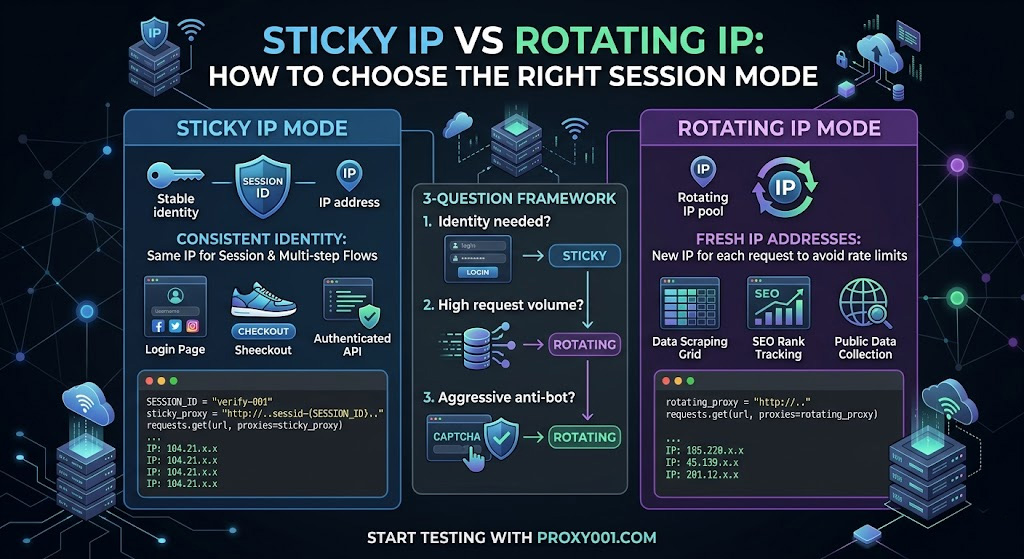
That single question cuts through 80% of the confusion. The remaining 20% lives in edge cases—tasks that need both modes, the wrong duration setting turning a sticky session into a liability, and the classic mistake of using rotating proxies on anything that requires logging in.
What Makes Sticky and Rotating Proxies Fundamentally Different?
Both modes route your requests through a backconnect server—a gateway that sits in front of a large IP pool and handles IP assignment automatically. That's where the similarity ends.
With rotating proxies, the backconnect server assigns a fresh IP from the pool for each outgoing request (per-request rotation) or swaps IPs on a fixed time interval (time-based rotation). The target server sees a different originating address on every hit, so even if one IP gets rate-limited or flagged, the next request arrives from a clean address.
With sticky proxies, the backconnect server binds a specific IP to a session identifier you supply. Every request carrying that session ID exits through the same IP, making consecutive requests look like they originate from the same user on the same device.
The practical consequence: rotating breaks any stateful interaction. If a site sets a session cookie after request #1 and expects to see that cookie's origin IP on request #2, a rotating proxy breaks that contract—and the site will either log you out or serve a CAPTCHA. Sticky preserves it.
One clarification worth making now: a static proxy is not the same as a sticky proxy. Static (typically ISP or dedicated datacenter proxies) gives you a fixed IP that's yours for weeks or months. Sticky is a temporary binding within a shared residential pool, subject to session timeout limits. The static residential proxy vs residential proxy distinction is a separate question; for session mode decisions, focus on sticky vs rotating.
Which Session Mode Do You Need? Answer These 3 Questions
Skip the feature comparison tables. Three questions get you to an answer faster.
Q1: Does your task require consistent identity across multiple requests?
Think: login flows, shopping cart state, multi-step forms, session cookies, authenticated API calls, account management on social media platforms. If any of these apply, the target server is tracking identity by IP (among other signals), and rotating will break the sequence. → Use sticky.
If your requests are fully stateless—each one stands alone, no cookies to carry forward, no session to maintain—move to Q2.
Q2: Will your request volume exceed the target site's per-IP rate limit?
Most sites enforce rate limits at the IP level. If you're running high-volume price monitoring, search engine rank tracking (the core seo proxy use case), or large-scale data collection across hundreds of pages per hour, a single IP—even one held for 30 minutes—will eventually hit rate limits or get flagged. → Use rotating.
If your volume is moderate and Q2 didn't resolve it, go to Q3.
Q3: How aggressive is the target site's anti-bot detection?
Sites with behavioral fingerprinting—request timing analysis, TLS fingerprint checks, interaction pattern scoring—use IP consistency as one signal among many. High-security targets like major e-commerce platforms and social networks are more likely to flag IPs that accumulate many requests over time, even within a single sticky session. For these targets at any non-trivial volume, rotating distributes your request load across multiple IPs—reducing the risk of false-positive rate limiting that would interrupt your legitimate data collection. For lower-security targets where session continuity matters more than IP freshness, sticky is the better trade-off.
If you're still undecided after Q3, default to sticky for anything requiring authentication and rotating for everything else.
Real Use Cases: Which Mode Fits Your Task?
Here's how the Q1–Q3 framework maps to the tasks that come up most often.
Sticky is the right call for:
Social media automation and multi-account management — Each account needs a consistent IP identity across the session; one unique session ID per account keeps identities cleanly separated. Social media proxies used for multi-account work should always run sticky: different accounts sharing a rotating IP pool is a reliable way to trigger platform-level account-linking detection.
Sneaker drops and limited-release checkout flows — The purchase sequence spans multiple authenticated steps. Rotating mid-checkout means your cart session disappears.
Scraping behind a login — After authenticating, the session cookie binds to your IP. Rotating breaks the authenticated context, and you'll get redirected back to the login page.
Ad verification for geo-targeted campaigns — Simulating a real user clicking through a complete ad funnel requires the same IP across the impression, click, and landing page sequence.
Rotating is the right call for:
Large-scale price and inventory monitoring — Thousands of product page requests per hour. Rotating proxy unlimited bandwidth plans are built for this load profile, spreading requests across a pool so no single IP accumulates enough hits to trigger a block.
SEO rank tracking across geographies — Checking keyword rankings requires fresh IPs to avoid IP-based result personalization. A proper seo proxy setup almost always runs rotating mode.
Public data aggregation — News feeds, job listings, public product catalogs. No login required, high volume, rotating is both cleaner and cheaper.
Parallel scraping with dedicated rotating proxies — Running multiple concurrent crawl threads? Each thread gets its own IP rotation to distribute load without IP collisions between threads.
The edge case worth calling out explicitly: login followed by bulk data collection. You authenticate with a sticky session, complete login successfully, then need to scrape thousands of pages behind that login. The right approach is to complete authentication in a sticky session, extract the session token or cookie, then pass that token explicitly in request headers while running the bulk collection with rotating IPs—if the target site doesn't validate session tokens against the originating IP. Before assuming that portability, send a handful of authenticated requests under a new IP to confirm the session transfers cleanly. Don't skip this check and jump straight to a full-scale run.
How Long Should Your Sticky Session Last?
Provider documentation gives us a useful baseline here. Oxylabs' residential proxy defaults to a 10-minute sticky session, configurable up to 1,440 minutes, with the session resetting after 60 seconds of inactivity between requests. Bright Data releases the bound IP back to the pool after 5 minutes of idle time, requiring a keep-alive request at least every 30 seconds to hold it longer. These aren't arbitrary design choices—they reflect a balance between user convenience and pool health, since a bound-but-idle IP is unavailable to other sessions.12
In practice, a reasonable starting target is: set duration to your estimated task completion time, rounded up to the nearest provider increment, with enough buffer to absorb retries and slow page loads. That said, this is a conservative estimate—actual needs vary based on network conditions and the site's response time. We've found that most workflows complete faster than expected on the first run, and you'll almost always want to trim the duration after your first successful test rather than start with the maximum.
Practical reference points:
Multi-step checkout (3–5 page flow): 10 minutes is sufficient in the vast majority of cases
Account login + profile interactions: 10–15 minutes covers most task sequences
Authenticated scrape of a moderate content set: 20–30 minutes; watch for idle-timeout resets if your request pacing is slow
Ongoing account management (posting, engagement sequences): break tasks into discrete sessions, each with its own session ID — a single IP open for hours accumulates risk faster than it provides stability
If your task genuinely needs more than 30–60 minutes under a single IP, sticky sessions are the wrong tool. That's where the isp proxies vs residential comparison becomes relevant: ISP proxies give you a static address for the duration of your subscription, with datacenter-level speeds and no session timeout. Residential sticky sessions give you IP diversity and easier geo-targeting, at the cost of duration limits set by pool dynamics.
Configuring the session in practice: Most residential proxy providers implement sticky sessions via a session parameter embedded in the proxy credential string. Using Oxylabs' format as a reference example:3
customer-USERNAME-sessid-abc123:PASSWORD@proxy.host:port
The sessid-abc123 segment is a unique identifier you generate per task. Every request using that credential string exits through the same IP until the session window expires or inactivity triggers a reset. To manage multiple identities in parallel—say, 10 social media accounts running simultaneously as separate social media proxies—generate 10 unique session IDs and assign each account to its own credential string. Your provider's API documentation will confirm the exact parameter name and separator, since this varies by platform (common variants: -session-, _sessid_, or a URL query parameter).
Proxy001's residential and ISP proxies support this session ID approach across 200+ regions, with concurrent sticky sessions available per account. City-level and carrier-level geo-targeting works at the credential level, so you can pin different sessions to different locations without needing separate plans.
How to Confirm Your Session Mode Is Working Correctly
Before running anything at scale, take two minutes to verify your configuration behaves as expected.
Prerequisites: Python 3 with the requests library installed (pip install requests). Active proxy credentials from your provider, with the correct endpoint and port for the session mode you're testing. Replace the placeholder values below with your actual credentials.
Test 1 — Rotating mode (expect a different IP on each request):
import requests

def get_ip(proxy_url):
    proxies = {"http": proxy_url, "https": proxy_url}
    resp = requests.get("https://httpbin.org/ip", proxies=proxies, timeout=10)
    return resp.json()["origin"]

rotating_proxy = "http://YOUR_USERNAME:YOUR_PASSWORD@YOUR_PROXY_HOST:YOUR_PORT"

results = [get_ip(rotating_proxy) for _ in range(3)]
print(results)
# Expected: three distinct IP addresses
# ['104.21.x.x', '185.220.x.x', '45.139.x.x']
Test 2 — Sticky mode (expect the same IP on each request):
SESSION_ID = "verify-001"
sticky_proxy = f"http://YOUR_USERNAME-sessid-{SESSION_ID}:YOUR_PASSWORD@YOUR_PROXY_HOST:YOUR_PORT"

results = [get_ip(sticky_proxy) for _ in range(3)]
print(results)
# Expected: same IP three times
# ['104.21.x.x', '104.21.x.x', '104.21.x.x']
Interpreting the output: httpbin.org/ip occasionally returns a comma-separated string if your request passes through a proxy chain. The first IP listed is what the target server sees—compare that one across calls.
If rotating shows the same IP repeating: either your provider uses time-based rotation (not per-request), or a session parameter has accidentally been included in the credential string. Check the docs to confirm which rotation mode you've enabled.
If sticky shows different IPs: the session parameter syntax is wrong. The exact format is in your provider's API documentation under "Session Control" or "Sticky Sessions."
If you get a ProxyError or connection timeout: the two most common causes are (1) wrong port—some providers expose different ports for rotating vs. sticky endpoints, so confirm the endpoint in your dashboard, and (2) special characters in your password breaking URL parsing. An @ or # in the password causes the credentials string to parse incorrectly. URL-encode the password before embedding it:
from urllib.parse import quote
password = quote("your_p@ssword#here", safe="")
proxy_url = f"http://YOUR_USERNAME:{password}@YOUR_PROXY_HOST:YOUR_PORT"
Compliance note: Use httpbin.org strictly for configuration testing against your own proxy credentials. Verifying that your session mode works correctly is a legitimate infrastructure check; don't repurpose these test patterns against production systems at volume.
The Most Common Mistakes When Choosing Session Modes
Mistake #1: Using rotating proxies for login-dependent workflows.
The failure is subtle—your script gets a 200 after logging in, then immediately hits a redirect back to the login page on the next request. That's the site rejecting your session because the IP changed between the login POST and the subsequent GET. The fix is sticky mode for any workflow where request N depends on state established in request 1.
Mistake #2: Not handling sticky session interruption.
Sticky IPs can get banned mid-session. When that happens, the session terminates and subsequent requests fail. In testing, we've seen scripts stall silently here—the session ID remains valid syntactically, but the bound IP is blocked and the backconnect server can't fulfill the route. Scripts that don't account for this just stop. The solution: catch connection errors and proxy-related HTTP error responses (407, or 403 responses carrying anti-bot headers), generate a fresh session ID, and retry from the last successful checkpoint—not from the beginning. Re-sending the same session ID after a ban does nothing; the binding is gone.
Mistake #3: Setting sticky duration too long as a safety margin.
A 60-minute sticky session on a site that rate-limits at 100 requests/hour means your IP absorbs all 100 requests before cycling. That's a faster path to a block than using a 15-minute session with natural turnover between tasks. Duration isn't protection—it's a task completion window. Keep it as short as the task requires.
Mistake #4: Sharing the same session ID across multiple accounts.
If two accounts share the same sticky IP, platforms that track account relationships via network signatures will link them. One account ban can cascade. Generate a unique session ID per account, per identity, per task context—no exceptions.
For workflows that genuinely need both modes, here's the structure that works: sticky session for authentication → extract cookie/token → pass token explicitly in request headers for the bulk phase → switch to rotating (or dedicated rotating proxies) for the heavy lifting. Before scaling, send a handful of test requests under the new rotating IPs with the extracted token to confirm the target site doesn't validate it against the originating login IP. Whether a site validates session tokens against the originating IP isn't typically documented—the only reliable way to confirm is to test before scaling.
Try Both Modes Without Committing
If you've worked through the framework and know which session mode fits your task, the next step is getting a proxy setup that supports both cleanly. Proxy001 offers residential proxies (100M+ IPs) and ISP proxies across 200+ regions, with full support for both rotating and sticky session modes using the session ID configuration pattern shown above. City-level and carrier-level targeting is available on both types, which matters for ad verification, localized scraping, and account management tasks where "residential IP in Chicago" isn't specific enough.
The free proxy trial covers both session modes, so you can run the verification scripts above against your actual target infrastructure before choosing a plan. Integration documentation is available for Python, Node.js, Puppeteer, Selenium, and Scrapy. Start testing at proxy001.com.
