 English
 繁體中文
繁體中文
 Deutsch
 Français
 Español
 日本語
日本語
 Tiếng Việt
 Português
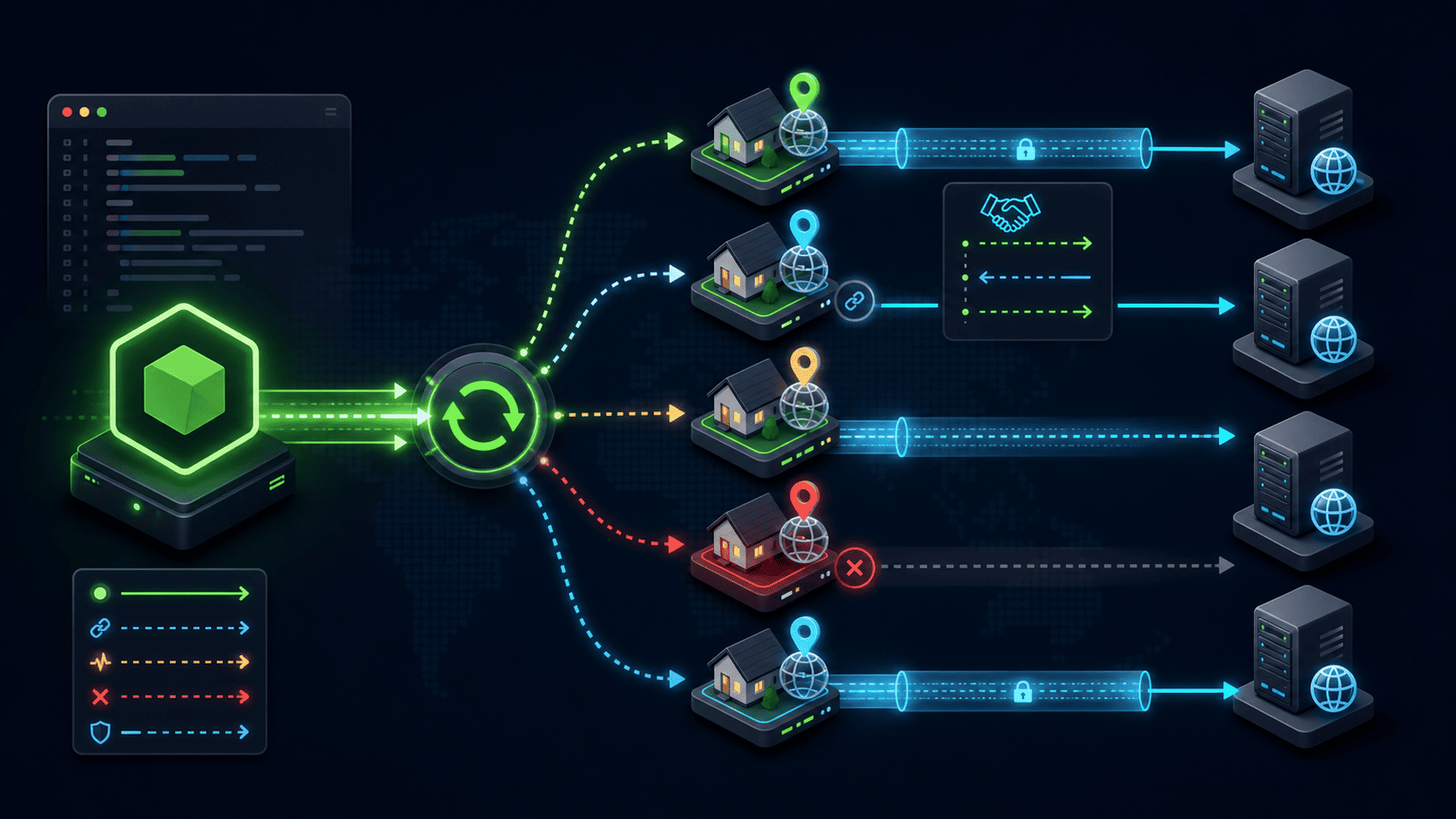
How to Implement Proxy Rotation in Node.js Without Any Third-Party SDK
You want to spread requests across a pool of rotating residential proxies in Node.js, but every tutorial reaches for axios, got, or a proxy-agent package — and you'd rather not add another dependency to audit and patch. You don't need one. Node's built-in http and https modules can route traffic through an HTTP proxy and open a TLS tunnel with the CONNECT method, and rotation itself is just a pool plus a selection function you write in about 40 lines. The genuinely hard parts aren't the code — they're sourcing trustworthy residential IPs and handling sticky sessions — so this guide covers both, with full working snippets you can paste and run.
[Image: Side-by-side diagram — left: Node app cycling through a fixed list of proxy IPs (client-side pool); right: Node app hitting one gateway endpoint that swaps the exit IP per request (provider-side rotation) | Purpose: show readers the two architectures before any code | Alt: Node.js proxy rotation architecture comparing a client-side proxy pool with a rotating residential proxy gateway]
Proxy rotation happens in one of two places — pick the right one first
Choosing where rotation lives saves you from rewriting everything later. A rotating residential proxy gateway assigns a new exit IP per request from a single endpoint, while a client-side pool cycles through a fixed list of proxy endpoints you hold yourself. They look similar from your code but behave completely differently under load.
With a client-side pool, you hold, say, 50 proxy host:port pairs and your Node code decides which one each request uses. You control the rotation logic precisely, but the IP variety is capped at the size of your list — burn through 50 IPs against a site that bans on reputation and you're stuck.
With a provider-side gateway, you point every request at one address (for example gateway.example.com:7000) and the residential proxy network rotates the exit IP for you, drawing from a pool that can run into the millions. Your "rotation code" shrinks to nothing — but you give up per-IP control unless the provider exposes sticky sessions (covered below).
The practical rule: if you already hold a vetted, authorized IP list, build client-side rotation. If you need fresh residential IPs at scale, the rotation logic moves server-side and your job becomes session management, not IP cycling. Most real scraping and verification workloads end up doing both — a thin client-side rotator that points at one or more gateway endpoints.
Route one request through a proxy with built-in modules
Routing through an HTTP proxy needs no library — only a different request target. There are two cases, and mixing them up is the single most common reason "it works on http:// but hangs on https://."
Case 1 — an http:// target. Send the request to the proxy, but put the full absolute URL in the request path (this is called absolute-form). The proxy reads the URL and forwards it.
const http = require('http');

function fetchViaHttpProxy({ host, port, username, password }, targetUrl) {
  return new Promise((resolve, reject) => {
    const target = new URL(targetUrl);
    const auth = username
      ? 'Basic ' + Buffer.from(`${username}:${password}`).toString('base64')
      : undefined;

    const req = http.request(
      {
        host,                 // connect to the PROXY, not the target
        port,
        method: 'GET',
        path: targetUrl,      // absolute-form: the full URL goes here
        headers: {
          Host: target.host,
          ...(auth && { 'Proxy-Authorization': auth }),
        },
      },
      (res) => {
        let body = '';
        res.on('data', (c) => (body += c));
        res.on('end', () => resolve({ status: res.statusCode, body }));
      }
    );
    req.on('error', reject);
    req.end();
  });
}
Case 2 — an https:// target. You can't send an absolute URL through a proxy for HTTPS, because the connection is encrypted end to end. Instead you ask the proxy to open a raw tunnel with the CONNECT method, then run your own TLS request over the socket it hands back. CONNECT is the HTTP method that tells a proxy to establish a transparent TCP tunnel to a destination host and port, after which the proxy just relays bytes.
const http = require('http');
const https = require('https');

function fetchViaTunnel({ host, port, username, password }, targetUrl) {
  return new Promise((resolve, reject) => {
    const target = new URL(targetUrl);
    const auth = username
      ? 'Basic ' + Buffer.from(`${username}:${password}`).toString('base64')
      : undefined;

    const connectReq = http.request({
      host,                 // the proxy
      port,
      method: 'CONNECT',
      path: `${target.hostname}:${target.port || 443}`,
      headers: { ...(auth && { 'Proxy-Authorization': auth }) },
    });

    connectReq.on('connect', (res, socket) => {
      if (res.statusCode !== 200) {
        socket.destroy();
        return reject(new Error(`CONNECT failed: ${res.statusCode}`));
      }

      const proxied = https.request(
        {
          host: target.hostname,
          port: target.port || 443,
          method: 'GET',
          path: target.pathname + target.search,
          socket,                       // ride the tunnel we just opened
          agent: false,                 // stop the global agent from hijacking the socket
          servername: target.hostname,  // SNI — TLS fails on most CDNs without it
        },
        (response) => {
          let body = '';
          response.on('data', (c) => (body += c));
          response.on('end', () => resolve({ status: response.statusCode, body }));
        }
      );
      proxied.on('error', reject);
      proxied.end();
    });

    connectReq.on('error', reject);
    connectReq.end();
  });
}
Two lines do the heavy lifting and break everything if you omit them: agent: false prevents Node's default connection pool from ignoring your tunneled socket, and servername sets the TLS SNI value so CDN-fronted hosts complete the handshake instead of returning a certificate error. Both behaviors are documented in the Node.js http and https module references (nodejs.org/api), verified against Node.js 18–22 in June 2026.
If you're on Node.js 18+ and want to use global fetch instead, note that fetch has no proxy option in its public API as of June 2026 — proxy support there flows through undici's dispatcher, which pulls you back toward a dependency. The http/https tunnel above stays genuinely zero-dependency.
Build the pool and rotation strategies
The pool is a list plus a selection function — that's the whole abstraction. Wrap your proxies in a small class so rotation strategy, health state, and cooldowns live in one place instead of leaking across your codebase.
const nowMs = () => Date.now();

class ProxyPool {
  constructor(proxies, { strategy = 'round-robin' } = {}) {
    this.proxies = proxies.map((p) => ({ ...p, fails: 0, cooldownUntil: 0 }));
    this.strategy = strategy;
    this.cursor = 0;
  }

  healthy() {
    const t = nowMs();
    return this.proxies.filter((p) => p.cooldownUntil <= t);
  }

  next() {
    const pool = this.healthy();
    if (pool.length === 0) throw new Error('No healthy proxies available');

    if (this.strategy === 'random') {
      return pool[Math.floor(Math.random() * pool.length)];
    }
    if (this.strategy === 'least-failed') {
      return pool.reduce((a, b) => (b.fails < a.fails ? b : a));
    }
    // round-robin (default)
    const proxy = pool[this.cursor % pool.length];
    this.cursor++;
    return proxy;
  }

  penalize(proxy, cooldownMs = 60_000) {
    proxy.fails++;
    proxy.cooldownUntil = nowMs() + cooldownMs;
  }

  reward(proxy) {
    proxy.fails = 0;
    proxy.cooldownUntil = 0;
  }
}
Three strategies cover almost every workload. Round-robin spreads load evenly and is the right default for verification or uptime checks where every IP is equal. Random breaks predictable request patterns that simple rate-limiters key on, which matters against per-IP throttling. Least-failed biases toward IPs with a clean recent record, which pays off when pool quality is uneven — common with mixed datacenter and residential lists. Weighted rotation is just least-failed with a score instead of a counter; reach for it only when you can actually measure per-IP success, otherwise the extra bookkeeping buys nothing.
One caveat the size of your pool forces: with a static client-side list, round-robin on 20 IPs against a site that bans for 24 hours will exhaust the pool in 20 bans. That's the moment client-side rotation stops scaling and a rotating residential proxy network earns its cost — the next section's sticky-session handling is what bridges the two.
Authenticate and pin sticky sessions on residential proxies
Residential proxies authenticate by username and password, and that username is also where you control rotation. The transport is the standard Proxy-Authorization: Basic <base64> header you already saw in the code above — the same Basic authentication scheme HTTP defines for any proxy.
The part that's specific to a rotating residential proxy service is the session token. Most residential providers encode rotation behavior into the username string. A bare username rotates the exit IP on every request; appending a session identifier pins one IP for that session's lifetime. The exact format varies by provider, so confirm it in their docs, but the shape is almost always one of these:
// Rotate a fresh residential IP on every request:
const rotating = { username: 'user-99231', password: 'secret', host, port };

// Pin one sticky IP for a multi-step flow (login -> navigate -> submit):
const sessionId = 'sess-' + Math.random().toString(36).slice(2, 10);
const sticky = {
  username: `user-99231-session-${sessionId}`,   // provider-specific token
  password: 'secret',
  host,
  port,
};
Use sticky sessions whenever a single logical task spans multiple requests — anything with a login, a cart, pagination, or a CSRF token tied to a session. Switching exit IPs mid-flow is the fastest way to get a session invalidated or flagged. Use full rotation for stateless, one-shot requests where every hit should look independent. The boundary is clean: a stateful flow needs one sticky residential IP from start to finish; a stateless batch wants a new IP per request.
When you point your ProxyPool at a provider gateway rather than raw IPs, the pool entries don't change host or port at all — only the username's session token changes. That's why the client-side rotator from the previous section still earns its place even after you buy IPs: it becomes a session-token manager.
Add health checks, retries, and failover
Rotation without failure handling just rotates failures. The pool already tracks fails and cooldownUntil; the retry wrapper is what turns that state into resilience. Distinguish a transport failure (timeout, reset socket) from a soft block (the request succeeds at the HTTP layer but the target returns 403/429), because both should retire the IP but only one throws.
async function requestWithRotation(pool, targetUrl, { retries = 3 } = {}) {
  let lastErr;
  for (let attempt = 0; attempt < retries; attempt++) {
    const proxy = pool.next();
    try {
      const res = await fetchViaTunnel(proxy, targetUrl);
      if (res.status === 403 || res.status === 429) {
        pool.penalize(proxy, 5 * 60_000); // soft block: cool down 5 min
        lastErr = new Error(`Blocked with ${res.status}`);
        continue;
      }
      pool.reward(proxy);                  // mark healthy on success
      return res;
    } catch (err) {
      pool.penalize(proxy, 60_000);        // transport failure: cool down 1 min
      lastErr = err;
    }
  }
  throw lastErr;
}
Add a hard timeout so a hung proxy can't stall the loop. Native http.request supports it directly:
connectReq.setTimeout(10_000, () => connectReq.destroy(new Error('Proxy timeout')));Sensible starting defaults to tune against your own traffic, not fixed truths: a 10-second request timeout, three retries, a 1-minute cooldown for transport errors, and a longer 5-minute cooldown for HTTP 403/429 since those signal the IP is flagged rather than flaky. Verify each value against your target's real behavior — a site that rate-limits in 60-second windows wants a cooldown just past that window, and you can only learn the window by watching the responses. Treat HTTP 407 (Proxy Authentication Required) as a configuration bug, never a retry case: it means your credentials or session-token format are wrong, and rotating to another IP will just reproduce it.
Build your own rotation or buy a rotating residential proxy service?
Build the rotation logic yourself — you just saw it's under 100 lines — but be honest about whether you can supply the IPs. Those are two separate decisions, and conflating them is where projects stall. The code is cheap; a reliable, ethically sourced residential IP pool is not.
| Dimension | Self-managed pool (raw IP list) | Rotating residential proxy service |
|---|---|---|
| IP sourcing | You provide and vet every IP | Provider supplies a large residential pool via one gateway |
| Rotation control | Full — you write the strategy | Per-request rotation built in; sticky sessions via username token |
| Pool size & freshness | Capped at your list; ages out | Large, continuously refreshed (confirm scale in the provider's docs) |
| Block resistance | Weak once IPs are flagged | Stronger — fresh residential IPs, geo/ASN targeting |
| Ongoing maintenance | You patch failover, cooldowns, sourcing | Provider handles availability; you manage sessions |
| Best fit | Small, low-friction, authorized targets | High-volume scraping against reputation-aware sites |
Choose a self-managed pool if all three hold: you already have a vetted list of residential or ISP IPs you're authorized to route through, AND your targets run weak anti-bot (no IP-reputation or CAPTCHA gate on datacenter ranges), AND your volume stays low enough — roughly a few thousand requests a day — that a small static pool won't exhaust before IPs cool down.
Choose a rotating residential proxy service if any one is true: you need fresh residential IPs at scale and can't source them lawfully yourself, OR your targets enforce IP reputation, geolocation, or CAPTCHA on datacenter IPs, OR you need country/city/ASN targeting or thousands of concurrent sticky sessions. A residential proxy network such as proxy001.com exposes exactly the single gateway endpoint this guide's ProxyPool is built to drive — so the zero-dependency code you wrote doesn't go to waste when you buy rotating proxies; it becomes the session-and-retry layer on top of the provider's IPs.
The trap to avoid: do not "save money" by scraping residential IPs from unverified sources. IPs of unknown provenance create both reliability problems (they vanish without warning) and serious legal and ethical exposure. Sourcing is the one part of this stack worth paying for.
Mistakes that silently break proxy rotation
These failures don't throw clean errors — they return wrong results or intermittent hangs, which is why they eat hours. Fix them preemptively.
Omitting
agent: falseon the tunneled request. Node's global agent can reuse a pooled socket instead of your tunnel, so requests escape the proxy entirely and leak your real IP. Always disable the agent when you pass asocket.Forgetting
servername(SNI). CDN-fronted hosts serve the wrong certificate or reject the handshake without the SNI value, surfacing as cryptic TLS errors that look like proxy faults.DNS resolving on your machine. If you resolve the target hostname locally before connecting, you can leak intent and break geo-targeting. With the
CONNECTtunnel above, the proxy resolves the destination — keep it that way; pass the hostname, not a pre-resolved IP.Treating HTTP 407 as a rotation problem. It's an auth/format error. Retrying other IPs masks the real fix: correct the credentials or the session-token pattern.
Sending identical headers from every IP. A rotating exit IP paired with a frozen
User-Agentand header order is a trivial fingerprint. Vary request headers alongside the IP, within the bounds of what you're authorized to do against a target.Switching IPs mid-session. Rotating during a logged-in or multi-step flow invalidates the session. Pin a sticky IP for the flow's duration (see the sticky-session section).
Quick answers
Can you rotate proxies in Node.js without a library? Yes. The built-in http module forwards http:// targets in absolute-form, and the CONNECT method opens a TLS tunnel for https:// targets — rotation is a pool plus a selection function, no SDK required.
What's the difference between rotating and sticky residential proxies? A rotating residential proxy assigns a new exit IP per request; a sticky session pins one IP for a set duration. Stateless requests want rotation; multi-step flows want sticky.
How do residential proxies handle authentication in Node.js? Through the Proxy-Authorization: Basic <base64(user:pass)> header, with rotation behavior usually encoded as a session token inside the username string.
Why does my proxy work for HTTP but not HTTPS? HTTPS needs the CONNECT tunnel and a TLS request with agent: false and servername set; absolute-form (the HTTP approach) can't carry an encrypted connection.