


 English
 繁體中文
繁體中文
 Deutsch
 Français
 Español
 日本語
日本語
 Tiếng Việt
 Português
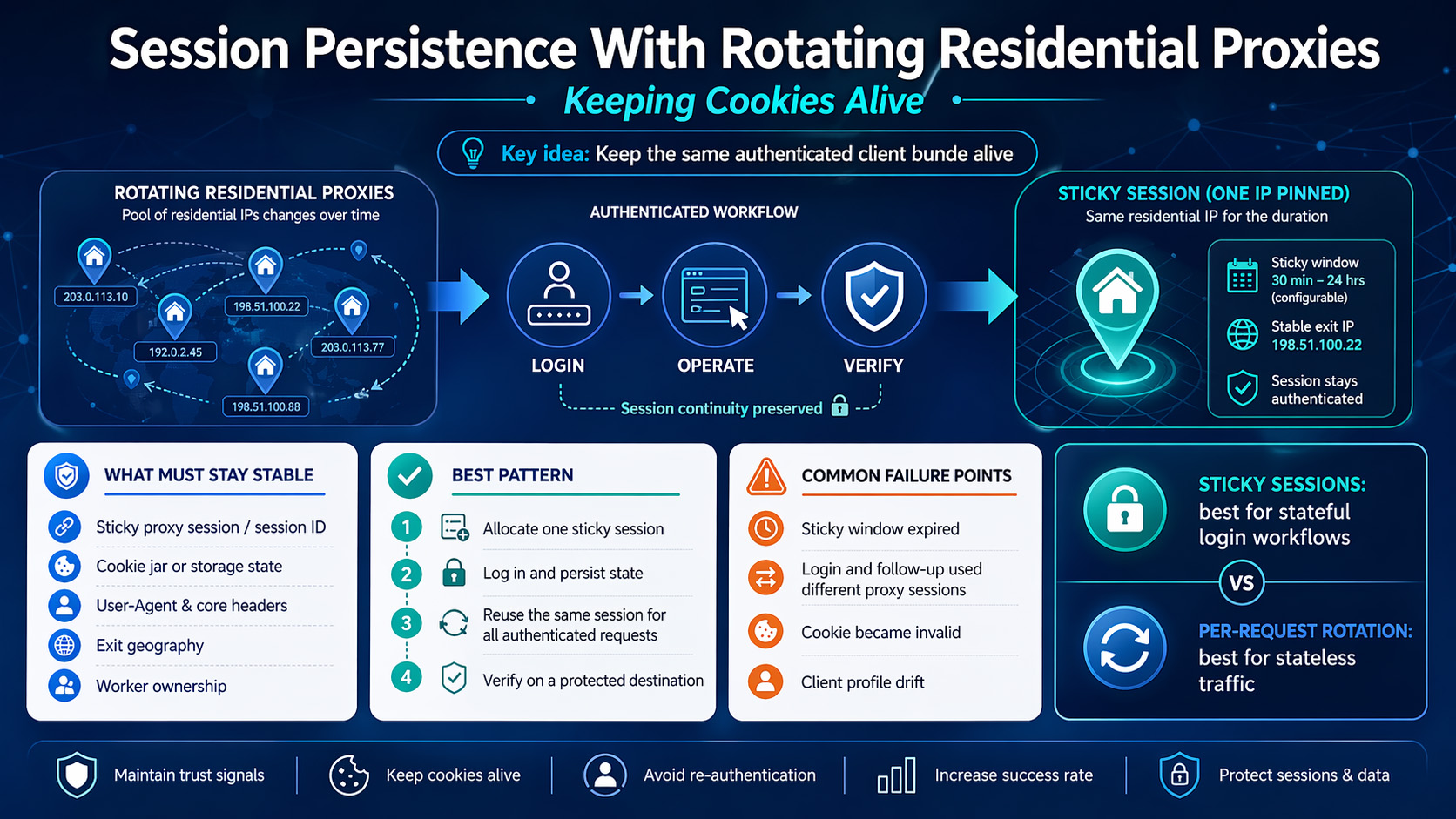
A login flow usually breaks under rotating residential proxies because the cookie survives, but the application stops trusting the client after the network identity changes. Cookies carry session state at the HTTP layer, but many applications also evaluate IP address, User-Agent, and related request context before they continue an authenticated session, which is why preserving a cookie jar alone often isn’t enough.datatracker.ietf+1
The fix is not to abandon rotating residential proxies. The fix is to use a sticky session so the same residential IP stays attached to the same unit of work long enough to complete login, action, and verification.
Why do logins break when a residential proxy rotates?
A cookie jar stores the tokens that represent session state, as defined in <a href="https://datatracker.ietf.org/doc/html/rfc6265">HTTP cookies</a>. But session state and session trust are not the same thing.
That distinction matters in real automation. You can log in on one residential IP, save the cookies correctly, and still get pushed back to login if the next authenticated request comes from a different IP or a noticeably different client profile.
The practical takeaway is simple: treat the proxy session, cookie jar, and runtime context as one bundle. If that bundle changes halfway through the workflow, session persistence becomes fragile.
Sticky sessions vs. per-request rotation
For any workflow that includes login plus follow-up actions, sticky sessions are the right default. A sticky session keeps one IP attached to the same session window instead of rotating on every request, which is why providers position it for continuity-sensitive tasks.
Per-request rotation is better for stateless traffic. If each request stands on its own, rotation can help distribute traffic; if request 2 depends on request 1 having established trust, rotation usually creates problems instead of solving them.
There’s a second distinction worth making. Time-based rotation is not exactly the same as a managed sticky session. In a time-based model, the provider may hold one IP for a short interval and then rotate; in a sticky session model, your workflow intentionally binds itself to one session handle for that window. If the window is shorter than your real workflow time, the setup is still unstable even if the provider markets it as “sticky.”
Use this rule:
Use sticky sessions for login, account settings, checkout QA, and authenticated dashboards.
Use faster rotation for public pages and other requests that don’t depend on an existing login state.
Move to a longer sticky session, a static residential proxy, or an ISP proxy when the workflow is long enough that a short session window keeps expiring before verification.
How to keep cookies alive in a login → operate → verify flow
The safest structure is one account, one worker, one state container, one sticky session. If you let multiple workers share the same authenticated state, or if one worker drifts to a different proxy session after login, you’re creating a state-management bug before the target site ever enters the picture.
What has to stay stable
For a compliant workflow, you don’t need to freeze every possible browser characteristic. You need to keep the fields that most directly affect continuity stable across the authenticated path:
Proxy session identifier or sticky port
Exit geography
Cookie jar for HTTP automation, or persistent browser state for browser automation
User-Agent and core request headers
Worker ownership of the session
If any of those move during the job, you increase the odds of a soft logout or a verification prompt.
Pick the right state model first
If your workflow is request-driven, use an HTTP client with a persistent cookie jar. If the flow depends on redirects, JavaScript rendering, or UI-based checks, use a browser context that can save and reload authenticated state. The <a href="https://playwright.dev/docs/auth">Playwright authentication guide</a> is a good reference for the browser side of that pattern.
That split matters because “save the cookies” means different things in different stacks. In an HTTP client, you persist the cookie jar itself. In browser automation, you usually persist storage state or a browser profile so the authenticated state survives later steps.
Size the sticky window before you start
Your sticky duration needs to cover the full workflow, not just the happy-path login. If the real path includes redirects, one retry, or a slow verification page, a session window that looks fine in testing can still fail in production.
A practical rule is to size the sticky window to at least your observed P95 workflow time plus retry buffer. If the full login-to-verify flow sometimes takes 9 minutes, a 10-minute sticky window is too tight to trust.
The minimal implementation pattern
You don’t need vendor-specific syntax to build this correctly. You need a state object that keeps the workflow tied to one proxy session from start to finish.
A minimal session object can look like this:
textjob: account_id: acct_42 worker_id: worker_03 proxy_session_id: sess_42_worker_03 proxy_endpoint: provider-host:port geo: us state_store: /state/acct_42_worker_03.json verify_target: /account
The exact field names don’t matter. What matters is that login, every authenticated action, and the final verification all read from the same state object instead of rebuilding proxy and auth settings independently.
Step 1: Allocate one sticky session to one workflow
Create a unique sticky session handle for each worker and each account workflow. Some providers expose this through a session parameter, while others use a dedicated sticky endpoint or port, but the principle stays the same: one workflow should own one session.
Don’t use one sticky session across multiple accounts. Don’t run one account across multiple sticky sessions in parallel. Both patterns create cross-talk that later looks like “random logout.”
Step 2: Log in inside that session and persist state immediately
Establish the sticky session before login, not after it. Then persist the authenticated state only after the login flow is fully complete.
This is where browser automation teams often save too early. If the application sets part of the state during redirects or on the final authenticated page, exporting state before the flow settles leaves you with an incomplete session even though the login screen seemed to pass.
Step 3: Reuse the same session handle for every authenticated request
Most session-persistence failures happen here. The login request uses the sticky session, but the action step gets sent through a generic rotating pool, a fresh browser context, or a retry worker that doesn’t inherit the original proxy session ID.
Your retry logic should reload the same job state. It shouldn’t generate a new proxy session unless you’ve decided to restart the whole authentication flow from scratch.
A clean pseudo-flow looks like this:
textcreate sticky session -> log in -> save auth state-> run authenticated actions with same proxy session-> verify on protected target-> rotate only after the job completes
Step 4: Verify with a protected destination
A 200 response is not enough. Verification should hit a page, API route, or UI element that only appears for authenticated users.
Treat the workflow as successful only if at least two of these checks pass:
The protected destination loads without redirecting to login
The expected authenticated cookie is still present
The response contains user-scoped data
No extra sign-in or warning prompt appears during the final check
What to log so you can prove it worked
If you don’t log the right fields, every failure looks like “cookies died.” Capture these fields on every run:
Login success timestamp
Worker ID and account ID
Proxy session ID
Exit IP before login and before final verification
Redirect chain for the verify step
Whether the protected destination rendered authenticated content
Presence of the expected session cookie after the action phase
That’s enough to separate cookie invalidation from proxy rotation and from worker handoff mistakes.
What to check before you blame the cookies
Most failures fall into four buckets.
1. The sticky window expired
This is the simplest failure mode. The login works, one or two actions pass, and then the next request fails because the provider rotated the IP when the sticky window ended.
Fix: increase the sticky duration or shorten the workflow so the whole path fits comfortably inside the window.
2. Login and follow-up requests used different proxy sessions
This is a classic orchestration bug. A retry or worker handoff can silently move the next request onto a different proxy session while the cookie jar stays the same.
Fix: log the proxy session identifier at login time and at verify time. If they differ, you have a session-affinity failure, not a cookie problem.
3. The cookie itself became invalid
Not every logout comes from proxy rotation. Cookies can expire, be saved too early, or be scoped to the wrong path or domain.
Fix: confirm that state is saved after the final authenticated redirect, and verify that later requests are hitting the same application surface the cookie was issued for.
4. The client profile drifted during the flow
A stable IP still won’t save a session if the rest of the request profile changes enough to look like a different client. That’s one reason teams should review <a href="https://cheatsheetseries.owasp.org/cheatsheets/Session_Management_Cheat_Sheet.html">session management guidance</a> before designing their retry and state-handoff logic.
Fix: keep the same browser context or HTTP session object for the full job, and avoid rebuilding headers or locale settings midway through the authenticated flow.
When rotating residential proxies are the wrong tool
Rotating residential proxies with sticky sessions work well when the authenticated workflow is bounded and you only need continuity for the duration of one job. They’re the wrong fit when the job runs longer than the available session window, when the application expects a longer-lived endpoint, or when you repeatedly return to the same authenticated identity over long intervals.
At that point, the question is no longer “how do I keep this cookie alive?” It becomes “what type of proxy identity does this workflow actually require?”
Use this decision rule:
Choose a longer sticky residential session if the workflow is still finite but the current window is too short.
Choose a static residential proxy if the same endpoint needs to persist much longer.
Choose an ISP proxy if you need a more durable and usually faster identity for authorized regional workflows.
The provider checklist should stay practical:
Does the provider support sticky sessions or session pinning?
Can you set or extend the sticky duration?
Can you keep geography stable for the full authenticated path?
Does the provider support your actual tools and deployment model?
Can you authenticate in the way your environment needs, such as credentials or IP whitelisting?
If you’re evaluating <a href="https://proxy001.com/en-us/residential-proxies">residential proxies</a> for this type of workflow, verify the operational details rather than buying on labels alone. The relevant questions are whether the provider can keep the same geo-targeted session stable for the full login-to-verify path, whether your stack can integrate cleanly, and whether you can test the workflow before scaling it.
A real-world failure pattern to watch for
One common pattern looks fine at first: login succeeds, cookie export succeeds, and the first authenticated page even works. Then a later step gets retried on a fresh worker, that worker rebuilds the proxy config without the original sticky session, and the final verification lands on a new IP with the old cookies.
From the outside, it looks like the cookies failed. In practice, the proxy state and auth state got separated. If you’re using browser automation, that’s the same broad problem the <a href="https://playwright.dev/docs/auth">Playwright authentication guide</a> helps you avoid by reusing authenticated state consistently instead of rebuilding it ad hoc.
If you’ve been saving cookies globally and letting retries float across workers, fix that first. A lot of “bad proxy” diagnoses are really automation state bugs.
Compliance note
Session persistence should be used to keep an authorized workflow consistent, not to defeat access controls. Appropriate uses include QA on your own systems, authenticated regression testing, regional experience validation, ad verification, and other workflows that stay within the target service’s terms and your legal boundaries.Gu-Ge-EEATSuan-Fa.md+1
If a service treats an IP change as a meaningful security event, respect that design. The right fix is to stabilize the session or redesign the workflow, not to turn a continuity problem into a stealth exercise.
The setup pattern that holds up in production
If you want one pattern to implement, use this one: assign one worker to one account, give that worker one sticky residential session, authenticate inside that session, save the resulting cookie jar or storage state after the final login redirect, run all authenticated actions through the same session handle, and verify against a protected destination before allowing any rotation.
That pattern lines up with the cookie model, the way sticky sessions are documented to work, and the way real applications commonly evaluate continuity. It also gives you a clean failure model: if verification fails, you can check session duration, session ID continuity, cookie validity, and client-profile drift in a predictable order.
For teams that want to test this on real infrastructure before rollout, <a href="https://proxy001.com/en-us/">Proxy001</a> says it offers residential, ISP, and static proxies, geo-targeting, support for tools such as Python, Node.js, Puppeteer, and Selenium, plus a free proxy test before purchase. Start small, confirm that one worker can complete the full login → operate → verify path without session drift, and then expand from there.
