


 English
 繁體中文
繁體中文
 Deutsch
 Français
 Español
 日本語
日本語
 Tiếng Việt
 Português
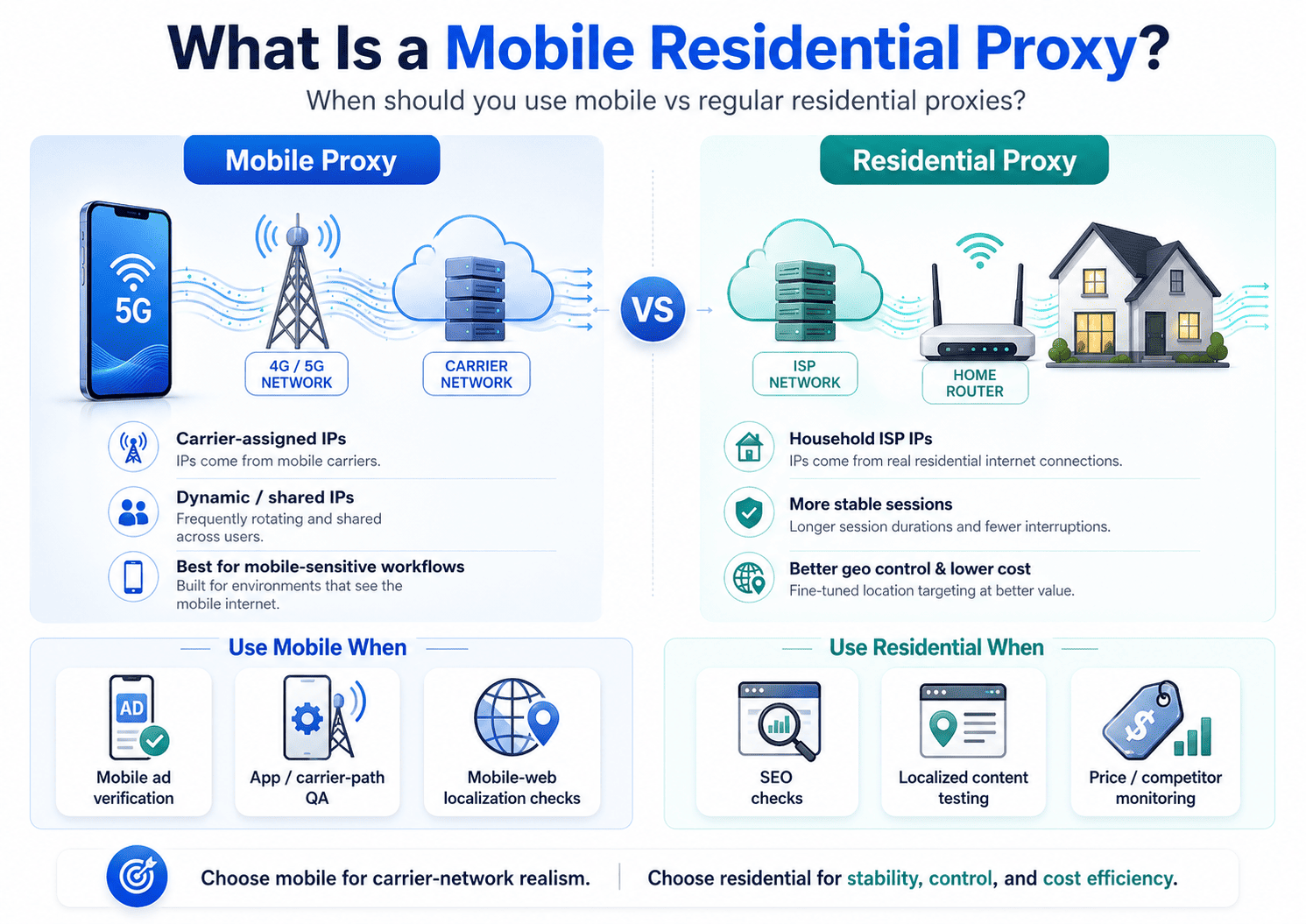
A mobile residential proxy sends traffic through IPs assigned by cellular carriers, while a regular residential proxy uses IPs assigned to household broadband connections.
If your real question is whether mobile proxies are worth paying more for, the short answer is this: use them when the target clearly responds differently to mobile-network traffic, not just because "mobile" sounds stronger.
That difference matters because the two proxy types create different network signals. Mobile IPs are often more dynamic and can sit behind carrier-grade NAT, while residential IPs usually offer steadier sessions and more practical location control for normal web workflows.
What Is a Mobile Residential Proxy?
A mobile residential proxy is best understood as a mobile proxy that uses real IPs from 3G, 4G, or 5G carrier networks instead of home internet providers.
Some vendors loosely place mobile and residential IPs under the same broad "real-user IP" category, but for choosing the right tool, you should treat mobile proxies and regular residential proxies as separate options because their network behavior is different.
A regular residential proxy makes your traffic look like it comes from a household ISP connection. A mobile proxy makes it look like the traffic is coming through a carrier network used by phones, tablets, or mobile gateways. So the useful comparison is not "real IP versus fake IP." It is "carrier-network behavior versus home-broadband behavior."
How Does It Work?
A mobile proxy forwards requests through a real mobile network, so the destination sees a carrier-assigned IP rather than your own connection. A regular residential proxy does the same basic job through consumer ISP addresses tied to household broadband users.
The practical difference shows up in how those networks assign and expose public IPs. Mobile carriers commonly use shared addressing and carrier-grade NAT, which means many users can appear behind the same public IPv4 address or a small shared pool. That shared, dynamic structure is one reason mobile traffic can blend in differently from fixed broadband traffic.
For buyers, this leads to a simple decision rule. If the workflow benefits from looking like carrier traffic, a mobile proxy may help. If the workflow depends on session consistency, repeatability, or fine-grained geo targeting, a regular residential proxy often fits better.
Mobile Proxy vs Regular Residential Proxy
The easiest way to compare them is by the network signals each type sends.
| Factor | Mobile proxy | Regular residential proxy |
|---|---|---|
| IP source | Carrier-assigned IPs from mobile networks. | ISP-assigned household IPs from home broadband connections. |
| Traffic profile | Looks like mobile-carrier traffic. | Looks like normal household broadband traffic. |
| Rotation behavior | Often more dynamic, depending on carrier behavior or proxy setup. | Usually easier to keep stable with sticky sessions or provider-controlled rotation. |
| Session stability | Can be less predictable for long sessions if the visible IP changes at the wrong time. | Usually better for workflows that need steadier continuity. |
| Geo precision | Can be coarser because carrier routing does not always map neatly to exact local geography. | Often better for city- or region-level targeting tied to household ISP footprints. |
| Cost profile | Usually higher because mobile supply is tighter. | Usually more cost-efficient for broad testing and data workflows. |
The key takeaway is that mobile proxies buy you a different network profile, not automatic superiority. For many legitimate tasks, a standard residential proxy is the better starting point because it gives you enough trust signals without the extra cost and session volatility that mobile can introduce.
Why Are Mobile Proxies Often Harder to Block?
Mobile proxies are often described as harder to block because they come from real carrier networks, frequently use shared address pools, and can resemble ordinary mobile traffic more closely than fixed infrastructure does. That does not mean they are unblockable, and it does not mean they outperform residential proxies in every legitimate workflow.
There is another limit that matters just as much. Modern bot and fraud defenses evaluate broader behavior, not just the IP label attached to a request. If your headers, timing, session handling, request pattern, or workflow logic are poor, switching to mobile will not solve the underlying problem.
The useful way to think about "pass rate" is in business terms, not marketing terms. What matters is whether the real workflow completes more often, triggers fewer challenges, stays stable long enough to finish, and does so at a cost you can justify. That is why mobile can help in one scenario and hurt in another: the same IP churn that improves short checks can also break a long, stateful flow if continuity matters more than carrier context.
This article is not presenting a published benchmark. It is a buying model based on verified source material and network behavior, so the right move is to validate on your own authorized workflow before paying mobile rates.
When Should You Use One?
You should use a mobile residential proxy when the target genuinely behaves differently for carrier traffic than it does for standard household traffic. That usually applies to legitimate work such as mobile ad verification, mobile-web localization checks, app-facing regional QA, and authorized fraud-testing scenarios where network context affects the result.
In plain terms, mobile is worth testing when the workflow is mobile-sensitive. If the task is mainly about seeing content from a real-user IP, but not specifically from a carrier network, regular residential is usually the better first choice.
A few examples make the split clearer. For mobile ad verification or carrier-path QA, mobile often makes sense because you are checking how the experience behaves on carrier traffic itself. For general authorized data collection, city-level SEO checks, localized content validation, or other tasks that benefit from steadier sessions and cleaner location targeting, regular residential is usually more practical.
When a Standard Residential Proxy Is Better
A standard residential proxy is usually the smarter buy when you need broader coverage, lower cost, more stable sessions, or more practical location targeting instead of mobile-network realism. That covers a large share of normal business use cases, including geo-targeted QA, competitor monitoring, price checks, ad verification, and localized search observation.
Once you know mobile behavior is not essential, provider choice matters more than proxy category. At that point, you should look for enough pool depth, location coverage, supported protocols, and a residential product that matches the size of your workflow.
For teams starting with standard residential, Proxy001's public pages describe 100M+ residential IPs across 200+ locations or countries and support for HTTP(S) and SOCKS5 on residential offerings; disclosure: this article includes editorial input related to Proxy001, and product-specific statements here are limited to publicly available Proxy001 pages. That makes it a reasonable option to evaluate when your testing suggests you need regular residential first, not mobile first.
Common Misconceptions and Risk Boundaries
The biggest misconception is that mobile proxies are the "best" proxies. They are not. They are the right fit only when carrier-network context changes the outcome of your legitimate workflow.
Another common mistake is assuming that a higher pass rate automatically means higher business value. If the proxy helps one request complete but makes the full session less reliable, it is not actually improving the job you need to finish.
There is also a compliance angle you should not ignore. OWASP's automated-threat guidance shows that organizations are trying to separate legitimate automation from abuse, which is why your safest path is authorized testing, documented collection rules, clear rate controls, and provider terms that match your use case. That is also why any article or product page promising "undetectable," "never blocked," or other absolute outcomes should make you skeptical.
Next Steps
If you are still choosing, do not buy by category label alone. Compare mobile and residential on the exact authorized workflow you care about, while keeping the target, request shape, headers, session policy, and concurrency consistent across both tests. Then judge the result by completed workflows, challenge frequency, session stability, and total cost rather than by raw request count alone.
The decision usually becomes clear once you ask four things in plain language. Does the workflow truly depend on mobile-network context? Does it need long-lived continuity more than carrier realism? Do you need practical city-level targeting? And does any lift from mobile justify the higher spend?
That gives you a complete answer to the original question. Use a mobile residential proxy when carrier-network behavior is part of the problem you are solving. Use a regular residential proxy when you mainly need real-user IP space, better control, and lower cost.
If your own test data shows that standard residential already clears the job, there is no reason to pay mobile rates just because they sound more advanced. If you want a practical place to start that comparison, Proxy001's public pages present residential products with 100M+ IPs across 200+ locations or countries and HTTP(S)/SOCKS5 support, which makes it a sensible option for benchmarking the cheapest sufficient setup before moving to a more specialized proxy type. Start with the smallest legitimate test that answers your real business question, and only upgrade when your results justify the switch.
