


 English
 繁體中文
繁體中文
 Deutsch
 Français
 Español
 日本語
日本語
 Tiếng Việt
 Português
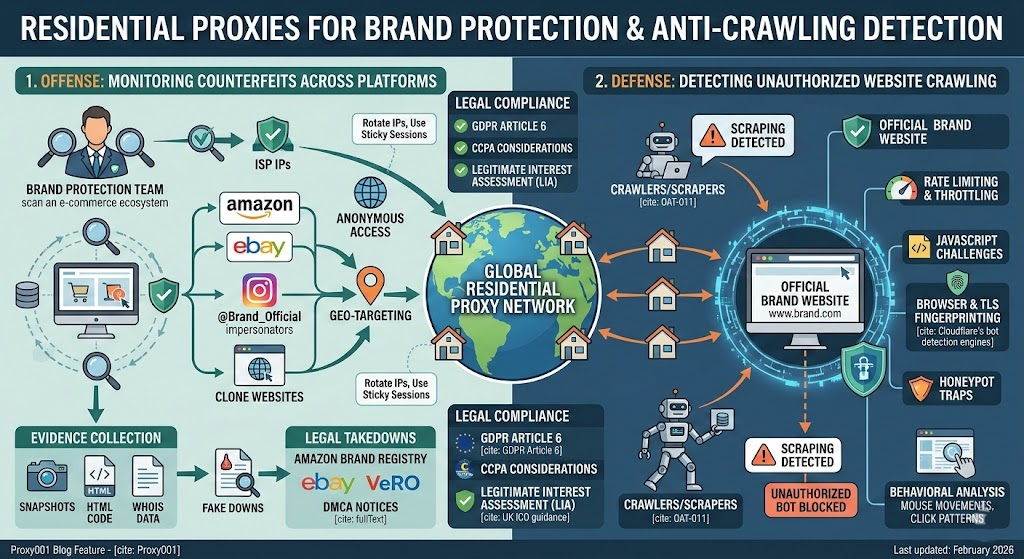
Every brand with an online presence faces a two-front war. On one side, counterfeiters and unauthorized resellers clone your product listings, hijack your brand name in paid ads, and spin up lookalike storefronts across dozens of marketplaces. On the other, competitors and data aggregators quietly crawl your website to siphon pricing data, product catalogs, and inventory signals — intelligence they use against you.
Residential proxies sit at the center of both battles — enabling your team to monitor infringement across platforms undetected, while also helping you understand and defend against the very same crawling techniques aimed at your own site.
Why Brand Protection Requires Residential Proxies — Not Just Any Proxy
If your team has tried running monitoring scripts through datacenter proxies, you already know the problem: major marketplaces like Amazon, eBay, and AliExpress maintain extensive blocklists of datacenter IP ranges. A datacenter IP originates from a hosting provider, and platforms can identify these ranges almost instantly. Your monitoring requests get throttled, CAPTCHAed, or outright blocked within minutes.
Residential proxies route traffic through IP addresses assigned by real Internet Service Providers to household devices. To a target platform, a request from a residential proxy looks indistinguishable from a genuine shopper browsing from their home network. This distinction matters enormously for brand protection work:
Marketplace access: E-commerce platforms apply stricter bot detection to datacenter traffic. Residential IPs pass these checks because they carry legitimate ISP signatures and are associated with real geographic locations.
Geo-accurate results: Counterfeit operations often target specific regions. A residential proxy with geo-targeting lets your team see exactly what a customer in São Paulo, Lagos, or Jakarta sees — including region-locked counterfeit listings that would be invisible from your office IP.
Session durability: Investigating a suspicious seller often requires browsing multiple pages, examining reviews, and documenting product images. Residential proxies with sticky session support maintain the same IP for an extended window, preventing mid-investigation disconnects that would force you to restart.
The tradeoff: residential proxies cost more per gigabyte and introduce higher latency than datacenter alternatives. There are also quality concerns — not all residential IP pools are equally clean. Some lower-tier providers include IPs already flagged by major platforms, meaning your requests get blocked despite using "residential" IPs. We have seen monitoring campaigns burn through budgets on pools where a significant portion of IPs were dead on arrival at Amazon and Shopee. Before committing to a provider, always run a small-scale test against your actual target platforms to measure real-world success rates, not just advertised numbers.
For brand monitoring work, where accuracy and access matter more than raw speed, the cost tradeoff is well worth it — but vet your provider carefully.
The Offense: Monitoring Counterfeits and IP Infringement Across Platforms
Where to Look — and What to Look For
Counterfeit operations rarely limit themselves to a single channel. A systematic monitoring program needs to cover four categories of platforms, each with distinct infringement patterns:
E-commerce marketplaces (Amazon, eBay, AliExpress, Shopee, Mercado Libre): Watch for listings using your brand name or trademarked terms with pricing significantly below your MAP (Minimum Advertised Price). Other red flags include product images copied directly from your official listings, newly created seller accounts with no established review history, and slight misspellings of your brand name designed to evade keyword-based detection.
Social media platforms (Facebook, Instagram, TikTok, Pinterest): Counterfeiters use paid ads and organic posts to drive traffic to fake storefronts. Look for accounts impersonating your brand — they typically copy your logo and brand imagery but use subtly different handles (e.g., @YourBrand_Official vs. your actual @YourBrand). Fake giveaway pages and phishing profiles that harvest customer information are also common.
Independent websites: Clone sites that replicate your entire product catalog, often with a domain that closely resembles yours (extra hyphens, alternate TLDs like .shop or .store). These sites scrape your product descriptions and images, sometimes even copying your SSL certificate branding.
Search engine ads: Competitors or counterfeiters bidding on your trademarked terms in Google Ads or Bing Ads, directing traffic away from your legitimate properties. Geo-targeted ad monitoring through residential proxies reveals regional ad hijacking that you would miss from a single location.
Building a Monitoring Workflow with Residential Proxies
A functional counterfeit monitoring operation follows a repeatable cycle:
Define your monitoring scope. Start with your core brand terms, registered trademarks, product SKUs, and common misspellings. Include visual assets — reverse image searches using your official product photography can surface listings that copy your images but use different brand text.
Configure geo-targeted residential proxies. Set your proxy rotation to target the specific countries and regions where your products are sold. If you sell in 15 markets, you need exit nodes in those 15 markets. Country-level targeting is the minimum; city-level targeting catches infringement patterns that country-level sweeps miss. In our experience monitoring across Southeast Asia, switching from country-level to city-level targeting in markets like Indonesia and Thailand surfaced significantly more infringing listings — counterfeiters were running localized campaigns aimed at second-tier cities that were invisible at the country level.
Crawl target platforms systematically. For each marketplace, search your brand terms and SKU identifiers through the proxy. Rotate IPs between requests to avoid triggering platform rate limits — common practice suggests rotating every 5 to 15 requests for marketplace scanning, though the right interval depends on each platform's detection sensitivity. Use sticky sessions when you need to drill into a specific seller's storefront and browse multiple pages without losing context.
Cross-reference against your product database. Compare scraped listings against your official product catalog: pricing, authorized seller lists, and approved product imagery. At minimum, your reference database should include official product names, approved SKUs, MAP pricing, and perceptual hashes of your authorized product images. For brands with large catalogs, dedicated brand protection platforms like Red Points or Corsearch automate this comparison at scale — they continuously scan thousands of marketplaces and flag deviations from your authorized parameters. For smaller operations, a structured spreadsheet cross-referenced with scripted image hash matching (using perceptual hashing libraries like pHash or ImageHash) provides a workable starting point.
Document everything. Every flagged listing needs timestamped evidence: full-page screenshots, cached HTML, seller profile data, and the geographic location from which the listing was accessed. This documentation forms the basis for takedown requests and, if necessary, legal proceedings.
Social Media Brand Monitoring
Social media monitoring demands a different approach than marketplace scanning. Platforms like Facebook and Instagram aggressively detect automated access, making residential proxies essential rather than optional.
Search for your brand name, common typos, and hashtag variants through rotating residential IPs. Pay particular attention to accounts that have recently started posting about your brand — counterfeit promotion campaigns often spin up fresh accounts in batches. Monitor your brand's tagged posts and mentions for phishing links disguised as customer engagement.
When you identify a fake profile or counterfeit ad, capture the profile URL, post content, associated links, follower counts, and creation dates. Most major platforms offer IP-specific reporting channels: Facebook and Instagram have dedicated brand IP reporting forms, while TikTok provides a trademark infringement report flow through its support center.
The Defense: Detecting Unauthorized Crawling on Your Own Website
While your team monitors external platforms for infringement, competitors and unauthorized aggregators may be crawling your own site to extract pricing data, product details, and inventory levels. Understanding how to detect this activity — and how it connects to the residential proxy ecosystem — is equally critical.
Identifying Who Is Crawling Your Site
Server access logs are your primary detection tool. Every HTTP request to your site records the source IP address, user agent string, requested URL, timestamp, and response code. The OWASP Automated Threats to Web Applications project classifies this type of activity as OAT-011 (Scraping) — defined as collecting accessible data and/or processed output from the application for use elsewhere. Patterns that suggest unauthorized automated crawling include:
Abnormal request volumes from a single IP or narrow IP range — hundreds of product page requests per minute when a human visitor might browse 5 to 10 pages in that time.
Sequential URL patterns — a crawler systematically working through your product catalog in order (page 1, page 2, page 3...) rather than the nonlinear navigation pattern of a human shopper.
Missing or generic user agent strings — legitimate browsers send detailed UA strings; basic crawlers often send minimal identifiers or impersonate outdated browser versions.
Requests for robots.txt followed immediately by rapid crawling — a signature of automated tools that check your crawling policies before ignoring them.
Requests that skip all static assets (CSS, JavaScript, images) — human browsers load the full page; many scrapers fetch only the HTML to extract data faster.
Run reverse DNS lookups on suspicious IPs. Legitimate search engine crawlers (Googlebot, Bingbot) resolve to identifiable domains owned by their respective companies. IPs that claim to be Googlebot but resolve to unrelated hosting providers are impersonators — a technique documented in Google's own webmaster guidelines for verifying Googlebot.
Understanding the Anti-Crawling Techniques You Can Deploy
Detecting crawlers is step one. Mitigating them requires layered defenses:
Rate limiting and IP-based throttling: Cap the number of requests any single IP can make within a time window. This stops unsophisticated crawlers but is easily circumvented by adversaries using rotating residential proxies — which is precisely why you need to combine rate limiting with other methods.
JavaScript challenges: Require the client to execute JavaScript before serving page content. Simple HTTP-based scrapers cannot execute JavaScript, so they receive empty or redirected responses. More advanced crawlers using headless browsers can pass these challenges, so this is a filter for basic bots, not a complete solution.
Browser and TLS fingerprinting: Collect signals like screen resolution, installed fonts, WebGL rendering characteristics, and canvas fingerprints. Cloudflare's bot detection engines, for example, combine TLS fingerprinting (JA3/JA4), HTTP/2 fingerprinting, and canvas fingerprinting to verify that a client's browser environment matches its claimed user agent. When the same fingerprint appears across different residential IPs, it suggests a single automated tool rotating its IP address while maintaining the same browser environment.
Honeypot traps: Embed hidden links in your pages that are invisible to human visitors (via CSS display:none or zero-pixel elements) but visible to crawlers that parse raw HTML. Any client that follows a honeypot link is definitively not a human user and can be immediately blocked.
Behavioral analysis: Track mouse movements, scroll depth, click patterns, and time between page loads. Machine learning models trained on these signals can distinguish human navigation from automated access patterns, even when the crawler uses residential IPs and valid browser fingerprints.
The critical insight: sophisticated adversaries will use the same residential proxy networks your team relies on for monitoring. Your anti-crawling defense cannot rely solely on IP reputation — you need behavioral and fingerprint-based detection layers that evaluate how a visitor interacts with your site, not just where their IP address is registered.
Putting Defense into Practice
For teams without dedicated security engineering resources, managed bot detection services bundle most of these techniques into turnkey solutions. Cloudflare Bot Management, DataDome, and Akamai Bot Manager handle JavaScript challenges, fingerprint analysis, and behavioral scoring out of the box, and provide dashboards for reviewing blocked traffic patterns. If you run a custom infrastructure, open-source options like the OWASP ModSecurity Core Rule Set provide rate limiting and basic bot filtering at the WAF layer — not as sophisticated as commercial solutions, but a meaningful first line of defense.
One caveat: aggressive rate limiting can inadvertently block legitimate services. Before tightening your anti-crawling rules, inventory which third-party services (price comparison sites, authorized aggregators) you want to allow access to and create explicit allowlists for them.
Evidence Collection and the Path to Legal Action
Discovering counterfeit listings or unauthorized crawling is only valuable if you can convert that discovery into enforceable action — specifically, evidence that meets the documentation standards platforms and courts require.
Building a Court-Ready Evidence Package
For every infringement you identify, capture the following at minimum:
Timestamped full-page screenshots showing the infringing content, the URL bar, and the date. Automated screenshot tools that embed timestamp metadata are more credible than manual captures.
Archived HTML source code of the infringing page, preserving the complete DOM including hidden elements and metadata.
Seller or domain registrant information, including WHOIS records for infringing domains and seller profile data from marketplaces.
Purchase evidence when feasible — buying a sample of the counterfeit product and documenting the transaction creates physical evidence of the infringement.
SSL certificate details for clone websites — who issued the certificate and when it was registered can help establish the timeline of the infringement.
For tamper-evident timestamping, use the Internet Archive's Save Page Now feature to create a publicly verifiable snapshot of the infringing page — the archived URL serves as independent proof that the content existed at a specific date. For higher evidentiary standards, dedicated services like OriginStamp provide blockchain-anchored timestamps, and some brand protection platforms such as Corsearch include built-in evidence vaults with chain-of-custody documentation. Whatever method you choose, capture evidence before initiating contact with the infringer, since pages often disappear once the seller suspects they are being investigated.
Executing Takedowns
Each platform has its own reporting mechanism:
Amazon Brand Registry provides a Report a Violation tool accessible through Seller Central. You specify the infringement type (trademark, copyright, or patent), provide your registration numbers, and supply ASINs or product URLs for the infringing listings. Amazon's team reviews and typically acts within several business days.
eBay's VeRO (Verified Rights Owner) Program requires enrollment with proof of your registered trademark. Once approved, you submit a Notice of Claimed Infringement (NOCI) identifying the infringing listings. eBay investigates and can remove listings and suspend offending accounts.
Google (for search ads and DMCA): For trademark violations in ads, file through Google's Trademark Complaint form. For copyrighted content appearing in search results, submit a DMCA takedown request through Google's Legal Help center. Under the Digital Millennium Copyright Act, your notice must identify the copyrighted works, the infringing URLs, and include a statement under penalty of perjury that you are authorized to act on behalf of the rights holder.
Social media platforms: Facebook/Instagram, TikTok, and Pinterest each maintain dedicated IP reporting portals. Response times vary, but providing comprehensive evidence with your initial report significantly accelerates the review process.
For independent clone websites, a DMCA takedown notice sent to the site's hosting provider is the standard first step. Identify the host through WHOIS records, then submit your notice to their designated DMCA agent.
Proxy Configuration Best Practices for Brand Monitoring
The difference between a monitoring operation that runs reliably for months and one that gets blocked within days comes down to configuration discipline. The following practices assume you are conducting authorized brand protection monitoring within the legal boundaries outlined in the Compliance section below.
Rotation, Throttling, and Session Management
IP rotation strategy: For broad marketplace sweeps (searching brand terms across thousands of listings), rotate IPs with each request or every few requests. For deep-dive investigations into specific sellers, switch to sticky sessions that hold the same IP for the duration of your investigation — typically 10 to 30 minutes per session, depending on your provider's capabilities.
Request pacing: Marketplaces detect bot-like behavior partly through request timing. Introduce randomized delays between requests rather than firing at a constant interval. A natural browsing pattern includes variable pauses — uniform timing is a bot signature.
Geo-distribution: If you are running high-volume monitoring in a specific market, distribute requests across multiple cities within that country rather than concentrating all traffic through a single exit node. This prevents subnet-level detection even when using residential IPs.
Header and fingerprint consistency: When you rotate IPs, also rotate your user agent strings and ensure that the browser language and timezone settings match the geographic location of your exit IP. An IP geolocated in Germany paired with an en-US language header and America/New_York timezone is a detectable mismatch. Shopee, for example, enforces this strictly — our monitoring scripts were getting soft-blocked within minutes until we matched locale headers to exit node geography.
Testing Your Monitoring Setup: A Quick Validation Run
Before scaling up your monitoring operation, validate that your proxy configuration actually works against your target platforms. Here is a minimal test you can run in under an hour.
What you need before starting: a residential proxy account with geo-targeting support (a free trial from any provider is sufficient for this validation), an HTTP client such as curl or a simple Python script using the requests library, and your brand's primary search term on one target marketplace.
Step 1 — Configure a geo-targeted request. Set your proxy endpoint to a country where your products are sold — for example, country=DE if you sell in Germany. Send a single search request for your brand name on the target marketplace (e.g., Amazon.de) through the proxy.
Step 2 — Verify the response. Check that you receive a full product listing page, not a CAPTCHA, block page, or redirect. Compare the results against what you see when searching directly from your office IP — listings and pricing should reflect the German market, not your office location.
Step 3 — Test across geographies. Run the same search through 3–5 different geo-targets (e.g., DE, BR, JP, NG, AU) and compare results. Note any listings that appear only in specific regions — these are exactly the region-locked counterfeits your monitoring program needs to catch.
Step 4 — Stress-test at low volume. Send 30–50 requests through the same geo-target over 10 minutes, with randomized delays of 3–8 seconds between requests. This simulates a light monitoring workload and verifies that you can sustain activity without triggering rate limits.
You know it is working when: (1) your requests consistently return full marketplace pages rather than CAPTCHAs or blocks, (2) results differ by geography in ways that match expected regional availability, and (3) you can sustain the 50-request test without throttling or IP bans.
If something goes wrong: If you get blocked immediately, the most common cause is an outdated user agent string — update it to match a current Chrome or Firefox release. If results look identical across all geos, verify that your provider's geo-targeting is actually routing to distinct exit nodes by checking your external IP through a geolocation service (like ipinfo.io) via the proxy. If pages load but product data is missing or incomplete, the marketplace is likely serving a JavaScript-rendered page — switch from a simple HTTP client to a headless browser tool such as Playwright or Puppeteer.
Evaluating a Proxy Provider for Brand Protection
Not every residential proxy service is equally suited for sustained brand monitoring. Evaluate providers against these criteria:
IP pool size and geographic coverage: Brand protection requires access across all markets where your products are sold. A pool spanning 100+ countries with city-level targeting gives you the geographic reach to detect region-specific counterfeiting operations.
Real-time success rate: Monitoring scripts that fail 20% of the time waste resources and leave gaps in your coverage. Look for providers with documented success rates above 95%.
Session control flexibility: You need both per-request rotation and sticky sessions with configurable durations. Providers that support sticky sessions of 30 minutes or longer accommodate deep-dive investigations.
Protocol support: HTTP/HTTPS coverage is baseline. SOCKS5 support provides additional flexibility for custom monitoring tools.
Pricing model alignment: Brand monitoring is a continuous operation, not a one-time project. Per-gigabyte pricing (common for residential proxies) works well for monitoring workloads where traffic volume is predictable. Compare this against per-IP or unlimited plans based on your expected data volume.
For teams running continuous marketplace monitoring across multiple countries, Proxy001 provides a pool of over 100 million residential IPs spanning 200+ countries with city-level geo-targeting, a documented 98.9% success rate, and sticky sessions up to 180 minutes. The per-gigabyte pricing starts at $0.7/GB, and they offer a free trial so you can run the validation test described above before committing to a plan.
Compliance and Legal Boundaries
Brand protection monitoring operates in a legal gray area that demands careful navigation. Protecting your own intellectual property does not exempt you from data protection regulations — and the legal landscape around automated data collection is still actively evolving.
What You Can and Cannot Do
Permissible activities in most jurisdictions include: scraping publicly visible product listings and pricing data from marketplaces, capturing screenshots of infringing content for evidence, monitoring public social media posts and ads for brand misuse, and purchasing counterfeit products as evidence.
Activities that cross the line include: accessing non-public seller dashboards or backend systems, collecting personal data about individual sellers beyond what is publicly listed, scraping customer reviews or personal information for purposes beyond infringement documentation, and circumventing access controls (such as login walls) without authorization.
A note on platform Terms of Service: some marketplaces explicitly prohibit automated access, even for brand protection purposes. The legal relationship between ToS restrictions and actual enforceability remains unsettled. The hiQ Labs v. LinkedIn case established that scraping publicly accessible data does not violate the Computer Fraud and Abuse Act (CFAA), but the case ultimately ended in a private settlement where hiQ agreed to cease scraping — illustrating that legal viability and practical outcomes can diverge. Consult with your legal team about the specific marketplaces you plan to monitor.
GDPR and CCPA Considerations
If your monitoring activities touch personal data of individuals in the EU or California, additional obligations apply. Under GDPR Article 6, even publicly available personal data requires a lawful basis for processing. For brand protection, "legitimate interest" is the most commonly cited basis, but it requires a documented Legitimate Interest Assessment (LIA).
The UK Information Commissioner's Office (ICO) publishes a practical LIA template built on a three-part test:
Purpose test: Document the specific legitimate interest pursued — in this case, protecting registered trademarks from counterfeiting and enforcing intellectual property rights.
Necessity test: Demonstrate that automated monitoring is the only feasible way to detect infringement at scale across global marketplaces, and that you cannot achieve the same result by processing less personal data.
Balancing test: Show that your brand protection interest does not override the individual's privacy rights — for example, by documenting that you collect only publicly listed seller information, retain it only for the duration of the enforcement action, and do not repurpose it for marketing or profiling.
CCPA imposes transparency obligations: if you collect personal information of California residents during your monitoring activities, you must be prepared to respond to consumer rights requests and maintain records of your data collection practices.
Complete the LIA before launching any monitoring program and establish written policies that define what data you collect, how long you retain it, and when you delete it.
Conclusion
Residential proxies enable both sides of brand protection: geo-accurate monitoring of counterfeits across marketplaces and search ads on offense, and informed defense against unauthorized crawling of your own site. The key is connecting detection to evidence collection to enforcement — whether through platform-specific programs like Amazon Brand Registry and eBay VeRO, or DMCA notices to hosting providers — all within the compliance boundaries set by GDPR, CCPA, and platform terms of service.
The residential proxy infrastructure you choose directly affects how reliably this system operates. Gaps in geographic coverage, low success rates, or inflexible session management will create blind spots that counterfeiters exploit.
Ready to build your brand monitoring infrastructure? Proxy001 offers a free trial with access to over 100 million residential IPs across 200+ countries, a 98.9% real-time success rate, and flexible session controls including sticky sessions up to 180 minutes. Test your monitoring workflow — from marketplace sweeps to seller deep-dives — before committing. Residential proxy plans start at $0.7/GB. Get started with a free trial →
Last updated: February 2026. Sources include platform documentation from Amazon Brand Registry, eBay VeRO, the U.S. Copyright Office (DMCA), GDPR Article 6, and OWASP Automated Threats project. Technical recommendations are based on operational experience with brand monitoring deployments. This article will be reviewed and updated quarterly.
