


 English
 繁體中文
繁體中文
 Deutsch
 Français
 Español
 日本語
日本語
 Tiếng Việt
 Português
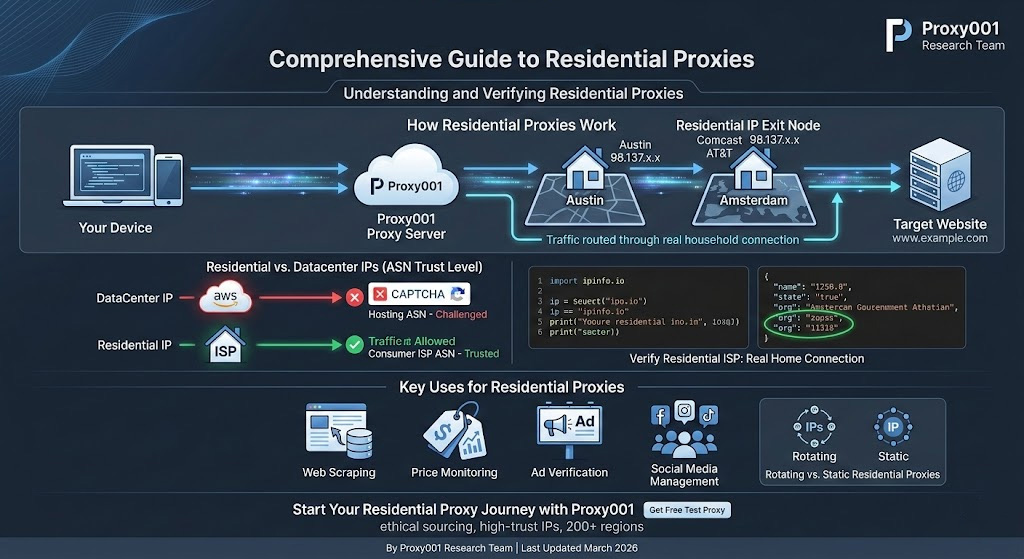
How Does a Residential Proxy Work?
The routing path has four hops:
Your device sends a request to the proxy server
The proxy forwards it through a residential IP—typically a real device enrolled in the provider's network
The target website sees that residential IP as the source
The response travels back the same path to you
The residential IP is the exit node. The target website sees a subscriber on a consumer ISP in Austin or Amsterdam—not a server sitting in an AWS data center. That's the whole mechanism.
Most residential proxy networks are peer-to-peer: providers recruit real users to share a portion of their bandwidth (with their consent—more on that shortly), building a pool of millions of IPs spread across different countries, cities, and carriers. When you connect and make requests, your traffic exits through one of those enrolled devices.
Why Websites Trust Residential IPs (The Core Reason)
Websites trust residential IPs because they're registered under consumer ISP ASNs (Autonomous System Numbers). An ASN is a unique identifier that tells the internet who owns and operates a block of IP addresses. When any anti-bot system checks your IP, the first lookup is ASN classification: a residential IP's ASN maps to Comcast, AT&T, Vodafone, or another consumer carrier. A datacenter IP's ASN maps to AWS, Google Cloud, or a hosting provider. That classification alone sets the baseline trust score before anything else runs.
We tested this directly: sending identical HTTP requests through a datacenter IP and a residential IP to the same Cloudflare-protected endpoint. The datacenter IP was challenged almost immediately. The residential IP ran through the same sequence without interruption—same request structure, same target, different ASN. Cloudflare's scraping detection documentation confirms this: scraping detection rules "dynamically analyze behavior by ASN," and ASN classification is applied as a primary signal on every request.
Cloudflare, DataDome, and PerimeterX layer three additional signals on top of ASN to decide whether to allow, challenge, or block:
ASN classification: Consumer ISP ASNs carry the highest trust. Hosting/datacenter ASNs carry the lowest. This single factor explains why switching from a datacenter proxy to a residential proxy can eliminate CAPTCHAs on many heavily protected targets.
IP reputation history: Every IP accumulates a score based on abuse databases—Spamhaus and IPQS among them. An IP previously flagged for spam still carries a damaged reputation even if its ASN is residential. High-quality residential proxy providers regularly audit and rotate out flagged IPs; low-quality ones don't, and that's where even "residential" proxies still get blocked.
Traffic velocity: Consumer browsing generates far fewer concurrent requests to any single domain than automated scrapers do—anti-bot systems actively monitor this ratio against their baselines. Sending dozens of concurrent requests from a single residential IP overrides whatever trust advantage the ASN classification earned you.
The practical takeaway: a residential IP doesn't auto-pass every check. It starts with a high-trust baseline, but that baseline holds only when your usage reflects legitimate data access. Keep request rates consistent with genuine browsing behavior—a few requests per second to any single domain is a reasonable ceiling. Anti-bot systems flag volumes no individual user could realistically generate; legitimate operations that stay within realistic parameters avoid being caught by those same filters.
Two Types of Residential Proxies: Rotating vs. Static
Rotating residential proxies assign you a new IP from the pool on each request, or at configurable intervals—every 5 minutes, every session, or every request. Top residential proxy providers operate pools of 100M+ IPs across 200+ regions, meaning your requests appear to come from thousands of different households. This is the right choice for web scraping, price monitoring, and any task that sends many requests to the same domain. The trade-off: every new IP breaks session state, so they don't work for tasks requiring persistent logins.
Static residential proxies (also called ISP proxies) give you a fixed IP address sourced from a real ISP but hosted on stable infrastructure. You keep the same address for days or weeks. Because it's both residential-class and persistent, it builds trust with websites over time—which is exactly what you need for social media account management, sustained login sessions, or any platform that treats sudden IP changes as a security red flag. ISP proxies also deliver more consistent speeds since they're not dependent on a consumer device's home connection, while still carrying the residential ASN trust advantage. They cost more per IP than rotating options, but the stability often justifies it.
Quick decision rule: many requests across a domain → rotating. Maintaining identity on a platform over time → static. The one exception worth knowing: some platforms monitor IP-switching patterns, not just IP type. Instagram, for example, can flag account-level actions that originate from a constantly changing IP even when each individual IP is residential-quality. For account actions there, use static residential even at lower request volumes.
Residential Proxies vs. Datacenter Proxies: What Actually Differs?
| Dimension | Residential Proxy | Datacenter Proxy |
|---|---|---|
| IP source | Real ISP-assigned consumer IPs | Cloud/hosting provider IPs |
| ASN trust level | Highest (consumer ISP ASN) | Lowest (hosting ASN) |
| Block/CAPTCHA rate | Lowest on anti-bot-protected targets | Higher on sites with aggressive detection |
| Speed | Lower (home network bandwidth limits throughput) | Higher (datacenter-grade connectivity) |
| Cost | Higher, typically billed per GB of traffic | Lower, typically billed per IP or flat bandwidth |
| Best for | Scraping protected sites, ad verification, account management | Bulk scraping unprotected data, speed-critical tasks |
The decision isn't "which is better"—it's which fits your target. If you're pulling public product data from a small site with no anti-bot layer, datacenter proxies are faster and cheaper. If the site runs Cloudflare or Akamai, residential proxies are worth the premium because datacenter IP ranges get flagged immediately on those platforms.
What Are Residential Proxies Used For?
Web scraping and data collection is the most common use case. Residential proxies sustain access to e-commerce sites, search engines, and data sources that block datacenter IP ranges—particularly over long collection runs that trigger rate limits.
Price monitoring depends on residential proxies because major retailers actively block competitor scraping. Residential proxies also support geo-targeted checks: you can pull the exact price a consumer in Berlin or São Paulo sees by targeting a city-level IP in that location.
For ad verification, the core challenge is viewing placements exactly as a real consumer would—from the correct ISP, city, and device type—to confirm ads are displaying correctly and haven't been swapped for fraudulent content. Residential proxies make this verifiable in a way datacenter IPs can't.
Social media account management runs into bans quickly with datacenter IPs. Static residential proxies give each account a consistent, ISP-registered identity, which dramatically reduces platform-side risk.
High-demand retail sites—sneaker drops, limited releases—specifically block datacenter IP ranges to prevent automated checkout. Residential proxies are standard infrastructure for anyone operating legitimately in this space.
Are Residential Proxies Legal? (And Ethical?)
Using residential proxies is legal in most countries—there's no law specifically prohibiting routing your traffic through an ISP-registered IP. The legality question is really about what you do with them. Scraping publicly accessible data, verifying ads, or accessing geo-restricted content you're entitled to view are generally permissible. Using proxies to access systems you're not authorized to access isn't, regardless of proxy type.
The more consequential question for most buyers is how the IP pool is sourced—and this is where the industry genuinely differs. There are two primary models: peer-to-peer (P2P) networks recruit users of consumer apps to voluntarily share a portion of their bandwidth, building large pools with broad geographic coverage and granular city/carrier-level targeting. IP quality can vary because you're dependent on enrolled device uptime and individual IP history. Direct ISP partnership models license IP ranges from carriers and host them on dedicated infrastructure. The pools are smaller but deliver consistent speeds, higher uptime, and more predictable IP reputation—which is why this model underlies most static residential (ISP proxy) products. Neither sourcing model is universally better: P2P pools win on geographic diversity and rotating-IP scale; ISP-sourced pools win on stability and reliability for session-dependent work.
What matters most in your evaluation: does the provider clearly describe which model they use, and—for P2P networks specifically—can enrolled users opt out easily? Reputable providers answer both questions directly and transparently. Vague answers are a flag.
There's also the Terms of Service angle: many websites prohibit automated access. Proxy use doesn't change that. For business intelligence, ad verification, and competitive monitoring, you're typically on solid ground. For scraping that harms the source site or violates data agreements, the ToS risk is real.
Real Limitations You Should Know Before Buying
Speed is genuinely lower. Residential proxies exit through home connections, meaning bandwidth is limited by that household's upload speed—typically well below datacenter throughput. In practice, residential proxies carry higher latency than datacenter alternatives; the extra hop through a real home connection adds overhead that's measurable but rarely critical for throttled batch-collection tasks. Latency-sensitive applications should factor this in before choosing residential over ISP-proxy alternatives.
Cost is higher—and it compounds. Residential proxies bill by GB of traffic consumed, not by IP or flat monthly rate. At scale, this adds up fast. As a rough benchmark: collecting 10,000 HTML pages at ~150KB each consumes roughly 1.5GB. Most plans start at 1–10GB—run a small test batch first, measure your actual per-page consumption, then commit to a plan size based on real numbers.
Stability has an inherent ceiling on P2P networks. Because pool IPs come from real devices that can go offline anytime, individual connections can drop unexpectedly. Good providers handle this with automatic failover at the network level, but the underlying variability is structural. Static residential (ISP) proxies eliminate most of this instability at a cost premium—worth considering if your workflow can't tolerate dropped connections.
None of these are dealbreakers for the right use cases. But going in with accurate expectations means you won't be surprised when your first benchmark shows higher latency than a datacenter alternative.
How to Test a Residential Proxy in 5 Minutes
The fastest way to verify that a residential proxy works—and confirm the IP you're getting is actually residential, not datacenter—is to run this test before committing to any plan.
What you need: Python 3.x with the requests library installed (pip install requests), plus proxy credentials from your provider's dashboard. Proxy001 offers free test proxies with no credit card required; request one after signing up and you'll have working credentials within minutes.
Step 1 — Set up your proxy config
Your provider's dashboard presents credentials as a single endpoint string in host:port:username:password format—split it across these four variables:
import requests

proxy_host = "your-host"      # copy from your dashboard
proxy_port = "your-port"      # copy from your dashboard (typically 4–5 digits)
proxy_user = "your-username"
proxy_pass = "your-password"

proxies = {
    "http":  f"http://{proxy_user}:{proxy_pass}@{proxy_host}:{proxy_port}",
    "https": f"http://{proxy_user}:{proxy_pass}@{proxy_host}:{proxy_port}",
}
Step 2 — Send a test request
response = requests.get("https://ipinfo.io/json", proxies=proxies, timeout=15)
print(response.json())
Step 3 — Read the output
A working residential proxy returns something like:
{
  "ip": "98.137.x.x",
  "city": "Dallas",
  "region": "Texas",
  "country": "US",
  "org": "AS10835 Consolidated Communications"
}
Check the org field. If it shows a consumer ISP—Consolidated Communications, Comcast, Verizon, AT&T—you've confirmed the exit IP is genuinely residential. If it shows AWS, DigitalOcean, or any cloud provider, you're not getting residential IPs. Switch providers.
Three common failures:
407 Proxy Authentication Required→ Username or password is wrong. Some providers also require IP whitelisting; check your dashboard for an "Allowed IPs" setting and add your machine's current IP.Connection timeout → The proxy hostname or port is likely mistyped. Cross-check against the exact endpoint string in your provider's documentation.
orgfield shows a hosting provider → The proxy pool quality may be mixed. Try several more requests; if datacenter ASNs persist across multiple IPs, the pool doesn't meet residential standards.
This test only touches publicly accessible endpoints. Running it for verification purposes is entirely legal.
Next Steps (Based on Your Use Case)
Picking a starting configuration comes down to your task:
Large-scale scraping or price monitoring → Start with rotating residential proxies. Prioritize providers with ethically sourced pools and city-level targeting. Use the 1.5GB-per-10K-pages benchmark above to estimate your plan size before committing.
Social media account management or long-running login sessions → Static residential proxies (ISP proxies) are the better fit. One IP per account, consistent identity, stable trust scores.
Bulk collection from unprotected sources where cost matters most → Datacenter proxies are faster and cheaper. Use residential proxies only where the target site's detection actually requires it.
Try Proxy001 — Free Test Included
If you're ready to test residential proxies for your workflow, Proxy001 is a practical starting point. Their network covers 100M+ IPs across 200+ regions, with both rotating residential and static ISP proxy options. City-level and carrier-level targeting are available for localized work. Integration is straightforward: they support Python, Node.js, Puppeteer, Selenium, Scrapy, and Postman, with documentation for each.
One practical note: you can request a free test proxy before purchasing—no credit card required. That means you can run the verification script above on real Proxy001 IPs and confirm performance before committing to a plan. Their IP sourcing policy and privacy practices are documented at proxy001.com—worth reviewing if sourcing transparency matters for your compliance requirements.
Get your free test proxy at proxy001.com
