


 English
 繁體中文
繁體中文
 Deutsch
 Français
 Español
 日本語
日本語
 Tiếng Việt
 Português
Method note: this article is based on public documentation from IP geolocation accuracy, Apple, IPinfo, and the current product pages on this website. It does not claim street-level certainty or universal agreement across geolocation providers, because IP geolocation is an estimate, not a physical truth source.
Disclosure: this article is published by the operator of this website, and the product example near the end reflects the site’s own catalog.
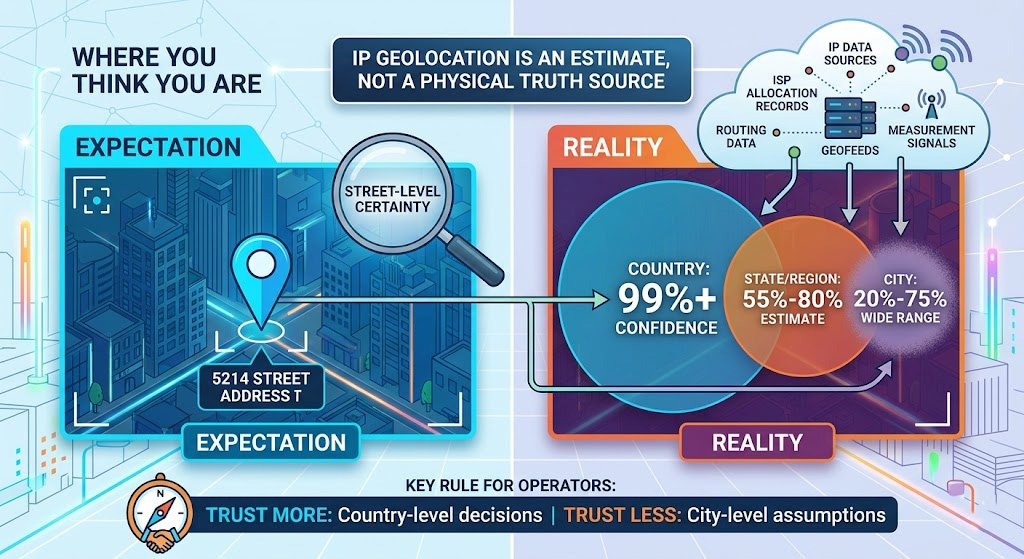
IP geolocation can be very useful, but it is easy to ask too much from it. A site that sees your public IP can often infer a likely country and sometimes a likely region or city, but that does not make the result equivalent to device GPS, browser geolocation, or a verified physical address. MaxMind’s guidance is explicit on this point: IP geolocation should be understood as regional estimation, not exact user positioning. That distinction solves most of the confusion around “wrong” results. If your task is country-level SEO checking, broad ad verification, regional fraud review, or localization QA, IP geolocation is often good enough. If your task depends on exact city presence or exact physical presence, IP alone is the wrong signal to trust.
How accurate is IP geolocation, really?
The practical answer depends on the granularity you need. MaxMind says state or province accuracy typically falls in the 55% to 80% range, while city-level accuracy commonly falls in the much wider 20% to 75% range depending on country and network conditions. That is why “IP geolocation is accurate” is not a complete statement. Country-level decisions and city-level decisions live in very different accuracy bands.
This is also why map pins mislead people. A lookup tool may display a dot on a city map, but the underlying reality can still be “somewhere in this broader area.” MaxMind’s public documentation uses the idea of accuracy radius precisely because a returned city should not be read as an exact point in space.
For operators, the working rule is simple: trust IP geolocation more as you move toward country-level decisions, and trust it less as you move toward city-level or person-level assumptions. That is not a flaw in one vendor’s UI. It is a property of the signal itself.
What IP geolocation is — and what it isn’t
IP geolocation estimates location from network evidence attached to a public IP address. Providers may combine allocation records, ISP information, routing data, geofeeds, crawled signals, traceroute-style measurements, and customer corrections, but they do not all build their datasets the same way. IPinfo’s public explanation is useful here: differences in collection and validation are one reason provider outputs diverge. See their discussion of IP geolocation methodology differences.
It is not browser geolocation, not Wi-Fi positioning, and not device GPS. Apple’s location stack and browser-side location features rely on different inputs and can be far more precise than a server-side IP lookup. If a site only has the connecting IP, it is working with a rougher, infrastructure-level clue.
That matters because people often compare two completely different systems and assume one is broken. A phone app that has device location permission and a website that only sees an IP are not solving the same problem.
How IP geolocation works behind the scenes
At a high level, a provider starts with who controls an IP range and then tries to infer where that IP space is actually being used. Public registration records help, but they are only one input. IPinfo notes that WHOIS-style location fields are voluntary and unregulated, which is exactly why serious geolocation providers supplement them with additional measurement and validation signals.
That also explains why two databases can disagree about the same IP. One provider may lean more on older allocation records or geofeeds, while another relies more heavily on measurement-based updates or different confidence thresholds. Provider disagreement is not rare enough to treat as an exception. It is part of how this ecosystem works.
So if one checker says Dallas and another says Fort Worth, that does not automatically mean one of them is defective. It usually means the signal is being interpreted with different data freshness, different validation logic, or different tolerance for regional ambiguity.
Why IP geolocation is often wrong
Most bad results come from network behavior, not from a single defective lookup page. Residential IPs are often dynamic, and IPinfo notes that dynamic reassignment can affect geolocation precision because the same IP space does not stay tied to the same subscriber context forever.
Shared gateways create another problem. Mobile carriers, schools, corporate networks, and some ISP architectures may send many users through centralized egress points. In those cases, the visible IP reflects the gateway’s network geography more than the user’s exact local position. MaxMind’s public explanation of geolocation accuracy highlights exactly this kind of variation across network types.
Proxies and VPNs change the visible exit IP on purpose. Once traffic exits through another network, the destination sees the exit location rather than the original user’s network location. That is why a proxy session can look correct for one business workflow and still fail to match a user’s real-world position.
Privacy relays add another layer. Apple says iCloud Private Relay coarse city-level location presents relay IP addresses that represent the client’s coarse city-level location by default. That is useful for broad regional relevance, but it is not exact-location data and should not be interpreted that way.
Why a target-country IP can still show the wrong city — or even the wrong country
Wrong city is common. In many cases the IP is being mapped to a nearby metro, a broader service area, or a regional hub rather than to the exact city you expected. MaxMind’s documentation makes clear that city precision is where uncertainty grows most, which is why city mismatches are common even when country placement is fine.
Wrong country is less common, but it still happens. The usual reasons are stale database data, a relay or proxy exit that is not where you thought it was, complex carrier architecture, or a destination platform that is not using IP alone to decide what to show. Country-level accuracy is generally much stronger than city-level accuracy, so when country disagreement appears, it is a sign to check the exit route and the session context more carefully rather than assuming one lookup tool has the full story.
There is also a product-side reason for mismatch: many sites do not localize on IP alone. They may combine IP with browser language, cookies, account state, previous sessions, storefront defaults, or other platform heuristics. Public sources do not provide one universal formula for all destination sites, but they consistently support the broader point that IP geolocation is an estimate and that disagreement between a lookup tool and a destination experience is normal.
When IP geolocation is good enough — and when it isn’t
IP geolocation is usually good enough for country-level content routing, broad compliance routing, market-level SEO monitoring, top-of-funnel ad validation, and regional fraud signals that do not require exact local presence. It is much less reliable for store-level routing, exact branch selection, hyperlocal ad QA, or any workflow that assumes an IP lookup can prove where a specific person is physically located.
A useful way to think about it is this: if your workflow only needs “the right country” or “roughly the right metro,” IP geolocation can be a workable operational signal. If your workflow needs “the exact city every time” or “proof of exact physical presence,” you need stronger evidence than IP alone.
Which proxy type makes more sense when location matters?
You cannot force perfect geolocation, but you can choose an exit IP type that fits the kind of location consistency your workflow needs.
Rotating residential proxies make more sense when the priority is broad coverage and IP churn. Static residential proxies, often marketed in the industry alongside ISP proxies, make more sense when the priority is steadier sessions and more repeatable regional validation. Unlimited residential proxies are positioned around fixed-cost usage rather than per-GB billing. Datacenter proxies still have a place when speed and cost matter most, but they are usually not the first choice when residential trust signals or session stability matter. The product catalog on this site currently reflects those same categories, with the homepage describing residential IPs as real home IPs, ISP proxies as static, fast, and stable, and datacenter proxies as best for less sensitive tasks.
That is a selection rule, not a promise of exact city matching. A more stable exit type can improve consistency. It does not convert IP geolocation into GPS.
How to validate a location-sensitive setup without overtrusting one IP checker
Before you treat any setup as “correct,” compare the exit IP in more than one geolocation database. You are looking for country agreement first and broad regional consistency second. A small city mismatch may still be acceptable for a metro-level workflow; a country mismatch deserves more investigation. Public discussions from IPinfo about validation and provider disagreement support exactly this kind of multi-source caution.
Then check the destination itself. If your real goal is local SERP monitoring, ad verification, pricing review, or localized UX testing, the pass condition is not “one checker displayed the perfect city label.” The pass condition is whether the destination platform behaves like the region you intended to test.
It is also worth rerunning the same session pattern more than once if your workflow depends on repeatability. A setup that looks right once but drifts across sessions may still be useful for broad regional coverage and still be a poor fit for repeated validation work. That is one reason static residential or ISP-style residential products are often easier to work with when session continuity matters.
Compliance and usage boundaries
This article is about lawful business uses such as SEO monitoring, ad verification, localization QA, fraud review, and similar testing or analysis workflows. It is not a guide to bypassing access controls, evading rate limits, mass account creation, or circumventing platform or regional restrictions. Any location-sensitive testing should follow the destination service’s terms, stay within authorized use, and avoid traffic patterns that could disrupt the target system. The point here is to judge location signals more accurately, not to turn proxy selection into an abuse tutorial.
What this article does not claim
This article does not claim that IP geolocation can identify a household, a street address, or a user’s exact physical location. It does not claim that every provider will agree on every IP, and it does not claim that a residential or static residential setup will make every website and every geolocation database resolve to the same city every time. The public documentation points in the opposite direction: IP geolocation is probabilistic regional data, and city-level precision is where uncertainty becomes much more visible.
The decision to make after reading this
If your job is to understand why IP location looks wrong, the answer is straightforward: IP geolocation is estimating a probable region from network evidence, and the uncertainty grows as you move from country to state to city. If your job is to choose a workable setup, the decision is also straightforward. Use rotating residential when you need wider coverage and churn. Start with static residential or ISP-style residential when you need steadier sessions and more repeatable regional validation. And if the workflow depends on exact city certainty or exact physical presence, stop expecting IP geolocation alone to solve it.
If you want to test that decision in practice, Proxy001 is a reasonable place to start because its current lineup includes rotating residential, unlimited residential, and static residential options, along with a register path and demo or free-trial entry points on the site. For location-sensitive SEO checks, ad QA, or repeated regional monitoring, the static residential option is the clearest starting point; for broader coverage, the residential product line makes more sense. Validate the destination behavior first, then scale the setup.
