


 English
 繁體中文
繁體中文
 Deutsch
 Français
 Español
 日本語
日本語
 Tiếng Việt
 Português
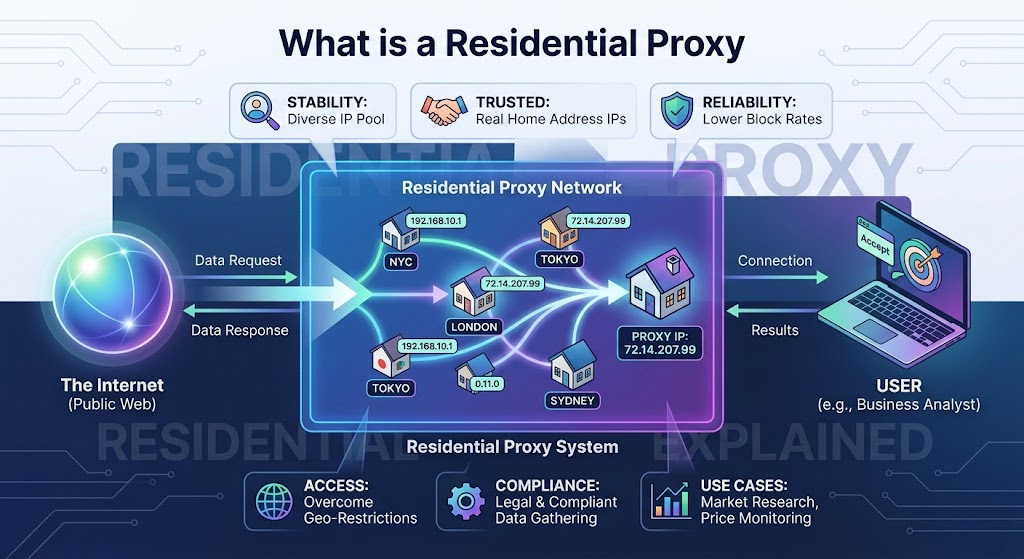
Start Here: What Is a Residential Proxy?
A residential proxy is an intermediary that routes your internet traffic through an IP address assigned by a real Internet Service Provider (ISP) to a real home device—like someone's home router or laptop. When you use one, websites see that home IP address instead of your own.
Think of it like borrowing someone's home address to receive mail. The post office (the website) delivers to that address without knowing it was actually meant for you.
That's the core idea. Everything else builds from there.
Why Do IP Addresses Matter?
Every device on the internet has an IP address—a unique number that identifies where a request is coming from. Websites use this to:
Determine your geographic location and show region-specific content
Detect whether you're a real user or an automated bot
Enforce rate limits—blocking IPs that send too many requests too fast
Apply geo-restrictions—blocking access from certain countries or regions
When you use a residential proxy, the IP the website sees belongs to a real household in a real location. That makes your traffic look indistinguishable from a normal person browsing from home.
Residential Proxies vs. Other Proxy Types
There are three main types of proxies. Understanding how they differ helps you choose the right one:
Residential proxies are the hardest to detect and block because the IPs genuinely belong to real households—they carry the same digital fingerprint as any ordinary internet user. Datacenter proxies are cheaper and faster, but websites can identify and block them easily by checking whether the IP belongs to a cloud provider's network.
How Does a Residential Proxy Actually Work?
Here's what happens step by step when you use one:
You send a request — Your browser or application wants to visit a website.
The proxy intercepts it — Instead of going directly to the site, your request goes to the proxy server first.
It exits through a residential IP — The proxy forwards your request using an IP address tied to a real home internet connection.
The website responds — The site sends data back to that residential IP.
You get the response — The proxy delivers the website's response back to you.
The website only ever sees the residential IP—not yours. The whole process happens in under a second.
Rotating vs. Static Residential Proxies
Once you start using residential proxies, you'll quickly encounter these two terms:
Rotating residential proxies assign a new IP address with each request—or at regular intervals. Every time you make a request, it appears to come from a different household. This is ideal for tasks where you need to make a large number of requests without any single IP standing out.
Static residential proxies (also called ISP proxies) keep the same IP address for your entire session. You get the same residential trust signal, but with a consistent identity. This is better for tasks that require staying logged in or maintaining session state over time.
A simple rule of thumb:
Need to scrape thousands of pages? → Rotating
Need to stay logged into an account? → Static
What Are Residential Proxies Used For?
Residential proxies are used across a wide range of legitimate business workflows:
Market research and price monitoring — Retailers and analysts collect pricing data, product availability, and competitor intelligence from e-commerce sites that block datacenter IPs.
Ad verification — Marketers confirm their ads are displaying correctly in target regions and aren't being replaced by fraudulent content.
SEO research — Search results vary by location. Residential proxies let SEO teams pull accurate local SERP data from any city or country.
Brand protection — Companies scan online marketplaces for counterfeit products, unauthorized resellers, or trademark violations across different regions.
Localization testing — Developers verify that their websites and apps display correctly for users in different countries.
What Residential Proxies Are NOT For
This matters, and it's worth stating plainly:
They are not a tool for accessing systems you don't have permission to use.
They are not designed to bypass authentication or circumvent security measures on platforms.
They are not a substitute for a VPN if your goal is personal privacy on your own browsing.
Every reputable residential proxy provider publishes an Acceptable Use Policy. Violating a website's Terms of Service—regardless of what proxy you use—carries real legal risk under laws like the Computer Fraud and Abuse Act (CFAA) in the US.
How to Get Started with a Residential Proxy
If you've never used a proxy before, here's the simplest path to getting up and running:
Choose a provider — Pick a residential proxy network that offers the locations and rotation options your use case needs.
Sign up and select a plan — Most providers offer bandwidth-based pricing. Start small to test before scaling.
Get your credentials — You'll receive a proxy hostname, port number, username, and password.
Configure your tool — Paste the proxy details into your browser extension, scraping framework, or automation tool. Most tools have a simple proxy settings field.
Test it — Visit
ipinfo.iothrough the proxy. You should see a residential IP in your target location, not your own address.
That's it. No complex setup required for basic use cases.
How to Choose a Residential Proxy Provider
Not all providers are equal. When evaluating options, look for:
Pool size — A larger IP pool means more diversity and lower chance of reusing flagged IPs.
Geo-targeting options — Country-level targeting is standard; city-level targeting is better for localized research.
Rotation control — You should be able to choose between rotating and sticky sessions.
Transparent pricing — Watch for hidden fees on bandwidth overages.
Acceptable Use Policy — A published AUP signals a legitimate, accountable provider.
Support quality — Technical issues happen. Responsive support matters.
Compliance: The Short Version
Using residential proxies responsibly means:
Only scraping publicly accessible data
Respecting robots.txt and site Terms of Service
Complying with GDPR if you're collecting data from EU users
Complying with CCPA if you're operating in California
Never using proxies to access systems, accounts, or data you're not authorized to access
When in doubt, consult legal counsel familiar with data privacy law in your jurisdiction.
Start with Proxy001
Proxy001 offers residential proxy infrastructure built for businesses that need reliable, geo-targeted access at scale. Whether you're just getting started with your first scraping project or running ongoing market intelligence workflows, Proxy001's residential proxy network gives you access to genuine ISP-assigned IPs with flexible rotation options and city-level targeting.
Getting started is straightforward—no long-term commitment required on entry plans. Visit proxy001.com to explore options, or head to the pricing page to find a plan that fits your volume.
