


 English
 繁體中文
繁體中文
 Deutsch
 Français
 Español
 日本語
日本語
 Tiếng Việt
 Português
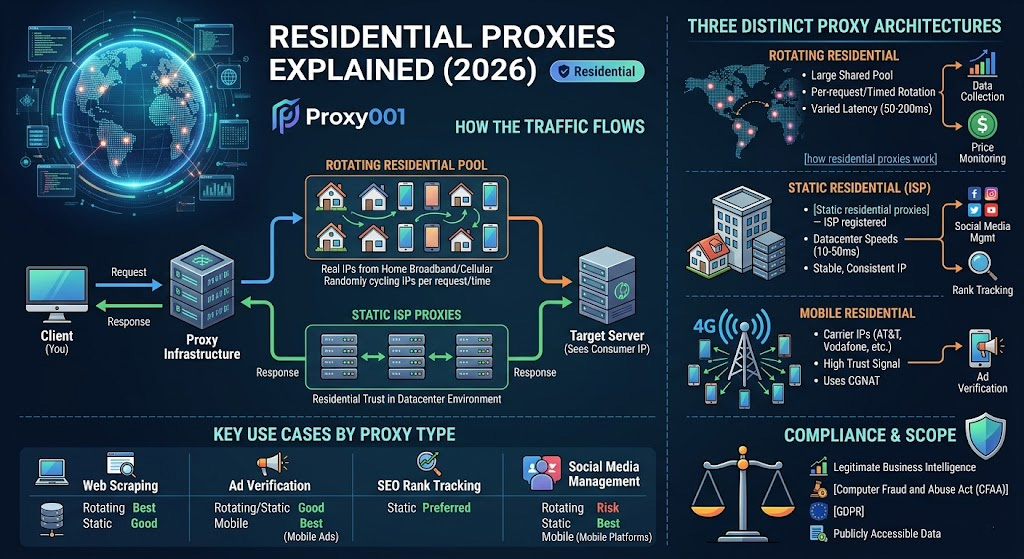
Every device that connects to the internet through a home broadband or cellular plan receives an IP address from its Internet Service Provider. Residential proxies work by routing your traffic through a pool of those addresses—real IPs tied to real household or mobile connections—rather than through the server farm infrastructure that datacenter proxies use. Because IP reputation databases like MaxMind and IPinfo classify these addresses as consumer-origin, websites and anti-bot platforms treat requests from them with a fundamentally different level of trust.
That distinction has real operational consequences, and understanding it at a technical level—not just a marketing level—is what separates configurations that work reliably from those that fail at scale.
Why IP Origin Matters
Anti-bot systems like Cloudflare Bot Management, Akamai Bot Manager, and PerimeterX don't just inspect request behavior. They assign trust scores based on the IP's Autonomous System Number (ASN)—the network block identifier that reveals whether an address belongs to Amazon Web Services, a regional cable provider, or a mobile carrier. A datacenter ASN covering millions of IPs from a single provider is trivial to block in bulk. A residential ASN resolves to a telecom like Comcast or Deutsche Telekom, which is the exact fingerprint you'd expect from a legitimate browser session.
This is why, even when request timing and header patterns look identical, a datacenter IP and a residential IP produce different detection outcomes. The IP's provenance is scored before any behavioral analysis runs.
How the Traffic Flows
To fully understand how residential proxies work, it helps to trace the request path step by step:
Your client sends the request to the proxy provider's infrastructure.
The provider assigns a residential IP from its pool—addresses sourced from real devices whose owners have opted in to share their bandwidth through legitimate consent programs.
The request exits through that residential IP. The target server sees a consumer address, not your actual origin.
The response routes back through the proxy infrastructure to your client.
The ethical sourcing detail in step 2 is worth scrutinizing. Reputable providers build their pools through opt-in bandwidth-sharing programs that compensate device owners. Pools built through malware or unauthorized means are a compliance liability—and their IPs tend to carry poor reputation scores precisely because of their origin. When evaluating any provider, asking how their IP pool is sourced isn't a philosophical question; it's a practical quality check.
Three Distinct Proxy Architectures
Residential proxy is a category, not a single product. Three technical variants exist under that umbrella, each with different performance characteristics.
Rotating Residential Proxies
Rotating residential proxies draw from a large shared pool and cycle through IP addresses—either per request, at timed intervals (commonly 30 seconds to 10 minutes), or at session boundaries. Sticky session support, where the same IP is held for a configurable window, addresses workflows that require multi-step navigation without losing session state.
Where they excel: High-volume data collection, price monitoring, and competitive intelligence. A crawl sending thousands of requests cannot be traced back to a single IP, which makes large-scale structured data extraction far more sustainable.
The honest tradeoff: Because traffic routes through actual household broadband connections, latency is variable—typically 50–200ms, compared to the sub-50ms latency you'd see from datacenter infrastructure. For latency-sensitive applications, this matters.
Static Residential Proxies (ISP Proxies)
Static residential proxies—often called ISP proxies—sit between rotating residential and datacenter proxies architecturally. The IP is registered to a real ISP, so it carries genuine residential trust signals, but the traffic runs through professional datacenter infrastructure rather than through a home router. The result is residential-grade credibility at datacenter-grade speeds, typically 10–50ms latency with consistent throughput.
The IP doesn't rotate unless you explicitly request a new one. This makes them the natural fit for session-persistent workflows where an unexpected IP change would trigger a re-authentication challenge or behavioral flag.
Understanding the difference between static and rotating configurations isn't just academic—it's the most common source of mismatched expectations when teams start deploying proxies at scale.
Mobile Residential Proxies
Mobile proxies route traffic through 4G and 5G cellular connections. The IPs are assigned by carriers like AT&T, T-Mobile, and Vodafone, and they rotate naturally as devices move between towers.
Two characteristics make mobile IPs uniquely resistant to blocking. First, carrier ASNs carry extremely high trust scores across virtually all detection systems. Second, mobile networks use Carrier-Grade NAT (CGNAT), which places hundreds or thousands of real subscribers behind a single public IP. Blocking that IP carries a high risk of collateral damage for the target site—a disincentive that makes mobile IPs the last type most sites want to wholesale-block.
The tradeoff: Mobile proxies typically cost the most per gigabyte, and connection speeds reflect the real-world variability of the carrier network, not a controlled datacenter environment.
Use Cases by Proxy Type
Web Scraping and Data Collection
E-commerce price intelligence, travel fare aggregation, and market research all rely on retrieving publicly accessible data at scale without triggering IP-based rate limits. Rotating residential proxies handle this well because no single IP accumulates enough request volume to flag as non-human. The engineering caveat: scraping frameworks need to respect sticky-session windows when crawling paginated content, or state—cookies, tokens—gets orphaned on mid-session IP rotation.
Ad Verification
Digital advertising is a significant vector for fraud—from impression stuffing to misplaced placements in brand-unsafe environments. Advertisers use residential proxies to pull ads from the perspective of real users in specific geographies, verifying that campaigns render correctly, that placement inventory matches what was purchased, and that compliance requirements are met across different regional regulatory environments. For campaigns running on mobile-first platforms, mobile proxies provide the most accurate representation of the actual user experience.
SEO Research and Rank Tracking
Search results are localized. Retrieving accurate SERP data for a target market requires requests that originate from within that geography. Static residential proxies work particularly well for rank tracking because their stability prevents search engines from correlating a monitoring tool with high-frequency query bursts from a single consistent source.
Social Media and Account Management
Platforms with sophisticated device fingerprinting—LinkedIn, Instagram, advertising dashboards—don't just look at IP address; they track the consistency of the IP-device relationship over time. This is the use case where static residential proxies outperform rotating ones. Each account benefits from a stable, consistent IP that doesn't unexpectedly change mid-session, which would trigger re-authentication or account review workflows.
Misconceptions Worth Correcting
"Residential proxies make you undetectable." No proxy type guarantees invisibility. Advanced detection systems analyze behavioral signals—TLS fingerprints (JA3 hashes), mouse movement patterns, request timing entropy—in parallel with IP reputation. A residential IP combined with obviously non-human behavior will still be flagged. IP origin affects one scoring dimension, not the entire detection model.
"A larger IP pool is always better." Pool quality matters more than size. An oversaturated pool containing previously flagged or shared-abuse IPs performs worse than a smaller, well-maintained one with high IP purity scores. When evaluating providers, ask about IP refresh rates and how pool health is monitored—these metrics are more diagnostic than raw pool size.
"Free residential proxy lists are workable for testing." Free residential IP lists are almost universally composed of compromised devices, misconfigured routers, or honeypot addresses. Using them in any business context exposes your traffic to interception and your operations to attribution risk. They're not a valid starting point even for evaluation.
Compliance and Scope
Residential proxies are standard infrastructure for security research, competitive intelligence, advertising compliance, and fraud prevention. The legal boundaries are clear, even if they're sometimes overlooked:
Automated access without authorization may violate the Computer Fraud and Abuse Act (CFAA) in the U.S. and analogous statutes in other jurisdictions.
Collecting personal data at scale may conflict with GDPR, CCPA, and applicable regional data protection frameworks, depending on what's collected and from where.
Automated access that violates a platform's Terms of Service—even if technically legal—can result in account termination, civil claims, or both.
The infrastructure is neutral. Restricting use to publicly accessible data for legitimate business intelligence, pricing research, and compliance verification keeps operations on defensible ground.
Choosing the Right Configuration
A practical decision framework:
High volume, broad geo coverage, cost efficiency at scale → Rotating residential
Stable sessions, account-based workflows, low latency → Static residential / ISP proxies
Maximum trust signal on platforms with aggressive mobile-detection → Mobile residential
Mixed workflows across use cases → Providers like Proxy001 offer rotating residential, static ISP, and mobile options under a single platform, which eliminates the operational overhead of managing multiple vendor relationships and API integrations.
Start with Proxy001
If you're evaluating residential proxy infrastructure for production use, Proxy001 is a provider worth testing early. Their network gives you access to over 100 million residential IPs across 200+ global locations, with 99.9% availability and both rotating and static (ISP) configurations available from a single dashboard. Pricing scales from $2.00/GB at entry level down to $0.70/GB at higher volumes, making it one of the more cost-efficient options for teams that need serious throughput. A 500MB trial is available if you want to validate latency, success rates, and geo-targeting accuracy against your specific targets before committing to a plan. Whether your priority is large-scale data collection, ad verification across regional markets, or stable session management for account-based workflows, Proxy001's infrastructure is designed for exactly these production-grade use cases. Explore plans at proxy001.com →
