


 English
 繁體中文
繁體中文
 Deutsch
 Français
 Español
 日本語
日本語
 Tiếng Việt
 Português
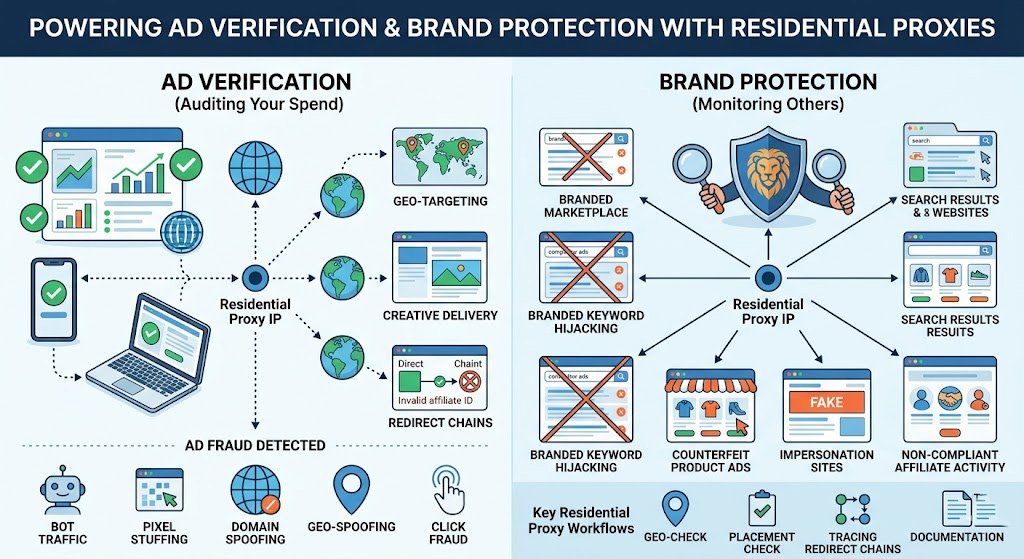
Ad Verification vs. Brand Protection: Why They Need Different Thinking
These two terms get used interchangeably, but they solve fundamentally different problems.
Ad verification is about your own campaigns. You've set targeting parameters—specific geographies, audiences, content categories, placements—and you need to confirm the delivery is actually matching those parameters. The threat is fraud: bots inflating impressions, publishers misrepresenting inventory, geo-targeting being spoofed, redirect chains being tampered with. You're auditing what your own spend bought.
Brand protection is about what others are doing with your brand without permission. An affiliate bidding on your trademarked terms and diverting customers through their own tracking link. A counterfeit seller running Google Shopping ads for knockoffs of your product. A fake landing page mimicking your site to harvest leads or payments. You're not auditing your campaigns—you're monitoring unauthorized activity in the wild.
Both scenarios share a technical problem: to see what's actually happening, you need to look from the same vantage point as your target audience. From a corporate IP or a standard datacenter proxy, you'll often see a sanitized version of reality—publishers and fraud operators know how to distinguish automated verification traffic and serve it accordingly. That's what makes residential proxies the right tool for both jobs, but how you configure them differs significantly between the two use cases.
What Ad Fraud Actually Looks Like (And What It Costs)
Knowing what you're specifically defending against makes the verification workflow much more purposeful.
On the ad delivery side, the major fraud types burning advertiser budgets in 2026:
Bot traffic and IVT: The 20.64% global IVT rate from Fraudlogix's 2025 dataset represents non-human activity generating impressions, clicks, and form fills with no legitimate users behind them. Desktop environments are the worst offenders at a 27.03% IVT rate—bot networks are easier to operate at scale on desktop infrastructure than on mobile.
Pixel stuffing and ad stacking: Publishers render your ad inside a 1×1 pixel iframe or stack it beneath other ads. The ad technically loads, impression trackers fire, the publisher gets paid—but no human ever sees it.
Domain spoofing: A low-quality publisher sells inventory while presenting it as coming from a premium domain. Your DSP logs a placement on a reputable news site; the impression actually came from a junk domain.
Geo-spoofing: Traffic sourced from cheap regions is presented as coming from your premium target markets—your U.S.-only campaign pays CPMs for impressions from Southeast Asia relabeled as domestic traffic.
Click fraud: Competitors or fraud networks generate fake clicks on your paid search and display placements, draining daily budgets with zero conversion value.
On the brand protection side, the threat profile is different:
Branded keyword hijacking: Affiliates or competitors bid on your trademark terms with near-identical ad copy, intercepting customers who were already searching for you. Search Engine Journal's reporting puts global losses to ad hijacking at over $12.6 billion. Hijackers deliberately use geo-targeting and dayparting to avoid detection—running campaigns in specific regions, at off-hours, specifically because they know brand teams aren't checking those windows.
Counterfeit product ads: Sellers of unauthorized or fake versions of your products run paid shopping ads targeting your product names, often concentrated in regions where enforcement is weak.
Impersonation landing pages: Fake sites replicate your brand assets to harvest leads or payments, running localized paid campaigns that only appear in specific regions—markets you're almost certainly not monitoring from headquarters.
Non-compliant affiliate activity: Affiliates violate program rules—no branded bidding, specific disclosures, content restrictions—specifically in markets where they know you're not watching.
The through-line in all of these: they're deliberately hidden from a static vantage point. Geo-targeting, dayparting, and cloaking are standard tools for fraudsters precisely because most brands are only checking from their home market.
Why Residential Proxies Beat Datacenter Proxies for This Job
Your corporate IP is easily identifiable as non-consumer traffic. So is a standard datacenter proxy IP sourced from AWS, Google Cloud, OVH, or any other commercial hosting provider—ad networks, publishers, and fraud detection systems all maintain IP intelligence databases that categorize these ranges as non-residential within hours of their allocation.
When a verification check comes from a datacenter IP, the target system's IP intelligence lookup flags it as non-residential, and publishers can—and often do—serve a different version of the page, show no ad at all, or display the "clean" version reserved for automated traffic. In practice, the most telling sign of filtering isn't an error response—it's a clean, fully rendered page with no ad inventory populated at all. Treat those results with skepticism before concluding your campaign is running cleanly.
Residential proxies route your request through IPs assigned by consumer ISPs to actual households. When your verification check comes from a residential proxy in Houston, the ad server's IP intelligence lookup returns a residential Comcast or AT&T record in Houston. Distinguishing that from a real user is significantly harder—these IPs carry genuine residential reputation and look like normal consumer traffic. That's why legitimate ad verification platforms and brand monitoring tools are built on residential proxy networks, not datacenter infrastructure.
Residential proxies don't replace your DSP's reporting or platform analytics—they answer a different question. Platform data tells you what was reported; proxy-based verification tells you what actually happened from the end-user's perspective. They're complementary, not redundant.
How It Works: Ad Verification and Brand Protection, Step by Step
The Ad Verification Toolkit
Geo-targeted ad verification: Your campaign targets Miami, Berlin, and Singapore. From your New York office, you have no visibility into what's actually being served in those markets. With residential proxies targeting those specific cities, you can pull the publisher page or search results and confirm your ad appears where it should—and that your geo-exclusions are working (your U.S.-only campaign shouldn't surface in Germany).
Redirect chain verification: For display and affiliate campaigns, the click path matters as much as the placement. A clean ad click should follow a direct path from the ad server to your intended landing page. With a sticky session residential proxy, you can trace the full redirect chain and spot unauthorized affiliate ID injections, landing page substitutions, or intermediate redirect steps pointing to domains you don't recognize.
For publisher content and anomalous inventory, pull the page through rotating residential proxies targeting your served regions—publisher self-declaration isn't always accurate, and DSP aggregate data won't tell you what's actually on the page. For pixel stuffing detection specifically, inspect the DOM for <iframe> or <div> containers with width:1px; height:1px or overflow:hidden inline styles. If your ad's impression beacon fires but the creative container carries these constraints, that's direct evidence—the IAB defines a viewable impression as 50%+ of the ad in view, and a 1×1 pixel container fails that threshold regardless of whether the tracker fires.
Brand Protection: Seeing What Your Customers See
Branded keyword monitoring: Run systematic searches for your trademark terms across multiple regions using rotating residential proxies. You're looking for ads you didn't place: competitors bidding on your name, affiliates violating your trademark policy, counterfeit sellers using your product name in ad copy. Because hijackers specifically geo-target to avoid detection, you need to check from within those markets, not from a single IP at headquarters.
Counterfeit and unauthorized seller detection: Search for your products in shopping results across different countries. Counterfeit sellers frequently concentrate activity in specific regions and run paid campaigns only where they've found enforcement blind spots. A residential proxy targeting the relevant market shows you the same shopping results a local consumer sees.
For affiliate compliance and impersonation sites, the monitoring is ongoing rather than one-off. Check whether affiliates are bidding on your branded terms or using non-compliant ad copy across platforms in your key markets—violations tend to concentrate in geos where affiliates know you're not watching. For impersonation sites, monitor branded search results for URLs you don't recognize, then click through using a residential proxy to inspect the page. What to look for once you land: your brand assets on an unfamiliar domain, SSL certificates issued to an unrelated entity, form fields collecting payment or personal data, and URL variants that swap letters or add prefixes (your-brand-secure.com, yourbrnd.com). Document with a full-page screenshot before the page is taken down—these sites can disappear quickly once they detect scrutiny.
Rotating Proxies vs. Sticky Sessions: Which to Use When
This configuration decision determines whether your verification actually works.
Use per-request IP rotation for:
Bulk sweeps across many publisher URLs or search results pages
Branded keyword monitoring across multiple regions
Any task involving many independent spot-checks where session continuity doesn't matter
Use sticky sessions for:
Following a full redirect chain through an ad click
Verifying multi-step user journeys (ad impression → click → landing page → confirmation)
Any scenario where the next step in a flow depends on maintaining session context from the previous one
Sticky sessions hold the same residential IP for a defined window—typically a few minutes to 30 minutes depending on the provider. Without a sticky session, redirect chain verification breaks immediately: step 1 comes from IP A, step 2 from IP B, and the session context disappears. Most providers let you set session type through the proxy authentication string or API parameters; check your provider's documentation for the specific syntax.
A Quick-Start Workflow: Verify an Ad Placement in Under 30 Minutes
Prerequisites:
A residential proxy account with city-level geo-targeting and sticky session support
Python 3.8+ with the
requestslibrary (pip install requests), or any HTTP clientThe publisher URL, search terms, or ad destination you want to verify
Step 1 — Set up your proxy connection
Get your proxy endpoint, port, and credentials from your provider's dashboard. Proxy001 offers a free residential proxy trial and supports city-level targeting, with setup documentation covering the exact authentication string syntax for both rotating and sticky modes.
import requests

# Replace with your actual credentials — exact username format
# is in your provider's API documentation
PROXY_USER = "your_username-country-US-city-miami-session-abc123"
PROXY_PASS = "your_password"
PROXY_HOST = "proxy-endpoint.proxy001.com"
PROXY_PORT = "10000"

proxies = {
    "http":  f"http://{PROXY_USER}:{PROXY_PASS}@{PROXY_HOST}:{PROXY_PORT}",
    "https": f"http://{PROXY_USER}:{PROXY_PASS}@{PROXY_HOST}:{PROXY_PORT}",
}

headers = {
    "User-Agent": "Mozilla/5.0 (Windows NT 10.0; Win64; x64) "
                  "AppleWebKit/537.36 (KHTML, like Gecko) "
                  "Chrome/122.0.0.0 Safari/537.36"
}
Step 2 — Verify the proxy's geographic attribution
Before checking ad delivery, confirm the proxy IP is actually resolving to your target city. Skipping this step is the single most common source of false results.
geo_check = requests.get(
    "https://ipinfo.io/json",
    proxies=proxies,
    headers=headers,
    timeout=15
)
print(geo_check.json())
# Should return city, region, and org matching your target location
If the city doesn't match, correct the session parameters before continuing. Any conclusions drawn from a mis-geolocated IP are invalid.
Step 3 — Check the publisher placement
target_url = "https://target-publisher.com/relevant-page"
response = requests.get(
    target_url,
    proxies=proxies,
    headers=headers,
    timeout=20
)
print(response.status_code)
print(response.text[:3000])
You're looking for your ad's creative elements, the absence of your ad where it should appear, or the presence of unauthorized ads on your branded terms.
Step 4 — Trace the full redirect chain
Keep the same sticky session (don't change the session ID) and follow the click path:
ad_click_url = "https://your-ad-click-url.example.com"
response = requests.get(
    ad_click_url,
    proxies=proxies,
    headers=headers,
    allow_redirects=True,
    timeout=20
)

print("--- Redirect chain ---")
for step in response.history:
    print(f"{step.status_code}  →  {step.url}")
print(f"Final destination: {response.url}")
Verify: A clean result looks like:
Geo check returns the correct target city
Your ad appears on the target publisher page (or SERP) from that city's IP
The redirect chain terminates at your own domain with no unrecognized intermediate steps
Troubleshooting common failures:
Geo check shows wrong location: The city parameter wasn't parsed correctly—this is more common than it sounds, and we've seen entire verification runs invalidated because the session format was off by a hyphen. Double-check the exact syntax your provider specifies; it varies between providers (
city-miamivs.city_miamivs. separate API parameter).Ad not appearing at expected placement: Re-confirm geo attribution first. If geo is correct and the campaign is active in your DSP, the placement may involve frequency capping—try a fresh session ID to simulate a new user, then retry.
Unexpected domain in redirect chain: What you'll typically see when a hijacked affiliate is in the chain is a redirect through an unfamiliar tracking domain. Cross-reference against your active affiliate list, then document the full chain—URLs, timestamps, proxy IP—before reporting to your DSP.
Timeout or connection refused: Rotate to a new session ID and retry. Consistent blocking across multiple IPs on a specific publisher is itself a signal worth flagging to your ad network.
When you find something actionable, document first: screenshot the SERP or page, log the full redirect chain, record the proxy IP, city attribution, and timestamp. Then:
For geo fraud or domain spoofing: Submit to your DSP's invalid traffic reporting portal with the documentation attached
For publisher misrepresentation: Contact your ad network's publisher compliance team directly
For branded keyword violations or affiliate hijacking: File a trademark complaint through the platform, or issue a cease-and-desist through your affiliate network's compliance channel
A quick compliance note: everything in this workflow—checking your own ad placements, monitoring your trademark in search results, auditing publisher inventory you're purchasing—is legitimate use. What falls outside that boundary is using the same setup to systematically harvest competitor data at scale, or routing checks through proxy IPs sourced from undisclosed device networks. Section 7 covers the full compliance landscape if you need more detail.
What to Look for in a Proxy Provider (Ad Verification Edition)
Geographic precision at the city level: Country-level targeting isn't enough—campaigns are geo-targeted at the city or DMA level, and that's the granularity you need to check. Confirm that the specific cities in your campaign targeting are actually available, not just major metros.
IP pool size and turnover: Large pools with active turnover give you enough IP diversity to avoid cycling through the same addresses—systems that track IPs they've seen before will start serving clean results if your rotation is too narrow. For most verification needs, pools of tens of millions of IPs or more provide adequate coverage; high-volume monitoring across many markets simultaneously benefits from larger networks in the 100M+ range.
Sticky session control: Confirm you can set session duration explicitly and that the window is long enough for your use case. For multi-step journey verification, 5–10 minutes minimum is a baseline requirement. Providers that only offer per-request rotation can't support redirect chain verification.
Success rate in target regions: For ad verification specifically, anything below 95% will generate enough timeouts that you can't reliably distinguish "ad not present" from "request failed." Ask providers for region-specific success rate data—aggregate numbers can mask poor performance in the markets that matter most to you.
Documented opt-in IP sourcing: Residential proxy networks source IPs from real devices. Networks where device owners have explicitly opted in tend to have cleaner, more stable IPs that are less likely to be flagged, and they keep you clear of any questions about the sourcing practices you're relying on.
Compliance Notes: What's Legitimate and What Isn't
Using residential proxies for ad verification and brand protection is a well-established, legitimate practice. A few boundaries are worth knowing before you scale up.
Clearly legitimate use:
Checking whether your own ads display correctly in your target markets
Monitoring for counterfeit ads, impersonation sites, or unauthorized use of your trademark
Verifying the quality and accuracy of publisher inventory you're purchasing
Testing your own geo-targeting rules, exclusions, and frequency caps
Auditing affiliate partner compliance with your program's terms
Areas that warrant more care: Large-scale competitive intelligence—systematically harvesting competitor ad creative, pricing, or messaging across many markets at high frequency—sits in grayer territory even when technically legal. Platform Terms of Service vary, and the line between "checking whether a competitor is bidding on my brand" and "building a comprehensive competitive intelligence database by scraping at scale" is worth drawing consciously before you expand. Always use residential proxy networks with documented opt-in consent from IP contributors; under GDPR and CCPA, undisclosed device access in your proxy supply chain creates compliance exposure for you as the end user.
Get More from Your Ad Spend with Proxy001
If you're setting up an ad verification or brand protection workflow, Proxy001 is a practical starting point worth evaluating. Their residential proxy network covers 200+ regions with 100M+ IPs and city-level geo-targeting, with support for mobile carrier-level targeting in advanced setups.
Integration is straightforward—Python, Puppeteer, Selenium, Scrapy, Node.js, and Postman are all supported, so automating recurring verification workflows doesn't require significant setup overhead. Both per-request rotation and sticky session configurations are available, covering the full range of use cases described in this article.
Start with a free residential proxy trial at proxy001.com and run your first geo-targeted ad placement check without a long-term commitment.
