


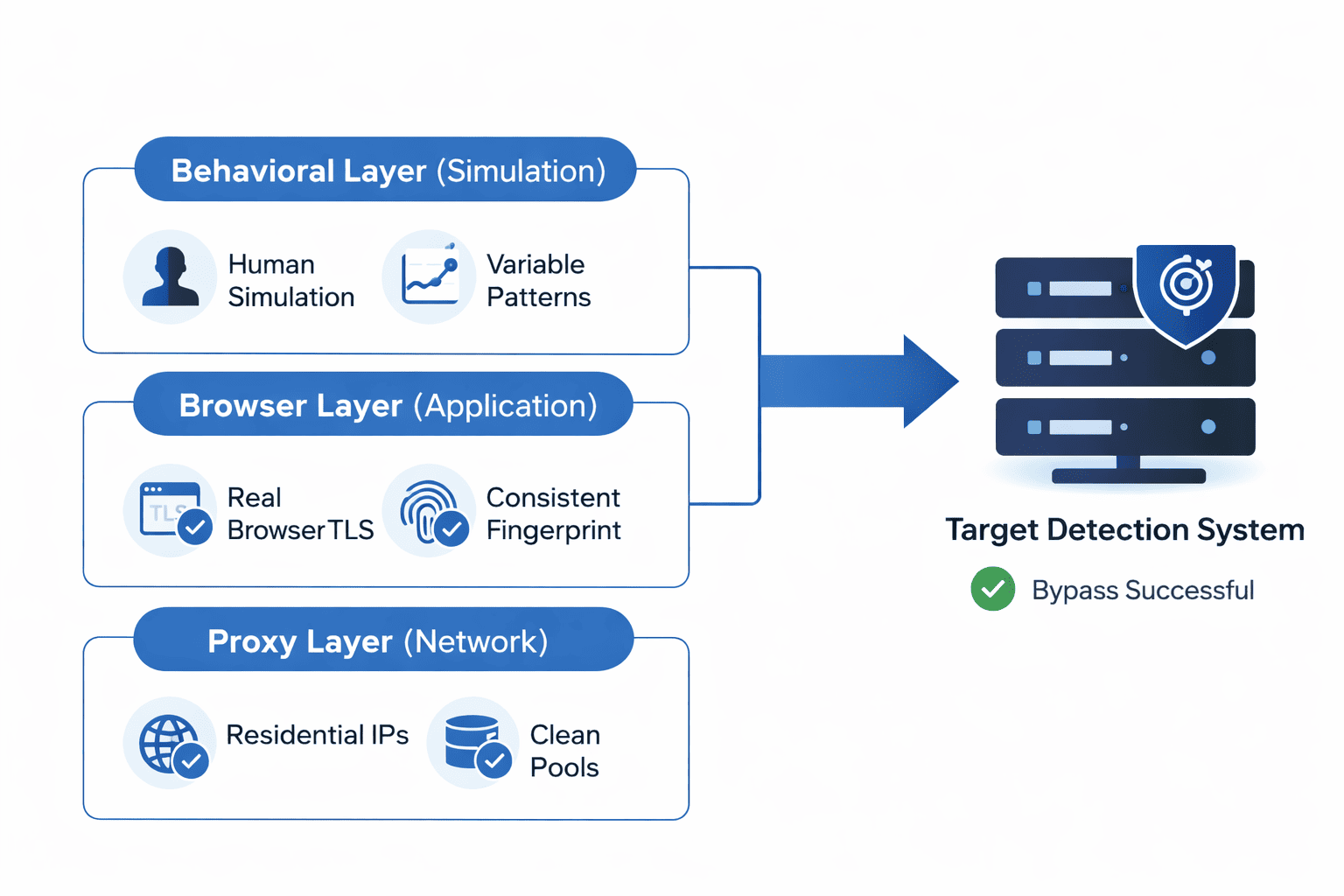
Modern detection systems don't just check if you're using a proxy. They evaluate your connection across three technical layers—transport, application, and behavioral—each analyzing different signals simultaneously. Understanding how this multi-layer detection actually works explains why residential proxies reduce ban rates and, critically, where they still fail.
This isn't marketing copy claiming residential proxies make you "undetectable." They don't. But understanding the specific mechanisms—TLS fingerprinting, ASN classification, Canvas rendering, behavioral scoring—helps you make informed infrastructure decisions and set realistic expectations for success rates.
Layer 1: Transport-Level Detection (Before JavaScript Runs)
Detection starts the moment your connection initiates—not when your page renders. Anti-bot systems analyze the encrypted handshake itself, extracting identifiable patterns from how your client negotiates the secure connection.
TLS Fingerprinting: JA3 and JA4
Every HTTPS connection begins with a ClientHello message where your client announces its capabilities: which encryption methods it supports, in what order it prefers them, and which protocol extensions it wants to use. Salesforce researchers developed JA3 to hash these parameters into a compact identifier.
The key insight: different software produces different handshake patterns. A stock Chrome installation negotiates connections differently than Firefox, which differs from Python's requests library, which differs from a custom-compiled Chromium fork. These differences persist across every connection attempt.
Detection systems maintain databases of known fingerprints. When your claimed browser identity (via User-Agent header) conflicts with your actual TLS behavior, that inconsistency becomes a detection signal. Claiming to be Chrome while connecting like Python triggers immediate scrutiny.
JA4 extends this approach to handle modern browser randomization. Since Chrome 110+, browsers shuffle TLS extension ordering to resist fingerprinting. JA4 normalizes this randomization and incorporates additional signals from HTTP/2 negotiation, making fingerprint matching more robust.
Why This Matters for Proxies
Changing your IP address doesn't alter your TLS fingerprint. A residential IP routes your traffic through a different network endpoint, but the handshake patterns originate from your local software stack.
Running Python scripts through residential proxies still produces Python TLS fingerprints. The IP looks residential; the connection behavior looks automated. Sophisticated detection catches this mismatch.
Effective evasion requires aligning the entire connection stack:
Headless browsers (Puppeteer, Playwright) inherit real browser TLS implementations
Specialized libraries like
curl_cffireplicate specific browser fingerprintsAnti-detect browsers manage fingerprint consistency across connection and application layers
Detection and evasion continuously evolve. Systems that worked six months ago may fail today as fingerprint databases expand and detection algorithms improve.
Layer 2: Network-Level Detection (IP Analysis)
This is where residential proxies provide their primary advantage.
ASN Classification
Every IP address belongs to an Autonomous System Number (ASN) registered with regional internet registries. ASN databases reveal whether an IP belongs to:
Consumer ISPs: Comcast (AS7922), Verizon (AS701), BT (AS2856)
Hosting providers: AWS (AS16509), Google Cloud (AS15169), DigitalOcean (AS14061)
Known proxy services: Often identifiable ASN ranges
Detection systems query these databases instantly. When your connection comes from AS16509 (Amazon Web Services), you're immediately flagged as datacenter traffic—even before examining any other signals.
The Residential Advantage
Residential IPs carry ASN classifications matching consumer internet providers. To detection systems, traffic from a residential proxy looks identical to traffic from someone browsing from their apartment in Chicago or their house in London.
This isn't spoofing or deception in a technical sense—the IP genuinely belongs to a residential ISP allocation. The traffic routes through real residential network infrastructure.
Per Decodo's 2025 market analysis:
84% of websites fail to detect residential proxy traffic
Datacenter detection rates exceed 60% on protected sites
Even major platforms like Amazon show 95%+ success rates with residential IPs
IP Reputation Databases
Beyond ASN classification, detection systems cross-reference IPs against reputation databases tracking:
Historical abuse patterns (spam, fraud, scraping)
Known proxy service IP ranges
IPs flagged by other services in shared threat intelligence networks
Residential IPs start from a cleaner baseline—they're primarily used by regular internet users for legitimate browsing. Datacenter IPs accumulate negative reputation faster because they're concentrated infrastructure used for automation.
However, residential proxy pools are shared. If another user abuses an IP in your provider's pool, that IP's reputation degrades. Quality providers actively manage pools, removing flagged IPs—but this is why "rotating residential" doesn't guarantee every IP is clean.
Layer 3: Application-Level Detection (JavaScript Environment)
Once JavaScript executes, detection systems collect dozens of signals to create composite fingerprints.
Canvas Fingerprinting
The HTML5 Canvas API renders graphics through your system's GPU and software stack. Detection systems exploit this by requesting your browser draw specific content—text, shapes, gradients—then reading back the resulting pixels.
Identical drawing instructions produce measurably different outputs across systems. Your GPU model, graphics drivers, operating system font rendering, and anti-aliasing implementations all influence the final pixel values. Hashing these outputs creates device-specific identifiers that persist across sessions.
Research from Princeton's WebTAP project demonstrated Canvas fingerprinting's effectiveness: when combined with two or three additional signals like WebGL data or font enumeration, the technique achieves extremely high identification rates across desktop browsers. The entropy contribution—roughly 8-12 bits depending on implementation—provides substantial discriminating power within fingerprint combinations.
WebGL Fingerprinting
WebGL exposes detailed information about your GPU:
Vendor string (NVIDIA, AMD, Intel, Apple)
Renderer string (specific GPU model)
Supported extensions
Parameter limits
Claiming to run on an NVIDIA RTX 3080 while showing WebGL parameter limits that don't match RTX 3080 capabilities creates an obvious inconsistency. Detection systems cross-reference GPU claims against expected parameter combinations.
Audio Fingerprinting
The Web Audio API produces subtle variations based on your audio stack:
Audio processing hardware
Driver versions
OS audio subsystem
Less commonly used than Canvas/WebGL but provides additional entropy for fingerprint uniqueness.
Consistency Detection
Detection systems don't evaluate signals in isolation—they cross-reference everything against everything else.
Consider what triggers flags:
User-Agent declares Chrome, but Canvas hash matches Firefox rendering patterns
Timezone configuration shows London, but IP geolocates to Singapore
Screen dimensions indicate mobile device, but no touch event support exists
GPU vendor string claims NVIDIA hardware, but WebGL parameters match software rendering
Each signal tells part of a story. When those stories contradict, detection systems notice.
This principle explains why randomizing fingerprints backfires. Legitimate users maintain stable device configurations—their hardware doesn't transform between sessions. Detection models train on this consistency. A browser producing different Canvas hashes on each visit, or cycling through GPU identifiers, exhibits patterns no real user would show. The attempt at evasion becomes the detection signal.
Layer 4: Behavioral Analysis (What You Do)
Even with perfect network and fingerprint alignment, behavioral patterns can trigger detection.
Request Pattern Analysis
Too-consistent timing intervals (real users have variable delays)
Lack of typical navigation patterns (direct URL access versus referrer chains)
Missing or anomalous cookies
Unusual session duration (too short or too long)
Interaction Patterns
Absence of mouse movements (common in headless browsers)
Keyboard timing (human typing has characteristic patterns)
Scroll behavior (bots often don't scroll or scroll mechanically)
Click patterns (spatial distribution and timing)
Statistical Anomalies
Request volumes exceeding human capacity
Geographic impossibilities (accessing from NYC, then Sydney, then London within minutes)
Behavioral uniformity across "different users" (coordinated automation)
Why Residential Proxies Work (And Their Limits)
Where Residential Excels
ASN classification: Passes the first-line check that datacenter IPs fail
Clean reputation baseline: Less accumulated abuse history than datacenter ranges
Geographic authenticity: Accurate geolocation tied to real physical locations
Diverse traffic patterns: Pool aggregates many real households, naturally varying
Where Residential Still Fails
TLS fingerprint mismatches: Residential IPs don't fix Python script TLS signatures
Application fingerprint inconsistencies: IP change doesn't change Canvas/WebGL output
Behavioral detection: Robotic patterns detected regardless of IP source
Pool contamination: Shared IPs may carry reputation damage from other users
Advanced correlation: Sophisticated systems correlate signals across sessions
Success Rate Expectations
Based on industry testing data:
| Scenario | Expected Success Rate |
|---|---|
| Residential IP + Real browser + Human behavior | 90-98% |
| Residential IP + Headless browser + Stealth config | 80-95% |
| Residential IP + Standard automation (no fingerprint handling) | 50-80% |
| Datacenter IP + Real browser | 40-70% |
| Datacenter IP + Standard automation | 20-50% |
These are approximations—actual rates depend heavily on target site sophistication, request volume, and implementation quality.
Practical Anti-Ban Architecture
Layer 1: Proxy Infrastructure
Residential IPs for protected targets
Provider with actively managed, clean pools
Geographic selection matching target region
Session management (sticky for account access, rotating for scraping)
Layer 2: Browser Environment
Real browser (Puppeteer, Playwright) or anti-detect browser
Consistent fingerprint configuration per "identity"
TLS fingerprint matching claimed browser
No detectable automation markers (webdriver flag, etc.)
Layer 3: Behavioral Simulation
Variable timing between requests
Realistic navigation patterns (referrers, cookie accumulation)
Mouse movement simulation if needed
Session duration matching expected user patterns
Layer 4: Monitoring and Adaptation
Track success rates by IP, fingerprint configuration, and target
Rotate out degraded IPs promptly
Adjust patterns when detection rates increase
Maintain provider redundancy
Comparing Proxy Types for Different Use Cases
Residential Proxies
Best for: Protected sites, account management, social media, e-commerce
Advantages: Highest success rates, authentic traffic appearance
Disadvantages: Higher cost ($3-8/GB), shared pools, variable speed
Cost structure: Bandwidth-based
ISP Proxies (Static Residential)
Best for: Long-running sessions, account management requiring consistency
Advantages: Dedicated IPs, residential ASN classification, datacenter-like performance
Disadvantages: Higher cost per IP, limited pool sizes
Cost structure: Per-IP monthly
Datacenter Proxies
Best for: Unprotected sites, high-volume low-sensitivity scraping
Advantages: Low cost ($0.05-0.50/GB), fast speeds, high availability
Disadvantages: High detection rates on protected sites
Cost structure: Bandwidth or per-IP
Mobile Proxies
Best for: Mobile-first platforms, highest anonymity requirements
Advantages: Carrier IP reputation, natural mobile fingerprints
Disadvantages: Highest cost, limited bandwidth, slower connections
Cost structure: Bandwidth-based, premium pricing
Legal and Compliance Considerations
Understanding detection mechanisms is intended for:
- **Legitimate use cases**: Account management, competitive research, authorized testing
- **Technical learning**: How modern anti-bot systems work
⚠️ **What this content does NOT support**:
- Bypassing security systems for unauthorized access
- Violating website Terms of Service
- Fraudulent activity or deception
- Copyright infringement or intellectual property violations
Using proxies to circumvent legitimate security measures may violate:
- Computer Fraud and Abuse Act (CFAA) in the US
- UK Computer Misuse Act
- GDPR and similar data protection regulations
- Individual website Terms of Service
The technical knowledge in this article should be applied only within legal and ethical boundaries. When in doubt, consult legal counsel before implementing proxy-based access to third-party platforms.
Proxy001 for Anti-Ban Infrastructure
For operations requiring consistent success rates on protected platforms, Proxy001's residential proxy network addresses the network layer of multi-layer detection:
Clean IP pools with active reputation management to minimize contamination issues
Global geographic coverage enabling authentic regional targeting
Flexible session control supporting both sticky sessions for account consistency and rotation for distributed access
Protocol options (HTTP/S, SOCKS5) for integration with various browser automation tools
Residential proxies are necessary infrastructure for protected targets—but they're one layer of a multi-layer challenge. Effective anti-ban architecture requires combining network-layer solutions with browser fingerprint management and behavioral discipline. No single component solves detection alone.
